GETTING STARTED
Set up your PlayStation®2 computer entertainment system according to the instructions supplied with your system. Check that the system is turned on (the on/standby indicator is green).
Insert the SEGA SUPERSTARS™ TENNIS disc in the system with the label side facing up. Attach game controllers and other peripherals as appropriate. Follow the on-screen instructions and refer to this manual for information on using the software.
Memory Card (8MB)(for PlayStation®2)
To save game settings and progress, insert a memory card (8MB) (for PlayStation®2) into MEMORY CARD slot 1 of your PlayStation®2 system.
You can load saved game data from the same memory card or any memory card (8MB) (for PlayStation®2) containing previously saved games.
Superstar Meter
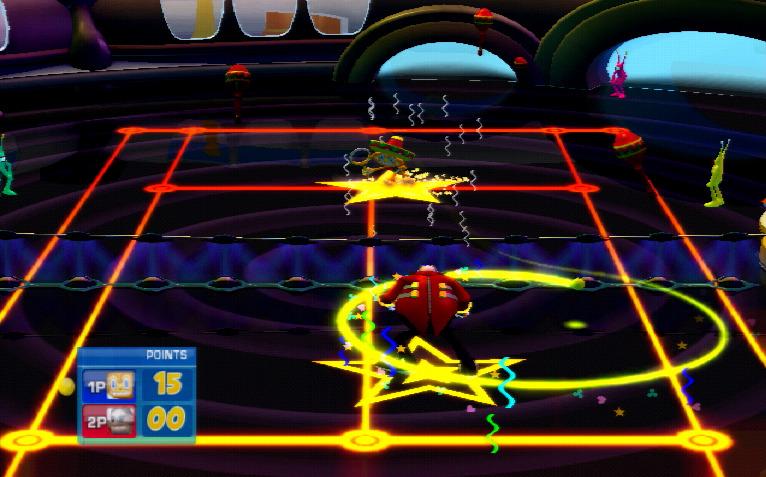
Every character has a Superstar meter in the form of a star beneath their feet, which is slowly filled whenever you perform well. When this star is filled, your character will transform into their Superstar State!
The Superstar State is triggered by pressing the R1 or L1 button. While the character is in their own unique Superstar State, they run faster, hit the ball harder, or even call down the power of the skies! Each characters' powers are different, so try them all!
STARTING THE GAME
Press the START button at the Title Screen to bring up the Main Menu. Use the directional pad and the button to select from the following modes:
PLANET SUPERSTARS
Planet Superstars allows you to take on over 100 challenges in some of SEGA's most recognized worlds where you will meet some familiar and well loved names along the way. Challenges include tournaments, ball games, special events and more, and allow you to unlock additional content.
MATCH
A player-designed match for up to four players. The court and all game settings can be decided by the players.
TOURNAMENT
Play alone or with a friend in a sequence of matches against randomly selected computer opponents. Tournament mode comprises five Singles matches, or three Doubles matches.
GAMES
A collection of eight fun new games based on famous SEGA titles! Play alone or with a friend.
OPTIONS
Modify game options and view records.
QUICK MATCH
Jump straight into a single-player Quick Match with a randomly-generated opponent, court and game settings.
STARTING QUICK MATCH
To begin a Quick Match, press the button while on the Main Menu screen.
PLANET SUPERSTARS
Planet Superstars allows you to compete in over 100 challenges including Exhibition matches, Tournaments and Party Games, as well as unlock additional characters, courts, games, music and other content.
PLANET SUPERSTARS Map
Navigate around the Planet Superstars Map using the left analog stick. The map contains a number of Game Zones, each representing a famous SEGA title. Game Zones are represented on the Planet Superstars Map as logos.
As the cursor hovers over an unlocked SEGA Game Zone, the HUD will change with information regarding the selected zone. Pressing the button will take you into the chosen Game Zone, where you will be presented with further information and shown available challenges. Game Zones that are presently locked will appear as silhouettes.
SEGA GAME ZONES
Within each SEGA Game Zone, you are presented with information related to the original SEGA game title, and a list of challenges available within the zone. You will be shown whether challenges will provide you with unlockable content, and what conditions you must achieve to gain that content.
Navigate the Zone menu by using the left analog stick and select a challenge by pressing the Ⓧ button while the desired challenge is highlighted. Press the Ⓧ button to return to the map.
If you have already attempted to complete a challenge, your previous rank will be displayed beside the challenge details. If there is a prize available for a challenge that has already been unlocked, the prize will be displayed.
CHALLENGES
When taking on challenges within a Game Zone, you will have the opportunity to play special Exhibition matches, whole Tournaments and a host of unique Party Games, each tailored to the particular Game Zone you have entered. You will be presented with detailed gameplay instructions or objectives via an on-screen message before a challenge begins.
Match Games
Match games may be played with up to four players, and take place on any unlocked courts using any unlocked players. You can also select from a range of other options including number of games, number of sets and more.
Character Select Screen
Navigate between available characters on the Character Select screen, using the directional pad. Pressing the button will select the highlighted character, and the button will return to the previous screen.
Once all players have selected their character, the characters can then be placed in the desired position on the court using the directional pad to move them and the button to confirm their position. Return to the Character Select screen by pressing the button.
After all players have selected their characters and positions, you are given a selection of advanced options, including courts, number of games, difficulty, etc. Navigate this list and toggle the options with the directional pad. Once the options have been set to your satisfaction, the button will confirm the selection. Pressing the button will return you to the Position Select screen.
.png)

.png)







_(En,Fr,De,Es,It).png)



.png)

_1.jpg)





 (En,Fr,Es).png)