Setting Up Your System
Set up your PlayStation®2 computer entertainment system using its Instruction Manual. Ensure the MAIN POWER switch (on the back of the console) is on.
•
When the power indicator lights up, press the OPEN button to open the disc tray.
•
Place the WORLD RALLY CHAMPIONSHIP™ disc on the disc tray with the label side facing up.
•
Press the OPEN button again to close the disc tray.
•
Attach game controllers and other peripherals as appropriate.
•
Follow on-screen instructions and refer to this manual for software information.
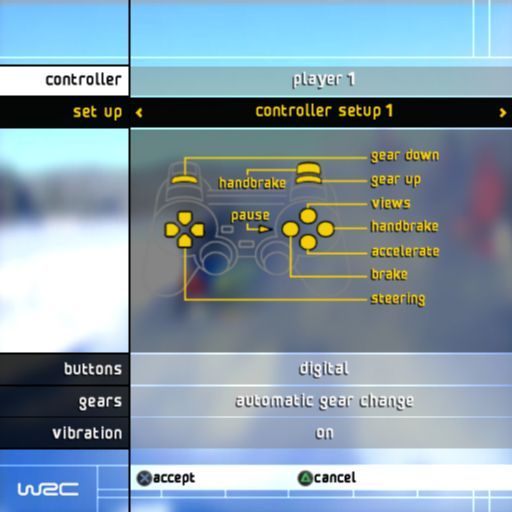
Controller Setup
You can use the right analog stick for steering, acceleration, or braking if you select CONTROLLER SET UP 3 – LEFT HANDED or CONTROLLER SET UP 3 – RIGHT HANDED in the CONTROLLER Menu.
•
If you select CONTROLLER SET UP 3 – LEFT HANDED, the right analog stick steers.
•
If you select CONTROLLER SET UP 3 – RIGHT HANDED, press the right analog stick ⬆ to accelerate or ⬇ to brake.
GT FORCE™ Steering Wheel Controller
Before using the GT FORCE™, read its instruction manual. Insert the GT FORCE™ directly into the console's upper USB connector before switching on the console. Do not disconnect it while the console is booting up. A USB hub cannot be used.
The GT FORCE™ Steering Wheel Controller allows you to drive like a real car and feel feedback corresponding to the car's status. If inserted during boot-up, it will automatically move as the console checks the connection.
When using only one GT FORCE™, ensure it is inserted into the upper USB connector.
Memory Cards
The term 'Memory Card' in this manual refers to the Memory Card (8MB) (for PlayStation®2). Memory Cards designed for PS one® format software are not compatible with this game.
To save game settings and progress, insert a Memory Card into MEMORY CARD slot 1. You can load saved game data from the same or any Memory Card containing previously saved WORLD RALLY CHAMPIONSHIP™ data. Ensure enough free space before playing.
Using the USB Connector
The "upper USB connector" is the uppermost USB connector on the front of the console when horizontal, used for Player 1's controller. The "lower USB connector" is directly below it, used for Player 2's controller.
2 Player Games
Two controllers are required for 2 Player modes.
•
If using two DUALSHOCK®2 analog controllers, connect Player 1's controller to port 1 and Player 2's to port 2.
•
If using two GT FORCE™ Steering Wheel Controllers, connect one to the upper USB connector for Player 1 and one to the lower USB connector for Player 2.
•
If Player 1 uses a GT FORCE™ and Player 2 uses a DUALSHOCK®2 analog controller, Player 2's controller should be in controller port 2.
Creating a Save File
Insert a Memory Card into MEMORY CARD slot 1 before switching on the console. If no WORLD RALLY CHAMPIONSHIP™ data is on the card, you will be given the option to CREATE SAVE FILE.
•
Alternatively, select RETRY to search for previously saved data or CANCEL to continue without saving.
•
You need at least 1440KB of free space to create a save file. If space is insufficient, use your console's internal browser to delete old game data.
Main Menu
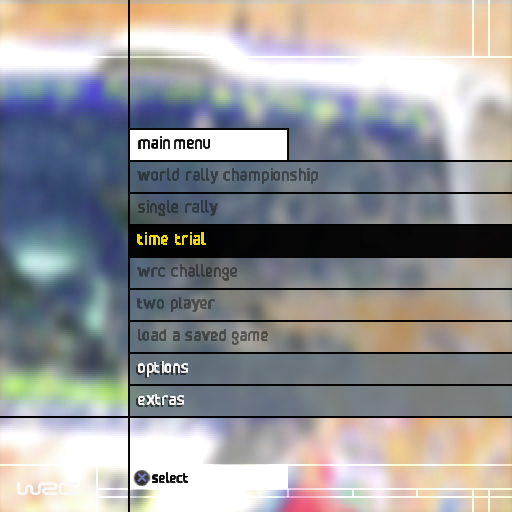
There are seven options on the Main Menu.
•
WORLD RALLY CHAMPIONSHIP: Take on all 70 stages in 14 countries.
•
SINGLE RALLY: Race in an individual event.
•
TIME TRIAL: Go for the fastest time in a chosen stage.
•
TWO PLAYER: Compete against an opponent to be first across the finishing line.
•
LOAD A SAVED GAME: Load a game previously saved to a Memory Card.
•
OPTIONS: Adjust game settings.
•
EXTRAS: View replays, high scores, and game credits. Access unlocked bonus stages here.
World Rally Championship Mode
Select this option to compete against the best pilots over seventy stages. A season has fourteen rallies, one per country, each with five stages.
Difficulty
Initially, choose from NOVICE or NORMAL difficulty levels.
•
To unlock PROFESSIONAL, win the WRC on NORMAL difficulty.
•
On NOVICE, you can restart a stage from the Pause Menu. This option is disabled for NORMAL and PROFESSIONAL settings.
Team Select
•
Select your team by pressing or .
•
Toggle between available pilot and co-pilot choices by pressing or .
•
Press the button to confirm your selection.
Stage Info
This screen displays information for the upcoming stage. Press the button to continue after viewing.
Car Set Up
This screen allows car adjustments before the race.
•
Press or to choose a setting to change.
•
Press ← or to toggle between options.
•
Current selections are in dark grey boxes.
•
Press the button to confirm selections and continue.
•
Changing your car setup can greatly improve performance. See the SERVICE AREA section for details.
Pre-Race Menu
Choose from the following options:
•
START RACE: Begin the race.
•
SHAKEDOWN: Take place before a rally. They allow pilots to feel conditions, track surface, and adjust car setup.
•
After a shakedown, the Car Set Up screen appears.


.png)