STARTING THE GAME
1. Set up your PlayStation® console according to the instructions in the instruction manual supplied with your console. 2. Insert the Eagle One™ Disc and close the Disc cover.
3. Insert a game controller into Controller port 1. For two players, insert a game controller into Controller port 2 as well.
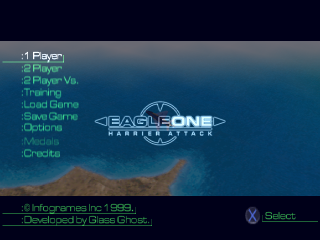
4. Turn on the PlayStation® console. 5. You may skip the introduction sequence by pressing the button. The main menu will appear.
DUALSHOCK™ Analog CONTROLLER
Do not insert or remove peripherals or MEMORY CARDS once the power is turned on. Make sure there are enough free blocks on your MEMORY CARD before commencing play. This game requires one free MEMORY CARD block to save.
THE MAIN MENU
WELCOME
It's up to you Pilot. The world faces a threat that's going to take every ounce of skill and guts to overcome. You'll face danger at every turn and the enemy will never let you rest. But there is hope. You have your own ability and you have Eagle One. Together you make a team the free world can be proud of. Your country needs you. Go get 'em.
Five options are available at the start of the game: One-Player, Two-Player, Two Player Vs., Options and Training. Other options will appear here as the game progresses.
Use the directional buttons (or left stick on a DUALSHOCK™ analog controller) to move up and down the options and press the button to choose from the list.
TRAINING
Every would-be, wet-behind-the-ears Pilot needs training and you're no exception. Choose the Training option on the main menu. This will take you to the Eagle Squadron Flight School in Nevada, where Commander Coleman will take you through basic flight and weapons training. You WILL follow the Commander's instructions carefully and you WILL take your time!
When you have completed your training successfully, you will be returned to the main menu.
THE ONE PLAYER GAME
THE ISLAND SELECT SCREEN
This screen allows you to choose the Hawaiian Island on which to fly a mission. At the start of the game, only Hawaii is available (other islands will open up as you complete missions).
Use the directional buttons to move the crosshair over the different islands. Intelligence reports on each island will be displayed as you do so. Press the button to choose an island.
THE MISSION SELECT SCREEN
This screen allows you to choose which of the island's missions you want to fly. At the start of the game, only "Scramble" is available - other missions will become available as you progress.
Use the directional buttons (or left stick on the DUALSHOCK analog controller) to move up and down through the list of missions. The view of the island will spin as you move up and down through the mission list to show you roughly where you will start the mission. Press the button to choose the mission.
STARTING YOUR FIRST MISSION
The self-proclaimed ANM force has invaded the Hawaiian Islands and established an occupying presence that is making a mockery of our nation. As pilot of Eagle One, YOU must resolve the situation and send a clear signal to all who would follow in the ANM's path. Intelligence show their forces to be strongest in the north where they landed and weakest in the south.
The USS Armstrong has arrived off the coast of the southernmost island, Hawaii, and marines have already established a US ground base at Hilo Airbase. As the game begins, you and two other pilots - Mad Dog in Eagle Three and Jackal in Eagle Five, are on your way from the USS Armstrong to the forward base to provide close air support.
You may skip the mission briefing by pressing the button, but it is strongly suggested that you watch it the first time you fly a mission.
CONTROLLING THE HARRIER
FLIGHT CONTROLS
The Harrier has two flight modes. Toggle between Jet mode and Hover mode by pressing the R1 button.
JET MODE
In Jet mode the Harrier flies like a conventional jet, with its nozzles pointing backwards to provide forward thrust. Use the directional buttons or left stick on a DUALSHOCK analog controller to control the direction of flight. Use the A button to speed up and the button to slow down. Your rudder (L2 and R2 buttons) can be used to assist turning.
HOVER MODE
When you switch to Hover mode, the Harrier rotates its nozzles to face directly downwards, providing upward thrust to hold the Harrier stationary. Use the button to increase thrust and rise vertically upwards. Use the button to decrease thrust and sink downwards.
You can perform a vertical landing by hovering above the landing cross (use the Harrier's shadow to position yourself) and slowly decreasing your thrust.
VIFFing
By using the directional buttons or the left stick on an DUALSHOCK analog controller, you can angle the Harrier so that its engines will push you forwards, backwards or to either side (strafing). This is called VIFFing (Vectoring In Forward Flight). Use it to maneuver in hover mode to avoid enemy fire and target enemies quickly. You can VIFF faster by using the button to increase your speed while moving in any direction.
CANNON
When using your cannon, simply aim the gun cue at the target you want to hit. If the target is moving, you will need to fire slightly in front of it, to allow for its movement. A predictive tracker will appear to help you aim. Fire at the x at the end of the line and you'll be more likely
 (En,Fr,Es).png)


.png)
.png)
 (En,Fr,Es).png)
 (En,Fr,Es).png)
.png)









_1.png)
.png)