MAIN MENU
At the G. DARIUS Title screen, press the Start button to go to the Main Menu. Use the Directional buttons to select the mode you want to play and then press the X button.
Game Modes
Arcade Mode
This mode is taken from G. DARIUS arcade version. Connect a second controller and two people can play simultaneously.
Battle through all the Zones alone or join forces with a friend. Your combat tactics against battleships and the number of power-ups that appear vary with each area. Destroy enemy ships to complete the Zones.
Check the battle conditions and strengths of your Hawk at each Turning Point in a Zone, and then select your next route.
To use a Turning Point:
•
Verify your Hawk's position before the time gauge in the center of the screen disappears.
•
Your Hawk's position (upper or lower area of the screen) when the time gauge runs out determines your next route.
Beginner Mode
This mode has three difficulty levels, and is designed for players who aren't ready for Arcade Mode. Make your own settings for initial equipment and select the number of ships remaining.
Practice your attacks in different difficulty modes, with varying equipment levels. Press the Directional buttons left/right to select a fighter, and press the X button to confirm. Press the button to cancel and return to the Main Menu.
Beginner Mode is essentially the same as Arcade Mode with these differences:
•
When you are attacked, you can't lose all your power.
•
When you continue, you return to the equipment levels you had at the start of play.
•
There are no cinema sequences at the end of the Zones you clear.
Fighter
Equipment
Vs. Boss Mode
Fight all the enemy battleship bosses that appear in Arcade Mode. Take on all the enemy battleships from Arcade Mode.
Press the Directional buttons up/down to select a Zone and left/right to select a setting or turn OFF (i.e., select not to battle). Choose several battleships and you can do continuous battles. Press the button to cancel the settings and return to the Main Menu.
The battle begins once you select the enemy battleship(s) and decide on the equipment for your own battleship.
•
When you are attacked, you can't lose all your power.
•
When you continue, you return to the equipment levels you had at the start of play.
•
Use Option Mode to give yourself unlimited ships and Credits.
Option Mode
Adjust game settings and watch cinema scenes for the Zones you have cleared. Use Option Mode to customize the game settings and watch cinema scenes of the Zones you've cleared.
On the Option menu, press the Directional buttons up/down to select options, and press left/right to adjust the settings. From any sub-options menu, press the ▲ button to exit back to the main Option menu.
MODE OPTIONS
For Arcade, Beginner and Vs. Boss Modes, set the following options (press the Directional buttons up/down to select, and press left/right to adjust the settings):
•
Game Rank: Set the game difficulty.
•
Player Stock: Set the number of reserve ships.
•
Credit: Set the number of times you will continue the game.
CONTROLLER SETTINGS
Select a function by pressing the Directional buttons up/down. To assign a setting, press one of these controller buttons: X, ■, ▲, ●, R1, R2, L1, L2.
You cannot use a button more than once, and you cannot change the functions of the Start, Select or Directional buttons.
SOUND SETTINGS
For the Sound settings, press the Directional buttons up/down to select and press left/right to adjust:
•
Sound Mode: Set sound to Stereo or Mono.
•
Music Volume: Adjust the background music volume.
•
SE Volume: Adjust the sound effects volume.
•
SE Test: Press the X button to test sound effects.
CAPTURING SHIPS
HOW TO CAPTURE
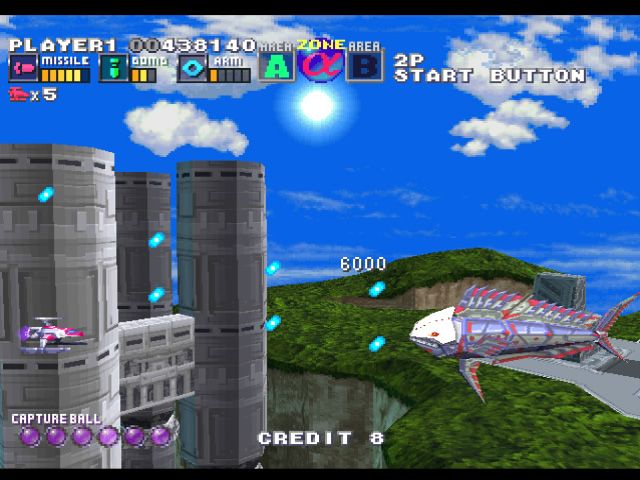
Silver Hawk can use most of the powers of its enemies after it captures them. To shoot a Capture Ball, use the Directional buttons to aim at the enemy and press the X button. Captured enemy ships lose their shield strength when shot at or when they hit the ground. When their shield strength reaches 0, they are destroyed.
Note: You need to have at least one Capture Ball in order to use this tactic.
ATTACKS AFTER CAPTURE
After an enemy is captured, you can use any of its remaining shields to protect yourself in an attack. You can also use one of the following attacks.
•
X button: Use captured bombs to dodge explosions. •
● button: Use the captured vessel to attack.
•
● button: Hold down the button for a short time and then release it to fire a super-powerful Alpha Beam.
Note: If you use the bomb or Alpha Beam, you lose the captured ship. CAPTURING MID-SIZE BATTLESHIPS
The Capture Ball can catch mid-sized battleships (after destroying their Solidnite shields, see pg. 20) and use their powerful attacking strength.
When
.png)