STARTING THE GAME
1. Set up your PlayStation™ game console according to the instructions in its Instruction Manual. Make sure the power is OFF before inserting or removing a compact disc. 2. Insert the NHL® 98 disc and close the Disc Cover.
3. Insert game controllers and turn on the PlayStation™ game console. The NHL 98 video introduction sequence begins, followed by the Game Setup menu. SOFT RESET
Press START to pause the game, then press SELECT. A menu appears prompting you to quit or continue gameplay.
NOTE
When using the Multi-Tap, at least one controller must be connected to Controller Port 1.
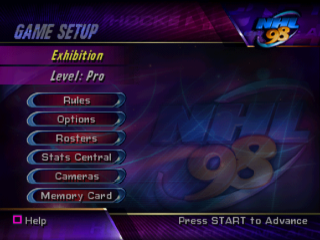
GAME SETUP
Press START to Advance.
NOTE
Whenever you see ■ in the lower-left corner of the screen, press ■ to access on-screen help. On-screen help displays button commands specific to the current screen.
NOTE
Default options appear in bold in this manual.
MODE
EXHIBITION
A single-game competition between any two teams. Take on your friends or test your hockey skills against the expertise of a computer opponent.
SEASON
Play through a 25- or 82-game NHL Season, complete with player transactions, stats, Playoffs, and Season-end awards presentation.
PLAYOFF
Rush for the Cup. Create a custom NHL Playoff tournament with 1, 3, 5, or 7 game series.
TOURNAMENT
Establish a round-robin Tournament with 44 NHL and national teams to determine the undisputed NHL 98 champs.
SHOOTOUT
Perfect your penalty shot technique or challenge your friends to a 5-round mini-competition.
LEVEL
ROOKIE
Designed for beginners and players who want to learn the basics. Computer teams skate and react more slowly.
PRO
High competition, high contact NHL action. Computer player performance is determined by real-life skill ratings.
ALL STAR
All players perform with All Star ability—the skating is quick and the passes are right on the tape.
RULES
Establish rules for the upcoming game.
PERIOD LENGTH
Select 5, 10, or 20 minute (regulation) periods.
PENALTIES
Use the slider to set the frequency of penalty calls. All the way left is OFF; all the way right follows NHL regulations.
FIGHTING
Toggle the possibility of fighting ON/OFF.
OFF SIDE
Handling or passing the puck across your opponent's blue line with a teammate already in the Attack zone. Toggle ON/OFF.
ICING
Sending the puck from your half of the ice over the opposing goal line (without entering the crease) and an opponent other than the goalie touches the puck first. Toggle ON/OFF.
2 LINE PASS
Completing a pass to a teammate across any two lines. Toggle ON/OFF.
INJURIES
Toggle the possibility of player injuries ON/OFF.
OPTIONS
Set pre-game and gameplay options.
CONFIGURE CONTROLLER
Choose one of four different controller configurations.
PASSWORD
When you win the Stanley Cup™, the celebration video appears followed by a password. Write down the password and save it; you can enter it here to see the video at any time.
AUDIO OPTIONS
Access the Audio Options menu to adjust Music, SFX, Crowd, Network (game intro) Speech, and In-Game Speech volume; toggle Color Commentary ON/OFF; and choose the Audio mode supported by your TV.
LINE CHANGES
•
AUTO: The computer automatically cycles your lines at each face off. Players never fatigue.
•
MANUAL: It's up to you to notice when your players show signs of tiring and change lines accordingly.
•
OFF: Your best line remains on the ice and at full energy for the duration of the game.
PRE-GAME PRESENTATION
Toggle the pre-game show ON/OFF.
SCORE OVERLAY
Toggle the in-game score overlay ON/OFF.
CREDITS
View a list of the people who brought you NHL 98.
ROSTERS
Set coaching strategies, view rosters, edit lines, trade players, sign and release free agents, create players, and build custom teams.
NOTE
If you add a player to a roster whose jersey number conflicts with an existing number, you are prompted to choose a different number for the new player. To choose a different number, D-Button to select, then press START.
COACHING STRATEGY
Set the strategies you want your team to employ. You can also change strategies on-the-fly during the game.
1. Choose the team whose strategy you want to set.
2. Cycle to the strategy you want to set for each game situation.
3. Use the sliders to set the amount of pressure you want the team to apply, then press START to accept.
VIEW ROSTERS
Take a look at team rosters to compare player ratings and access individual View Player screens.
EDIT LINES
Edit any team's lines to experiment











.png)
.png)