Console Setup
Set up your PlayStation® game console according to its Instruction Manual. Ensure the power is off before inserting or removing a compact disc. Insert the SEA-DOO® HydroCross™ disc and close the Disc Cover. Insert game controllers and turn on the PlayStation game console. Follow on-screen instructions to start a game. Console Top View
Game Modes
Practice Mode
ONE-PLAYER
Two tracks are for Practice Mode only. You can run them alone at your own speed. Wave conditions are selectable.
The Ramp Run is best for practicing tricks. The Buoy Run is designed to help you perfect your cornering and maneuvering. Practice Mode scores are not saved to the Leaderboard.
Quick Start Mode
ONE-PLAYER AND TWO-PLAYER
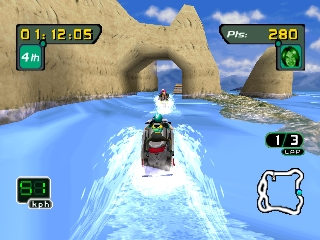
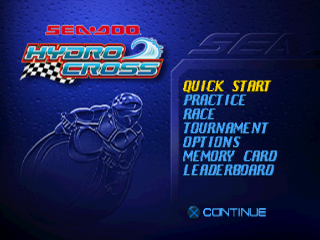
This mode gets you playing as fast as possible. Select 1 or 2 players. The game randomizes the character, watercraft, track, and difficulty setting, sending you immediately to the race with 3 randomized opponents*.
Watercraft and track are dependent upon whether or not they have been unlocked in Tournament Mode. Since this is a single race only, neither Reputation Points nor Division Points count toward Tournament. Your total Reputation Points for the race are displayed on the Heads Up Display (HUD).
*Randomized opponents do not appear in 2 player mode.
Race Mode
ONE PLAYER AND TWO PLAYER
This single race mode allows you to configure conditions to your exact specifications, using unlocked watercraft and tracks from Tournament Mode. Select the difficulty, then choose a character, watercraft, and track.
If this is a Two Player game, choose either a Timed race or a Points race. In a Timed race, players race to be the first to complete a selected number of laps. In a Points race, players try to accumulate the most Points before a timer expires by performing tricks and breaking obstacles.
Your Reputation Points will be displayed on the HUD, but both Reputation Points and Division Points are not earned since this is a single race only. If you have a top race time, you will be given the opportunity to enter your name into the Leaderboard.
Tournament Mode
ONE PLAYER
This is the grand tourney where you compete against all opponents on all 8 tracks in 2 different seasons. Select your character and the overall difficulty level.
Accumulate Reputation Points by performing tricks and hitting targets. Score enough Reputation to race advanced watercraft, including concept craft designed by Sea-Doo engineers. Gain Division Points according to your placement in each race.
If you do well, you'll advance to the next Division. Win each division in both the Summer and Fall Tournament to win the game.
Point Systems
Division Points
Division Points allow you to move from one racing division to the next. Moving to a new division opens up a new, more challenging set of courses. You earn Division Points every time you finish a race in Tournament mode. •
Finishing First: 3 points
•
Finishing Second: 2 points
•
Finishing Third: 1 point
•
Finishing Last: 0 points
Division Point Table
•
Season: Summer, Division: 1, Number of Tracks: 3
•
Season: Summer, Division: 2, Number of Tracks: 3
•
Season: Summer, Division: 3, Number of Tracks: 2
•
Season: Fall, Division: 4, Number of Tracks: 3
•
Season: Fall, Division: 5, Number of Tracks: 3
•
Season: Fall, Division: 6, Number of Tracks: 2
Reputation Points
Reputation Points allow you to upgrade your watercraft to better models. Points are awarded for performing tricks and hitting targets (unless you come in last place!). Different tricks and items are worth varying numbers of points.
In Tournament mode, you receive an upgrade after any race in which your Reputation is high enough. Once you've unlocked a watercraft in Tournament mode, you can use it in other parts of the game as well.
Options
Game Play
•
Handling: Toggle between Arcade and Realistic. Arcade handling is more forgiving, while Realistic handling more closely duplicates the properties of real watercraft.
•
Laps: Choose between 3 (the default), 5, 7, or 9 laps in non-tournament races.
•
Time: Select the amount of time in a two-player Timed Race.
•
Speed Compensation: Adjust whether or not your opponents allow you to catch up to them if you wipe out.
Effects
•
Music: Change the volume level of the game music.
•
SFX: Change the volume level of the sound effects.
•
Channels: Choose between stereo or mono audio.
DualShock
•
DUALSHOCK™ analog controller for controllers 1 and 2.
•
Controls the vibration function intensity for either controller.
Options Menu