To Select a Golfer
1. From the Golfers screen, press the D-Button until your golfer of choice is highlighted.
2. To add other golfers to the game, press the D-Button. You can play with up to four golfers at one time (Tournament mode and EA SPORTS PGA TOUR Challenge are one player only).
3. To customize your golfer, press [button]. (For more information, see Player Options below).
4. After you select your golfer(s), press [button] to reach the Course Select screen.
5. Press the D-Button to highlight the course of your choice and press [button] again to begin play.
Note
In some game modes the golf course is chosen for you.
Player Options
Controller
Assign a golfer to a controller. Press the D-Button to have a human player or the CPU control the golfer.
Name
You can personalize a custom golfer with a created name. This helps identify the different golfers when playing in head-to-head games.
To name a custom golfer, press [button] to begin editing. Press the D-Button to choose a letter or number and press the D-Button to move spaces. When your name is complete, press [button] again to accept.
Level
Select the difficulty level for your golfer. PRO is for the advanced gamer, AMATEUR is for those who have some experience, and NOVICE is for the real beginner. The courses are harder to master when the level is set at PRO.
Character
Select any PGA TOUR pro as your custom golfer.
Select Clubs
Select which clubs a golfer carries in his bag. You are allowed to carry 14 clubs.
To change your clubs, press [button] to reach the Club Select screen. Put the cursor on the club of your choice and press [button]. The club is either added or removed from your golf bag. Press [button] to revert back to the default settings. You can't add a club unless you are below the limit.
Load Player
If you have a saved custom golfer, you have the option to load him from your MEMORY CARD.
Save Player
Write custom golfers to your Memory Card.
Golf
To return to the Golfers screen, press [button] and then press [button] to go to the Course Select screen.
Course Select Screen
Tiger Woods PGA TOUR Golf features six championship golf courses including TPC at Summerlin™, TPC at The Canyons™, Badlands Golf Club™, TPC of Scottsdale™, TPC at Sawgrass™, and Poppy Hills Golf Course™.
To select a course, press the D-Button to highlight a venue and press [button] to accept.
Course Options
For Course Options, press [button].
Wind
Control the amount of wind during your round of golf. You can select wind settings of CALM, BREEZY, GUSTY, STRONG or NO wind at all.
Holes
You have the option to play ALL 18 HOLES, THE FRONT 9, or THE BACK NINE during your round.
Hole Select
In Practice mode, you have the option of choosing which hole to play. As you select holes individually, they will become grayed out. These holes will not be played.
Number of Rounds
In Tournament mode, you can select 1, 2, or 4 rounds.
Playing the Game
Take on the best from the PGA TOUR.
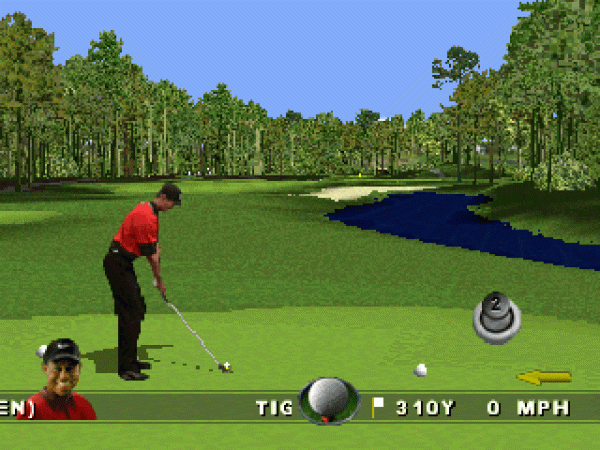
Game Screen
•
Distance potential of the club
•
Shot Select (Full/Punch/Pitch/Chip)
The Swing Meter
•
Contact crosshair for best accuracy
The Swing Meter determines how much power and accuracy you have on your shot when driving, swinging, and putting.
Note
If you are playing with a DUALSHOCK analog controller, the game automatically defaults to the Analog Swing. Press the ANALOG mode switch OFF to enable the Three-Click Swing.
The Golf Swing
How to swing:
Press [button] (or press the left or right analog stick) to start the backswing. When the Swing Meter is closest to the 100% mark, press [button] again (or press the left or right analog stick) to begin the downswing. Press [button] a third time in the hit zone to hit the ball (Analog Swing does not require a third input).
The power guide above the swing meter adjusts to changes in your aim.
How to aim:
Press [button] to enable the zoom camera.
To aim the target, press the D-Button in the direction you want your shot to go.
If the target is green, your aim is in play. If it's red, your aim is out of play.
EA Tip
On putts, the green is not always as flat as it looks. Read the green more precisely by pressing R1.
How to change the power of your swing:
Tap [button] (or press the left or right analog stick) during your backswing only once the desired power level is reached on the Swing Meter.
The longer you wait before starting the downswing, the more distance the ball travels.
EA Tip
A full backswing can be too powerful in some situations on