Starting The Game
To play VR Soccer™ '96 on your PlayStation™: •
Set up your PlayStation™ in accordance with the instruction manual supplied with the system. •
Follow your system directions to open the CD drive and place the CD on the bed of the drive, making sure the printed side faces upwards.
•
Close the CD drive and press the Power button to load and play the game.
Console Top View
Console Front View
Main Menu
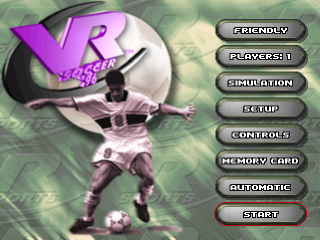
After the Introductory and Title screens, the Main Menu will appear. This menu allows you to set up all your options for VR Soccer™ '96.
The Game Type button is highlighted in red by default. Moving the Directional button will move the highlight between buttons and options. Pushing the X button will select the currently highlighted option.
Many buttons will revolve to different options when selected, while others will take you to an entirely different menu.
Demo Mode
If you leave the game on the main menu for more than 20 seconds, the game will go into a demo mode. This mode shows two computer-controlled teams matched up against each other.
Game Type: Friendly Game
A one-time match where you can pit any team against any other team. Once you've selected your options for the game, select the START button on the Main Menu, and press the X button or "START" to go to the Friendly Next Match screen.
To select a team, highlight the up or down arrows at the side of the flags to scroll through all of the available teams. Once you've selected the two teams, select the question mark of either team to view the team's player information in the Squad Selection screen.
Next Match Screen
Squad Selection: Who's Playing and What Formation
If you're playing against the PlayStation™, you can't change the computer's team structure, but you can change yours. In the Squad Selection screen, you'll see a full list of your squad and the formation in which they're playing. To move or change any of the players around, move the highlight to the player and push the X button. Then, move the highlight to the player you want to switch positions with and push the O button. To view a player's personal stats, move the highlight to the player and push the O button.
Player Stats
Each player has a set of personal stats based on a scale of 100%. If a player has a rating of 80% or over in any of the skills, this will be represented by a small icon in front of his name on the Squad Selection screen.
It's important that you check each player's stats because you'll want to be playing with the strongest squad possible if you're going to stand a chance of winning.
Important Player Stats
•
Goalkeeper: Vision, Pace, Control, Accuracy, and Discipline
•
Defender: Power, Discipline, Pace, Flair, and Stamina
•
Mid-Fielder: Control, Flair, Vision, Pace, and Accuracy
•
Attacker: Flair, Power, Accuracy, Pace, and Control
To change your team's formation, highlight the Formation button on the bottom left of the screen and push the X button. As you continue to push the X button, the button will revolve through all the available choices. The formation map gives you a visual representation of the chosen formation.
Once you're happy with your squad and their formation, select "DONE" to return to the Friendly Next Match screen. Click on "DONE" to start the match or click on "CONTROLS" (see Controls: In-Match in this manual) to configure your buttons. See "It's A Game Of Two Halves" for in-match tactics and gameplay.
Game Type: League Game
Select "LEAGUE" to play in league competition. Here you will play against all the other teams in your league in a bid to win the league or gain promotion to the league above you.
Select "LEAGUE" from the Game Type button on the Main Menu, then select "START" to begin the League competition. The Player 1 Select Team screen will now be presented; from this screen you select the team you want to play and select "DONE" to start.
If you've selected more than one player from the Players button on the Main Menu, Player 1 selects his/her team first, then selects "NEXT" so that Player 2 can select a team. Player 2 can select to play a different team or play on the same team as Player 1.
A small soccerball appears below the team's name, indicating that the other player already selected the team. Two players can play together on the same team, or can play on different teams if you desire.
All forty-four teams are divided into three leagues depending on how the teams are seeded. For example, if you pick England you'll be in group B, but if you pick Germany you'll be in group A. If more than one player is playing and the players are playing different teams, then the games