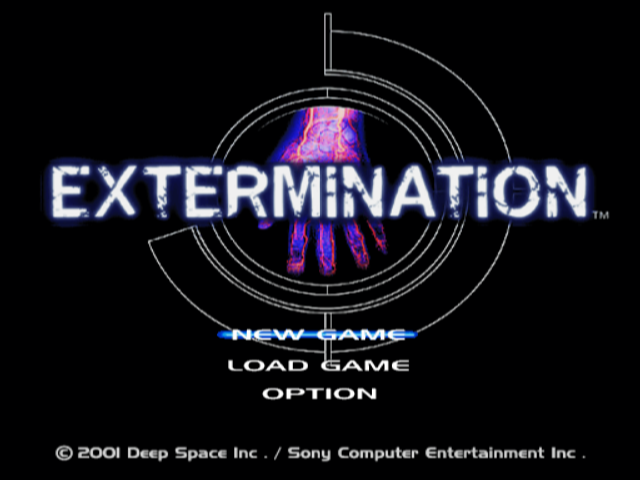
Title Menu Options
•
NEW GAME: Start a new game.
•
LOAD GAME: Resume a previously saved game.
Loading a Game
To load a saved game, select LOAD GAME from the Title Menu or LOAD in the Options Screen during a game.
Select the MEMORY CARD slot (8MB) (for PlayStation®2) with the saved game.
Then select the desired game to resume by pressing.
Saving Your Game
To save your current game progress, access the Save Terminals located throughout Fort Stewart.
Options Screen
You can adjust the following options:
•
Vibration: Turn the vibration feature ON/OFF on the DUALSHOCK™2 analog controller.
•
Sound: Select either Stereo or Mono output for sound effects and music.
•
Screen Position: Adjust the position of the game screen.
•
Brightness: Displays a grayscale for adjusting the brightness of the game screen.
•
Button Config: Select from three different controller configurations.
•
Default: Restore default settings.
Press the SELECT button during gameplay to access the Options Screen. In addition to the above options, the following two options are available:
•
Load: Resume a previously saved game.
•
Quit Game: Quit out of the current game and return to the Title Menu.
SPR4 Screen: Customizing the SPR4
Custom Parts Classification
Each custom part can be attached to only one part of the SPR4.
•
1 Upper U.R.S.: Upper Universal Rail System location of the rifle
•
2 Lower U.R.S.: Lower Universal Rail System location of the rifle (secondary weapon)
•
3 Scope Mount: Scope/sight
•
4 Selector: Switch for selecting the firing mode - Single Fire or 3-Point Bursts
•
M.A. Components: Multiple Attachment Components use more than one attachment location when equipping. Once equipped, one less attachment location on the SPR4 is available.
Use the left analog stick or directional buttons to highlight the portion of the SPR4 to be modified. Press to display the available parts that can be attached. Highlight the part and press to equip it.
Examples of Custom Parts
The following are examples of the SPR4's custom parts.
•
U.R.S. Cover (Upper U.R.S.): The stock Universal Rail System cover of the SPR4 assault rifle.
•
Tactical Grip Unit (Lower U.R.S.): A vertical fore-grip with an integrated tactical light. Press while aiming to turn the tactical light ON/OFF.
•
Shotgun Unit (Lower U.R.S.): Fires a single 12-gauge shotgun round using the U.R.S. trigger.
•
Zoom Scope (Scope Mount): Variable magnification scope. Zoom in with the L1 button and zoom out with the L2 button.
Survival Tactics
Pressing allows Dennis to perform a variety of actions. The action is dependent upon the situation. The following is a list of these actions: •
Acquiring and Using Items: Pressing in front of an equipment box, item, switch, etc. allows Dennis to acquire/use the item.
•
Rolling/Evading Attacks: Pressing in conjunction with the left analog stick or directional buttons near larger creatures will cause Dennis to evade the enemy by rolling in the desired direction.
•
Jumping: Pressing near the edge of a crate, facility ledge, etc. makes Dennis jump forward. Running before the jump extends Dennis' jumping distance.
•
Shake Off Enemies: If a creature latches onto Dennis, repeatedly pressing will help Dennis to break the creature's hold. Press in conjunction with the left analog stick or directional buttons to increase Dennis' chance for escape.
•
Climbing and Swinging: Pressing near a ladder or overhead bar makes Dennis grab onto the equipment. Once latched onto the ladder or bar, Dennis can move with the left analog stick or directional button.
•
Note: On some ladders and overhead bars, Dennis can reach for and grab other nearby overhead bars. Move in the desired direction and press.
•
Also, when Dennis is swinging at the end of the overhead bars, pressing and forward will make Dennis release his grip on the bar and swing forward.
•
Crawling Into Vents: Pressing near a vent makes Dennis crawl into the ventilation shaft. Once inside the shaft, pressing forward will make Dennis crawl forward. To exit the shaft, find a shaft opening and press forward.
The Infection Spreads
Infection
When attacked by creatures, Dennis' immunity to the virus weakens. Once the Infection level reaches 100%, his body enters a "pre-mutation" state as the virus attacks his bloodstream and causes a glowing "core" to explode from within and onto his back.
While in the pre-mutation state, Dennis' health will drop to a maximum of 60. If the Infection is left untreated, the virus will overtake Dennis' body, mutate him into a "creature" and he will die.
Dennis' Health and Infection levels can be monitored on the Main Menu.
Note: The virus can infect inorganic matter as well. Once infected, the material becomes "alive" and will stop at nothing to spread the virus.
Recovery
To replenish your health and reduce your Infection level, you must find and administer various healing items.
Recovery Units and Booster Shots will partially recover your health and reduce Infection. For full recovery, the MTS Vaccine and MTS Bed are required.
MTS (Medical Treatment System)
The MTS Vaccine can replenish your health to



.png)

.png)
.png)