STARTING THE GAME
Set up your PlayStation 2 computer entertainment system according to the instructions in its Instruction Manual. Make sure the MAIN POWER switch (located at the back of the console) is turned ON. Press the RESET button. When the power indicator lights up, press the OPEN button and the disc tray will open. Place the Harry Potter and the Goblet of Fire disc on the disc tray with the label side facing up. Press the OPEN button again and the disc tray will close. Attach game controllers and other peripherals, as appropriate. Follow on-screen instructions and refer to this manual for information on using the software.
Harry Potter and the Goblet of Fire supports three players using a multitap (for PlayStation 2). Insert the multitap (for PlayStation®2) into controller port 1 and insert the controllers sequentially into controller port 1-A, controller port 1-B etc. This game autosaves your progress. You must have a memory card (8MB) (for PlayStation®2) with 111KB free inserted in MEMORY CARD slot 1 to autosave. Follow the onscreen instructions to turn Autosave on.
•
multitap connector (for PlayStation®2)
SETTING UP THE GAME
Follow these steps to start your adventure:
•
Select NEW GAME from the Main menu. The Select A Save Game Slot screen appears.
•
Press the D-button ◄/► to choose a Save Game Slot to save your progress to and press the ✖ button to confirm.
•
You must have a memory card (8MB) (for PlayStation®2) with 111KB free inserted in MEMORY CARD slot 1 to save your progress.
•
At the Select A Character screen, press the D-button ◄/► to choose Harry, Ron or Hermione, and press the ✖ button to confirm.
•
Up to two friends can join in the fun if you have a multitap (for PlayStation®2).
BEGINNING YOUR ADVENTURE
•
Number of Bertie Bott's Every-Flavor Beans
Play solo and take control of Harry, Ron or Hermione to lead the three friends on their quest, or invite your friends to join in. Up to three players can play at any time on all levels, however Harry must face the Triwizard Tournament tasks and the battle with Lord Voldemort alone.
•
You and a friend can play using two DUALSHOCK®2 analog controllers inserted in controller port 1 and controller port 2.
•
Three players can team up using a multitap (for PlayStation®2) inserted in controller port 1, with three DUALSHOCK®2 analog controllers inserted sequentially into controller port 1-A, controller port 1-B and controller port 2.
Extra players can join in at the start of any level by pressing the START button on their DUALSHOCK®2 analog controller at the Select A Character screen. They can then choose a character, press the ✔button to confirm and press the button again when they are ready to begin.
Players can also drop in at any point during a level that you are playing by pressing the START button on their DUALSHOCK®2 analog controller and then selecting a character from the pause menu in the same way.
•
Players can drop out of a level by pressing the START button and then selecting DROP OUT from the pause menu. If you're playing alone, you can exit the level by selecting END LEVEL.
Bertie Bott's Every-Flavor Beans
These popular wizard sweets come in different varieties. Blue Beans fill your Magic Meter, red Beans replenish your character's Stamina, and any other Beans you collect can be used to buy collector's cards from the Folio Universitas.
CASTING SPELLS
Mastering magic has never been so intuitive or so rewarding. Cast impressive jinxes and charms and team up to create powerful co-operative spells, then experience the spectacular supercharged power of Magicus Extremos. Earn points for skillful spell casting to increase your Magic Mastery level and unlock collector's cards.
•
Cast a jinx by pressing the button. Cast jinxes in Magical Encounters to defeat creatures and on objects throughout the magical world to see what is uncovered.
•
Press the button to cast Accio and draw hard-to-reach items towards you.
•
To cast a charm, press and hold the button, then use the left analog stick to move and control the resulting stream of magic. There's a charm for every occasion:
•
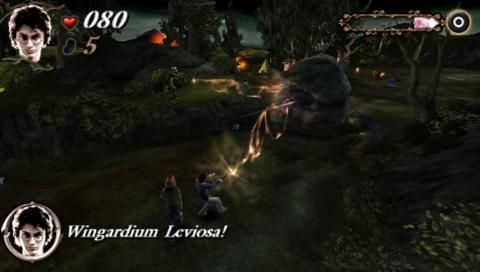
Wingardium Leviosa – Levitates objects and creatures.
•
Carpe Retractum – Pulls objects and certain creatures towards you.
•
Wizard Tip: Grab Bubotubers with Carpe Retractum, pull back, then release to send them catapulting through the air!
•
Aqua Eructo – Fires a jet of water that can be used to put out fires and cool down fiery creatures.
•
Herbivicus – Causes leaves to grow and certain plants to bloom at a rapid pace – Professor Sprout would be proud!
•
Wizard Tip: Skilled wizards-in-training should try perfecting their