PLAYING THE GAME
How to use the Phone
At some point, Harry will gain use of a cell phone. He can make use of this tool in a variety of ways.
•
Pressing ● will access the phone, allowing you to operate it with the directional buttons and ✘.
•
To cancel selections, tap ●.
•
You may still move Harry using the left analog stick while the cell phone is open.
The cell phone allows Harry to make and receive phone calls. To make a call, select DIAL and type in a phone number (numbers can be found throughout Silent Hill) or select a number Harry has previously called from the Phone Book. Text and voicemail messages can be accessed from the Messages menu. The phone can even take pictures! Accessing the Camera will allow you to then snap a shot by pressing ✘.
You can save photos (up to 10) after taking them, and saved photos may be viewed in the Gallery menu. You can also use the phone to view a Map or Save your data.
If you want to try a different ringtone, you can access the Settings menu to adjust phone-specific settings.
How to use the Map
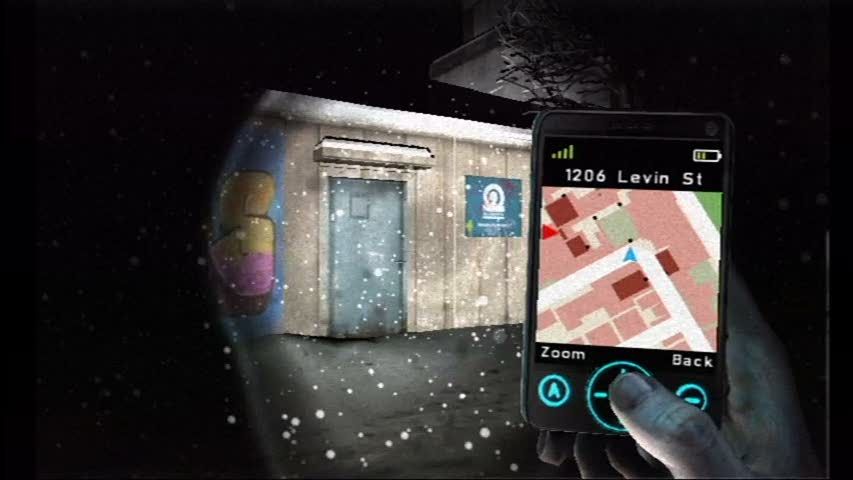
Harry's cell phone has a GPS map function. New waypoint locations will be added to the map, and you can use this to keep track of Harry's progress and his current location. It's also handy if you get lost or forget where you need to go.
To access the map, press ● to open the cell phone and then select MAP with ✘ or →. A small map of the immediate area will be shown.
By pressing ✘ you can zoom in for a full view of Silent Hill. To zoom in on a specific area, press the ↑ button for up to two levels of magnification. While zoomed in, you can scan across the map by moving your cursor to the edges of the screen. To back out of this view, tap ●.
Save and Load
At the start of the game, you will create a Profile for your data. You can save your progress to this Profile at any time by pressing ● to access the cell phone and then selecting the SAVE option.
Up to 3 Profiles can be saved at a time. To resume a saved game, simply select that Profile from the main menu.
•
When saving data, your progress is recorded to the nearest Checkpoint. In some instances, your game may load from a point slightly earlier than the exact location you saved.
•
Memory Card is required.
PROLOGUE
The town of Silent Hill is a very popular vacation spot. However, with a large number of young families settling there, the residential population has exploded over the past ten years. Currently, this warm community is striving to find its identity in the midst of a city that has as its backdrop a picturesque forest, growing commercial districts, and an amusement park with ephemeral thrills. This year, Silent Hills has fallen into a deep torpor. Usually living at the frantic pace of late vacationers who preferred to wait for the end of summer and the heat waves, the city is now deserted, in the grip of a blizzard of rare violence. Schools are closed and residents are holed up at home, terrified to walk the desolate streets from which the lugubrious howls of the unleashed storm rise.
Harry Mason glances in the rearview mirror to look at his daughter Cheryl, sitting in the back. The journey through Silent Hill is endless and only Cheryl's presence comforts him. Harry suddenly loses control of his car, which skids on a patch of black ice. He tries to straighten it, but the vehicle ends up in the ditch.
After regaining consciousness, Harry discovers that Cheryl has disappeared. Plunged into darkness, he grabs a flashlight from the glove compartment. Where could Cheryl have gone? Harry heads towards a building he spots nearby.
Objective
•
Find Cheryl, Harry's daughter.
PLAYING THE GAME
Exploration
To find his daughter Cheryl, Harry must explore the town of Silent Hill. Use the right joystick to control Harry and his flashlight. If you want to examine an object more closely, press and hold the R2 button. In some cases, inspecting the environment allows Harry to find clues. If you encounter an obstacle, such as a barrier or a door, pressing allows Harry to interact with that obstacle and pass through it. You can press and hold the L2 button to make Harry run. When running, Harry automatically interacts with doors and barriers.
At times, Harry will find doors and puzzles, or other objects he will need to use in a certain way to progress. When you press to enter "Interaction" mode, the camera zooms in on the object or area in question.
Generally, holding down when the cursor is positioned over an object allows you to grab that object. You can then use the left joystick to interact with that object depending on the situation. Other prompts may also appear to help you. To exit this view, press .
The Nightmare
As Harry explores Silent Hill, a freezing storm plunges the streets of the city into a horrible Nightmare. The objects Harry can interact with (doors, walls, etc.) are frozen and appear in a lighter blue than the rest of the world. Terrifying creatures roam the nauseating alleys, searching for Harry. If they spot him, they will chase him relentlessly; Harry will then have to dodge them and flee (press R1 to glance back and see if the creatures are still pursuing you).
Harry can also escape them by briefly hiding in or under certain objects. If a creature manages to grab Harry, push it away by pressing the button icon that appears on the screen. Although Harry can shake off creatures if he distances
.png)




.png)





.png)



.png)



.png)


