Monkey Menu
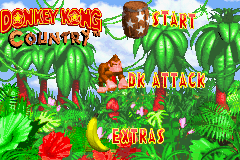
Insert your Donkey Kong Country Game Pak into your Game Boy™ Advance system, then turn the power ON. When you reach the title screen, press START. On the main menu, press Up and Down on the + Control Pad to cycle through the available options, then press the A Button to select one.
•
START: Begin the main game with one or two players.
•
DK ATTACK: Race against the clock and try to accumulate high scores (only available once the levels are unlocked in the main game).
•
EXTRAS: Play Funky's Fishing and Candy's Dance game, either solo or against a friend (using a Game Boy Advance Game Link™ cable-sold separately).
Getting Around
Choose START from the main menu and select one of the three available save files. Next, decide between one or two players.
•
One-Player Mode: A single player tackles the entire quest alone, controlling both Donkey Kong and Diddy Kong. •
Two-Player Mode: One player takes control of Donkey Kong while the other handles Diddy Kong. The game pauses when one character loses a life so that the GBA can be passed to the other player and the quest continued. After entering your name and selecting END, a short intro sequence will lead you into a map of Donkey Kong Country. Use the + Control Pad to move your character around, and press the A Button to select a destination. Each level must be completed before you can move on to the next. Extras
DK ATTACK
An all-new DKK challenge: use the Kongs to race through the levels before the one-minute time limit elapses. Everything collected or defeated will add to your score, so go all-out to achieve the highest possible totals and gain the medals.
BONUS GAMES
You can play any of the bonus games alone or against a friend. To start a game, highlight EXTRAS on the main menu and choose either Funky's Fishing or Candy's Dance Studio. Now select either one or two players. To play against a friend, connect two Game Boy Advance units using a Game Boy Advance Game Link cable. For more information about linking your Game Boy Advance systems, see page 28.
FUNKY'S FISHING
Try to achieve a high score by hooking as much sea life as possible before the time runs out. Gain extra time by hooking multiples of the same-colored fish.
Controls:
•
+ Control Pad Left/Right: Move Enguarde across the surface of the water
•
+ Control Pad Up/Down: Adjust the height of the hook in the water
•
B Button: Activate combo bar (multiplayer only)
•
SELECT: Quit to title screen (when paused)
Two-Player Modes:
•
3 Minutes: Try to achieve a higher score than your opponent before the three minutes are up.
•
5 Minutes: Try to achieve a higher score than your opponent before the five minutes are up.
•
Endurance: Battle it out with your opponent to decide a clear winner.
Combo Bar (multiplayer only):
At the bottom of the screen is a combo bar, which will increase with each combo executed. This will allow you to drop trash into your opponent's boat, reducing their score/time (depending on play mode). If you are feeling less hostile you can choose to award yourself extra points or time.
CANDY'S DANCE STUDIO
Try to keep up with Candy in her latest dance routines. Follow the instructions that scroll across the top of the screen.
Controls:
•
+ Control Pad: Perform dance move
•
A Button: Perform dance move
•
B Button: Perform dance move
•
L Button: Perform dance move
•
R Button: Perform dance move
•
SELECT: Quit to title screen (when paused)
Two-Player Mode:
Take part in a dramatic dance-off against your opponent and score points by performing to the best of your ability. The player with the higher score at the end of the game wins!
TOP TIP: Getting Perfect will give you a head start!
Using the Game Boy Advance Game Link® Cable
Here's all of the information you need to link multiple Game Boy Advance systems.
Necessary Equipment
•
Game Boy Advance systems: One per player
•
Game Boy Advance Game Link cables: One
Linking Instructions
1. Make sure that the power on all of the game systems is turned off, then insert the Donkey Kong Country Game Paks into the individual Game Pak slots. 2. Connect the Game Link cables and plug them into the External Extension Connector (EXT) on each of the game systems.
3. Turn both game systems on.
Player One will be the player with the smaller end of the cable connected to his Game Boy Advance.
Troubleshooting
You may be unable to transfer game data or you may experience malfunctions in any of the following situations:
•
When you are using any cables other than Game Boy Advance Game Link cables.
•
When any Game Link cable is not fully inserted into any game system.
•
When any Game Link cable is removed during the transfer of data.
•
When any Game Link cable is incorrectly connected to any game system.
*