Introducing Dr. Sudoku
Dr. Sudoku is a game of logic played with a 9 x 9 grid of squares and the numbers 1-9. The 9 x 9 grid is divided into nine separate blocks of 3 x 3 squares.
Rules of Play
Every row and column must contain the numbers 1-9. Every 3 x 3 block of squares must contain the numbers 1-9. No numbers may be repeated in the same row, column, or 3 x 3 block of squares.
The player is presented with a partially completed grid and must fill in the blank squares. To see a full tutorial, start the game and select How to Play from the main screen.
Advice
Never guess. You can arrive at correct answers by logical deduction, so there is no need to guess. A wrong guess will cause time-consuming backtracking.
If you are unsure what to put in a particular square, skip it. Alternatively, use the game's Memo Mode to note possible answers and come back to it later.
Getting Help
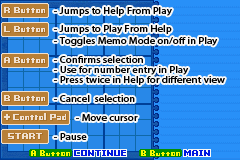
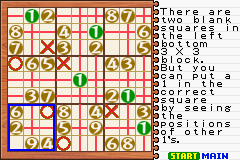
Press the R Button to jump the cursor to the Help and Information Panel. Choose a number and press the A Button to highlight it. The number will then turn green in the puzzle area. Press the A Button again and red lines will mark puzzle rows and columns that already have the number, meaning they are no longer candidates for it. Red Xs mark squares that are not candidates for the number because it appears in the same 3 x 3 block. Squares without a red line or an X are valid candidates for the number. Auto Fill
Auto Fill fills the puzzle with a random selection of valid numbers. With all squares filled, you can then use the B Button to remove some numbers. The more you remove, the more challenging the puzzle becomes. Puzzle Management
Use the following options to manage your puzzle: •
Reset: Clears the puzzle area completely. •
Save: Saves the puzzle in progress. •
Quit: Select to quit editing the current puzzle and return to the main Original Mode screen. If you want to save your puzzle, do so before quitting. Playing a Created Puzzle
To play a puzzle that you have created, choose the slot for the puzzle and then select Play. Play cannot be chosen if the puzzle you have created is unsolvable. Slots that have saved puzzles in them will display in the preview area. Slots without puzzles in them will display “NO DATA.”
Using Original Mode to Solve Difficult Problems
Pick an empty slot and choose Edit, as though you were going to create your own problem. Instead, enter the problem you are having difficulties with.
The Help function will act the same as with other puzzles in Normal Mode. The Check option can confirm whether the problem is solvable.


.png)
.png)
.png)
