Getting Started
•
Make sure the power switch is OFF.
•
Insert the ROGER CLEMENS' MVP BASEBALL™ Game Pak as described in your SUPER NINTENDO ENTERTAINMENT SYSTEM® instruction manual.
•
Turn the power switch ON.
Player Selection
When the title screen appears, press the START BUTTON. To select the number of players or to reach the Sound Options Screen, use the UP and DOWN CONTROL PAD ARROWS to highlight your choice, and press the A BUTTON.
•
1-Player - You against the computer in an Exhibition or Regular Season game.
•
2-Player - You against a friend in an Exhibition game.
•
Sound Options - Takes you to the Sound Options Screen.
Selecting the 1-Player game takes you to the Game Selection Screen. Selecting the 2-Player game takes you directly to the Team Selection Screen.
Sound Options Screen
To turn the sound effects and/or music ON or OFF, use the UP and DOWN CONTROL PAD ARROWS to highlight the appropriate option, and then use the LEFT or RIGHT CONTROL PAD ARROWS to select ON or OFF.
To confirm your selection and return to the Player Selection Screen, highlight EXIT and press the A BUTTON.
Game Selection
In the 1-Player mode, the game selection screen allows you to select the type of game you wish to play or to return to a season already in progress. Use the UP and DOWN CONTROL PAD ARROWS to select the type of game, and press the A BUTTON to confirm.
•
EXHIBITION - One game against the computer. (To play against a friend, reset and select a 2-Player game).
•
REGULAR SEASON - You play three games against each team in your division. A National Division Season consists of 33 games, while the American Division consists of 39 games. If your team qualifies, there will be a best-of-7 play-off, followed by a best-of-7 Championship Series. This mode is played entirely against the computer.
•
PASSWORD - When playing a REGULAR SEASON, a password consisting of letters and numbers is displayed at the end of every game. Keep a record of these passwords to resume your season later.
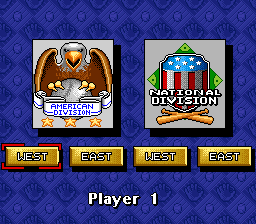
Division Selection
To move between the four divisions, use the LEFT and RIGHT CONTROL PAD ARROWS. Press the A BUTTON to confirm your selection.
Designated Hitters
The American Division has the designated hitter rule in effect. In inter-divisional games, the rule only applies when the home team is from the American Division.
The Teams
To move through the teams, use the LEFT, RIGHT, UP, and DOWN CONTROL PAD ARROWS. Press the A BUTTON to confirm your selection, or press the B BUTTON to return to the Divisional Selection Screen without choosing.
If you are playing a 1-Player Exhibition game, you must select the computer team in the same manner after choosing your own. In a 2-Player Exhibition game, Player 2 selects their team in the same manner.
Season Schedule
During Regular Season play, you will see the season schedule once you have selected your team. Press either the LEFT or RIGHT CONTROL PAD ARROW to alternate between the 2 months of the schedule.
During the Regular Season, the computer will control whichever team the schedule dictates. Home games are displayed in brown, and away games are displayed in white.
After reviewing the schedule, press the A BUTTON to scroll through the division standings and day's match-up screens to reach your pitching roster.
Pitching Rosters
To scroll through the starting pitchers, use the UP and DOWN CONTROL PAD ARROWS. Press the A BUTTON to confirm your selection.
During Regular Season play, starting pitchers must have 3 full days of rest between starts. Use the season schedule to calculate the most efficient use of your pitchers.
Tagging
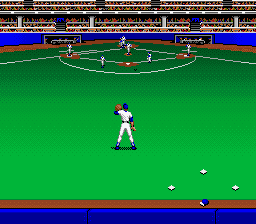
To run with the ball—either to tag a base or a runner—press the appropriate LEFT, RIGHT, UP, or DOWN CONTROL PAD ARROW for the direction you want to move. To move diagonally, press in-between the arrows.
Close Plays at the Bag
When a close play occurs at any base, the perspective switches to a close-up view of the baseman and the runner sliding in. The CONTROL PAD functions change depending upon whether you are the baseman or the runner.
Once you have committed to a direction for the tag or slide, you cannot change it. This is a challenge to see who lasts the longest without making the first move.
Baseman Controls
To tag the runner, you must judge which way and when he will slide. Press the appropriate CONTROL PAD ARROW to slap on the tag in the direction you think he will slide:
•
LEFT - Left side of the bag
•
RIGHT - Right side of the bag
•
DOWN - Center of the bag
Base Runner Controls
To avoid being tagged, you must determine which way the fielder is going to go and slide around his tag:
•
LEFT - Slide to the inside of the bag
•
RIGHT - Slide to the outside of the bag
•
DO NOTHING - Automatically slide to the center of the bag
Regular Season Standings
When the regular season starts, your team is situated two games out of first place in your sub-division. In order to capture first place and move onto the Division Championships, you must obtain the best won-lost record of the season. If there is a tie at the end of the regular season, there will be a one-game tie-breaker to determine who advances.
If you win the best-of-seven Division Championship, you move on to the best-of-seven Championship Series against
 (Rev 1).png)

 (Rev 1).png)

 (Rev 1).png)
 (Beta).png)

.png)
_1.png)

_1.png)
.png)
.png)

.png)
.png)

.png)
.png)

















 (Rev 1).png)