Before Starting the Game
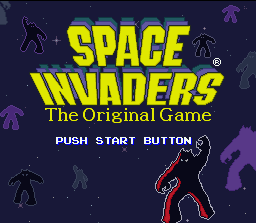
Insert the Game Pak into the Super NES Control Deck and turn the POWER switch to the ON position. When the title screen appears, press START to begin play.
If you do not press START, a demonstration will begin. Press any button to return to the title screen. On the title screen, if you press any button, the mode select menu will be displayed.
Mode Select Menu Options
•
ORIGINAL GAME MODE: There are four different Screen-Type modes that can be played by one player.
•
VS GAME MODE: The VS Game Mode allows you to play Space Invaders against a friend. •
OPTIONS: The Options menu will let you change some preferences.
Original Game Mode
After selecting the Original Game Mode, you must choose a screen type. The difference between the four types is only visual; it does not affect the game play. Select the one that you like best, the one that reminds you of the first time you played, or possibly even the one on which you "owned" the high score.
Select a Screen Type Menu
Screen Types
•
UPRIGHT CABINET: This screen type was found in upright-style arcade machines. Its picture was produced by reflecting a black and white CRT (cathode ray tube) image onto a mirror. The color moonscape was a simple cardboard cutout. •
BLACK & WHITE: The simplest of screens, the Black & White produced a two-color image directly on the CRT.
•
B & W WITH CELLOPHANE: Screens that used the "black and white with cellophane" method of image display were not actually color, but really only simple black and white screens overlaid with colored cellophane. While not really a color image, they at least gave that impression.
•
COLOR: Due to the additional cost of a color CRT, very few machines had color screens. This type of screen had a color palette of a whopping eight colors (counting black and white)!
How To Play (Arcade Game Mode)
The Arcade Game Mode demonstration will begin. After coining the machine the required number of times, press START on Controller One to begin a one-player game, or press START on Controller Two for a two-player game. Note that the machine will have zero credits when you begin and must be coined with the L or R Button. When the game begins, the screen will be filled with rows of alien invaders. Using the barriers for cover, shoot down all of the invaders to advance to the next round. Should you set the high score, it will be stored until the game is turned off.
Points
The points that you earn depend on the invader type that you shoot. Points are assigned as follows:
VS Game Mode
In addition to the original two-player arcade mode, you now have the ability to play Space Invaders in a new head-to-head VS Game Mode. This highly competitive game involves new strategies. Simply blasting everything on the screen might not lead to success. VS Game Mode: How to Play
On the Mode Select screen, choose VS GAME MODE and press START. Select the number of points that your match will be, then press START.
When the handicap screen appears, Player-1 and Player-2 must each choose their difficulty levels and number of ships. When each player has finished, they both must press START to begin.
VS Game Mode: Rules
•
1. The first player to shoot down all of the invaders on his side wins.
•
2. A player loses one ship each time his/her base is overrun.
•
3. If a player depletes all of his ship stock, he loses. If the ship stock is set to Infinity, this rule does not apply.
•
4. Each time a player destroys a complete row of invaders, that row will be sent to the top of his opponent's side.
•
5. If a player shoots down the UFO, the invaders will switch sides.
Colored Invaders
In this mode, some of the invaders are colored. Periodically, they will cycle to a different hue. The invader's color when hit will cause different things to happen.
•
Green: Clears that row of any remaining invaders.
•
Pink: Will randomly have the effect of shooting either green, blue, yellow or red.
•
Blue: Drops your opponent's invaders one level.
•
Yellow: Drops the invaders on your side one level.
•
Red: Drops both side's invaders two levels.
Options Menu
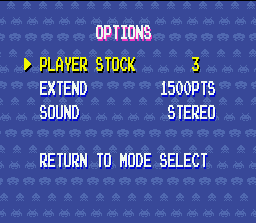
The options mode allows you to change three optional preferences. Use the + Control Pad to select and alter the settings. To exit, select RETURN TO MODE SELECT and press START.
Player Stock
This is the number of ships with which you will start. Select your choice of either 3, 4, 5 or 6.
Extend
Changing this setting will alter the point level at which you will receive a bonus ship. Your choices are 1000 or 1500 points. You can earn only one bonus per game.
Sound
To match your system's sound setup, select either Stereo or Mono.
.png)

.png)
.png)