Starting the Game
Make sure the POWER switch is OFF before inserting the Space Invaders™ Game Pak into the Game Boy® Advance slot. Refer to your Nintendo Game Boy® Advance instruction manual for proper insertion. Turn the POWER switch ON to start. Note that the Space Invaders™ Game Pak is for the Game Boy® Advance system only. Game Modes
•
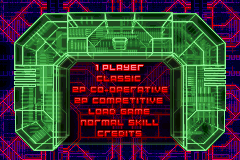
Classic: Step back in time to play a simulator of the first alien battle, the original Space Invaders. •
2P Cooperative: With a second cartridge, GBA system, Game Link cable, and a friend, combine forces to rid the solar system of alien warriors. Fight through each rack of aliens and bosses until the system is clear.
•
2P Competitive: Unlock this mode to outshoot your friend. Waves of aliens appear, and the player who shoots the most in each rack gains a point. The first player to win all points wins. See page 20 for connection instructions.
•
Load Game: Access previously saved games to pick up the battle halfway through.
•
Difficulty: Choose from Normal, Expert, or Maniacal. Alien speed and aggressiveness increase with difficulty. Maniacal Mode is locked until the single-player game is finished on Expert.
•
Credits: View the people behind the Tank.
Pause Menu
Pressing START during a game pauses it and displays a menu. Options include resuming the current game, saving the current game, and exiting to the Main Menu. Note that exiting will end the current game.
Save Game Menu
To save, access the Pause Menu and choose Save. Select an empty slot or one you wish to overwrite, then press the A Button. A message indicates a successful save before returning to the Pause Menu. Saved games resume play at the start of the relevant alien rack.
Alien World
•
Trapper: This alien's projectile is a highly viscous liquid that slows tank movement. While it causes no damage, the sticky substance leaves the tank vulnerable to attack from other aliens.
•
Unknown Boss: Security noted a breach in technical data regarding this upcoming attack. Little is known, but there is fear that their technology may be used against us. How to Connect Game Boy® Advance Game Link® Cables
What You Will Need
•
2 Game Boy® Advance systems (one for each player)
Connecting the Cables
1. Check that the POWER switch on each GBA is set to "OFF." Insert a game pak into each GBA.
2. Plug the Game Link® cables into the External Extension Connector of the GBAs.
3. Turn the POWER switch on both GBAs to the "ON" position.
4. Use the Control Pad to move the cursor to the same multiplayer mode you wish to play (2 Player Cooperative or 2 Player Competitive).
5. Either player can press the A Button to select the desired mode of gameplay.
6. Either player can follow the prompt to press Start from the load screen to begin the multiplayer game.


_2.png)
.png)
.png)
 (En).png)