Single Player Game
To begin a single player game, choose Start Game from the Game Choice screen by moving the control pad up or down, and pressing the START button. Then move the control pad right or left to choose a clay fighter.
The clay fighter surrounded by the red box is the one which you are considering. Below the portrait of your clay fighter is a small description. You might pick a certain clay fighter because of their likes and dislikes, or simply because of their motto.
After picking the clay fighter you wish to use, press the START button. Your clay fighter will walk into the Big Top ready for battle.
Battle Rules
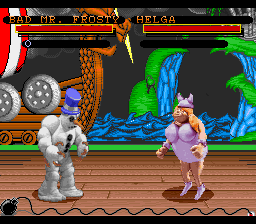
Once a battle begins, you will need to use all of your skill to defeat your opponent. Each time you hit the other clay fighter with any of your punches, kicks, holds, throws, or special moves their life energy will decrease.
This goes both ways, and you will lose a portion of your energy every time you are hit as well. When one of the clay fighter's energy has dropped to zero, the round is over.
Versus Mode
Versus Mode offers two players the chance to fight each other without the game returning to the Tournament game. Choosing this option from the Title menu brings up a different player choice menu. The menu also shows the Win, Loss, Draws, and Special Knock Out statistics for each player.
Once each player has chosen the clay fighter they want to use, by pressing the START button, the Handicap and Stage Select screen will come up. The first clay fighter to win 2 rounds will be declared the winner. You and your opponent can then pick two more clay fighters to fight with.
Handicap and Stage Selection
Changing the handicap for a player will make the battle more even. If one player is more experienced at Clay Fighter than the other, give them a lower handicap.
•
A handicap value of one will not give a clayfighter any advantage in a battle.
•
As the handicap value increases, a clayfighter will inflict higher and higher amounts of damage.
The stage background you wish to fight in front of can also be chosen from this screen. After you are satisfied with the stage and handicaps, press the START button.
Changing Options
The option screen allows you to change a number of things about the game. This gives you greater freedom to play clay fighter the way you want to play it.
To get to the Options screen, move the cursor to options and press START. Then move the control pad up and down to pick the aspect of the game you want to change.
.png)


.png)
_2.png)
.png)
.png)
.png)
.png)

.png)

.png)
.png)




.png)


.png)