Team Selection
Use the arrow keys on the Control Pad to highlight the desired team and press the B button to select that team. The second player uses the second controller to select his team. Team statistics are given in the back of this manual.
N League Teams
A League Teams
Edit Teams Options
Stadium Options
There are three different stadiums to choose from. Use the Control Pad left and right arrow keys to display the stadiums. Press B to enter your selection.
•
Air Dome: A stadium with an open air dome. The wind will affect the ball's flight.
•
Midsize Park: A small stadium with a chance for a lot of homers.
•
Huge Stadium: A large stadium with very high walls. Good fielding is the key to winning on this field.
Player Selection
There are 25 players on each team. Players are divided into starters, bench and farm. The farm players cannot play in the current game. They must first be brought up to the bench.
To change the line-up, highlight the player you wish to replace with the Control Pad arrow keys and press B. If you select the pitcher, a list of available pitchers will be displayed in the second column. If you select one of the other fielders, a list of available fielders will appear in the second column.
Use the control pad to highlight the replacement player from the second column and press B again. Press the start button to end player selection.
Player Condition Symbols
Pitcher and Catcher Position
Use the left and right arrow keys on the Control Pad to move the pitcher and catcher from side to side.
Pitching Controls
Use the Control Pad to select the type of pitch and press B to throw. For a slow ball, press the up arrow on the Control Pad. For a fast ball, press the down arrow on the Control Pad. For normal speed, do not push the Control Pad.
For a forkball or sinkerball, use the A Button instead of the B button.
Play Screens and Rules
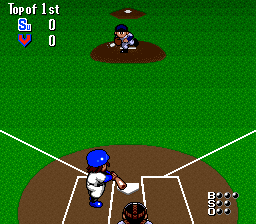
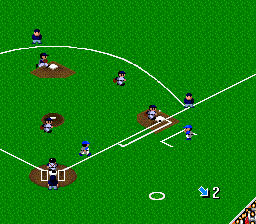
There are two basic views in which to view the game. There is a close-up view and a wide angle view.
•
Close-Up View: Focuses on the pitcher and batter. When a runner is on first and/or third base, a small window will appear in either corner of the screen to display the runners. A runner on second base will be displayed in the background of the close-up shot behind the pitcher.
•
Wide Angle View: When a ball is hit into play or if a runner steals, the display will automatically switch to the wide angle view. A small diamond will appear on the lower right-hand side of the screen to display the position of the runners.
•
Wind Indicator: The arrow with a number at the bottom right of the screen indicates the direction and strength of the wind.
All Star Mode Match-Up
The All Star Game mode may be played in three ways. Use the up and down arrows on the Control Pad to select the desired mode and press B.
•
1P: One player plays against the computer.
•
2P: Two players battle each other.
•
COMPUTER: Watch while the computer plays both sides.
Select the All Star Roster
Here you can choose which players will participate in the All Star game from the various team rosters. Press the SELECT button to display the roster for the starting line-up, the bench and the pitchers. For each of these screens, use the left and right arrows on the Control Pad to toggle between the various teams.
Those players that appear in grey on the team rosters have already been pre-selected. To change these selections for your own preferences, simply use the Control Pad to highlight the name of the player you wish to replace and press B.
Then use the Control Pad to highlight the name of the player you wish to substitute in and press B. Substitutions can be made to the starting line-up, the bench and the pitchers from any of the six teams for each league's team. Once all the players have been selected, press START. Select the desired stadium and starting line-up and the All Star game will begin.
Pennant Race Mode
The Pennant Race mode allows you to set up a schedule of games in which six teams try to win the pennant. You can select the number of games they play and choose which games to participate in.
You can participate in all of the games, or you can participate in some and have the computer play the rest. You can either watch or skip the games the computer plays by itself. To select this option, go into the Set Up mode and select either WATCH or SKIP.
Pennant Race Setup Steps
•
Number of Games: You determine the length of the season that will lead to the pennant. Use the up and down keys on the Control Pad to select between 10 and 130 season games and press START.
•
Select the Teams: Choose the 6 teams that will participate in the pennant race by using the Control Pad arrow keys to highlight the logos and press B for each team. Press START when you have finished your selections.
•
Pick Your Team: Choose which teams' games
.png)

.png)

.png)
.png)





.png)
.png)


.png)







.png)