Modes of Play
METAL WARRIORS has two modes of play:
•
Two player competitive mode
The one player story mode consists of 9 different combat missions. During the one player mode, the player will have to master several of the six different battledroid robots in order to finish the game.
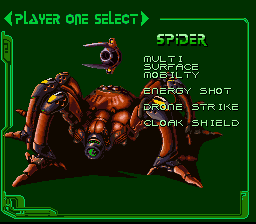
The two player competitive mode allows the players to select any of the six robots and battle each other. There are numerous different two player battlefields. Some two player battlefields have extra empty robots that players can take control of if their 'droid is destroyed.
Setting-Up Your Game
With your Super NES® turned OFF, insert the game pak into the game unit. Turn the power ON. The legal screens will appear, followed by the game story. Press START to skip the story—although we encourage you to watch through at least once to enhance your gaming experience.
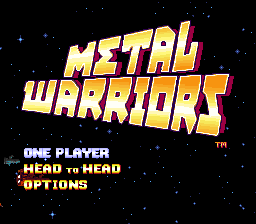
After the story, the logo screen will appear. Select ONE PLAYER, TWO PLAYERS, or go to the OPTIONS mode.
One Player Mode
Select the ONE PLAYER option. In this mode you will be briefed as to your mission objectives immediately prior to battle. It is your responsibility to carry out these objectives as quickly as possible. Only by completing all nine missions will the Free Earth forces triumph.
Mission Log
•
MISSION 1: "RESCUE AT AXIS 5"
•
MISSION 2: "BOARDING PARTY"
•
MISSION 3: "WAR ON THE ROCK"
•
MISSION 4: "SHIP DEFENSE"
•
MISSION 5: "FRONTAL ASSAULT"
•
LAST MISSION: "FINAL ASSAULT"
Two Player Mode
In the two-player game you and your opponent each select a Battledroid unit to use. Your goal is simple: destroy your opponent. Player One will appear on the top half of the screen and Player Two will be on the bottom.
Each player should follow the arrows indicating the direction of the enemy unit in order to locate the other player. Player One should watch the red arrow, and Player Two should watch the blue arrow.
The loser of each battle will get to select:
•
New Battlefield—take the fight to a new arena
•
Scramble—randomly picks a new battlefield and 'droid for each player
•
Same Fight—replay the same fight
Robot Damage
There are no life bars in the game. The robot shows its damage. First, it will dent and turn dark. When it starts to spark you can't use power-ups, except for Repair Units.
If your arms fall off, your offensive power is gone. If the Robot is killed with you in it, you are dead. Don't be afraid to bail out of a failing robot—you may find an empty suit somewhere else.
On/Off Switches
Sometimes players are required to exit the robot to open doors or lower force fields. Look for switches that can be turned on/off by the player's Robot Pilot. You must stand near the switch until the pilot finishes activating the switch.
Power-Ups Overview
Power-ups appear in gray boxes. Shoot them to open them. Walk over the item to pick it up.
Some power-ups are generated on spots marked "PORT" in the game. Ports continue to produce power-ups after you take one. Learning to use the ports is a big advantage in two-player mode.
Power-Up Types
•
Bouncing Bullets: Bullets bounce off walls. Takes effect when picked up.
•
Seeking Bullets: Bullets track nearest target. Takes effect when picked up.
•
Repair Unit: Repairs all damage on robot. Takes effect when picked up.
•
Grenade Pack: Pickup to mount on robot. L BUTTON Fires grenade. Lasts short time so keep firing!
.png)

.png)



_1.png)


_1.png)


.png)





.png)