Settlements
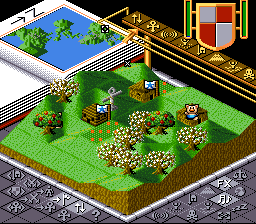
When instructed to settle, any Walkers that find flat land will build settlements and grow crops. The more flat land you create around a settlement, the larger and more advanced it becomes.
The larger the settlement, the faster the population grows and the more Manna you get. Population grows within a settlement until it is full, whereupon a Walker will emerge in search of more flat land to settle on.
•
Blue flags fly over Good Settlements.
•
Red flags fly over Evil Settlements.
Planted Land
•
Light colored rows of dots are Good crops.
•
Dark dots are Evil crops.
Swamps
Swamps reduce crop land and swallow Walkers. They are also either shallow or bottomless, depending on the world. If a Walker sinks in a shallow Swamp, the Swamp becomes flat land.
To remove Swamps, raise and then lower the affected land.
Ruined Land
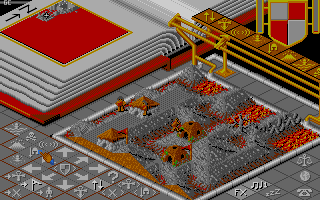
To restore land decimated by fire, raise and then lower the affected land.
Knights
Knights seek out and battle with Evil Walkers, raid enemy settlements, and torch buildings and crops. They are strong, but not invincible, growing weaker with every battle until they die.
A single Knight represents a large part of your population. Their loss can be devastating.
World Description Screen
In the Conquest Mode, the first thing you see is the World Description Screen. It describes the world you must conquer and the Supreme Power Commands available to you and to Evil. This screen will also appear at the start of each new world.
•
World to Conquer: The name of the current world. With every world you conquer you will advance to a more challenging world. Write down this name as it acts as a Password to resume your game later.
•
Battle Number Is: Each world is numbered in order of difficulty up to 989 worlds. If you conquer a world with ease, you will jump up several worlds.
•
Landscape Is: One of the 10 types of landscape (Grassy Plains, Desert, Snow & Ice, Rock & Lava, Bit Plains, Japanesque, French Revolution, Cake Land, Piggy Land, or Silly Land).
•
His Reactions: The speed with which Evil can match your actions, measuring from very slow (left) to very fast (right).
•
His Rating: Evil's level of skill and ingenuity, running from very poor (left) to very good (right).
•
Built: The build mode determines when you can alter land. "People" allows changes if a Walker or Settlement is on the Close-up Map. "Towns" allows changes only when a Settlement is visible. "Neither" prevents raising or lowering land.
•
Swamps: Shallow swamps disappear if a Walker falls into them. Bottomless swamps only disappear if the land is raised or lowered.
•
Water: "Fatal" kills Walkers immediately. "Harmful" allows Walkers longer to drown, giving you time to save them by raising the land.
•
You and Evil: Stipulates which Supreme Power Commands and starting Walkers are available to each side.
•
Start Game: Select this option and press the A BUTTON to begin the world.
•
New Game: Select this option and press the A BUTTON to enter a password and start from your last reached world.
*Note: On all descriptive and option screens, a large light grey square signifies "OFF" or "NOT AVAILABLE", while a smaller dark grey square signifies "ON" or "AVAILABLE".*
Quick Map Controls
•
Instant Settlement Upgrade: If you have sufficient Manna, move the cross hair over a pre-castle settlement and press the X BUTTON to instantly advance it to its maximum level.
•
Find Settlements: Press the Y BUTTON to instantly find any of your Settlements other than castles.
•
Quick Raise & Lower Land: Press the R BUTTON plus the A BUTTON to access this command without using the icon.
Place Papal Magnet
Select this icon to place the Papal Magnet anywhere in the world. The Close-up Map cursor will be replaced by a small Papal Magnet with a blue arrow. Move it to your desired location and press the A BUTTON or B BUTTON.
*Note: You can only move your Papal Magnet if you have a Leader.*
Earthquake
Select this icon to shake the ground, making it uneven, unsuitable for crops, and turning high ground into low ground.
•
Quick Shortcut: Press the L BUTTON plus the R BUTTON plus the A BUTTON to earthquake the area shown on the Close-up Map.
Swamp Command
Select this icon to change the cursor to a mini-swamp. Move it to a flat land area and press the A BUTTON to create a swamp.
•
Cancel Command: Press the B BUTTON if you choose not to use the command after selecting it.
•
Quick Shortcut: Press the L BUTTON plus the R BUTTON plus the B BUTTON to obtain the Swamp cursor.
Volcano
Select this icon to turn the area on the Close-up Map into a rocky mountain. The damage takes a great deal of Manna to recover from.
•
Quick Shortcut: Press the L BUTTON plus the R BUTTON plus the X BUTTON to turn the area into a mountain.
Flood
Select this icon to raise the water level by one throughout the world. When the icon flashes, press the A or B BUTTON again to execute.
All flooded settlements are destroyed. Drowning Walkers can be saved by raising the land beneath them.
Armageddon
Select this icon to declare the final battle. When the icon flashes red,
.png)


.png)







_1.jpg)


 (Beta).png)




.png)



.png)






.png)