Getting Started
•
Flip the power switch on your Super NES™ to the OFF position. (WARNING: Never try to insert or remove a Game Pak when the power is ON.)
•
Make sure a Controller is plugged into the left-hand port on the Console. If you're playing against a friend, plug the other Controller into the right-hand port.
•
Insert the Game Pak into the slot on the Super NES™. Press firmly to lock the Game Pak into place.
•
Turn the power switch ON.
•
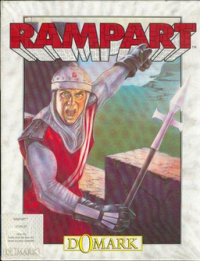
When the Rampart title screen appears, press START to see the Game Setup screen.
The Game Set Up Screen
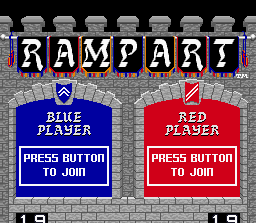
When the Game Set Up Screen appears, choose whether a game will be one player or two player. Controllers must be plugged into both the left port and the right port to play a two player game.
In a one player game, the player will be the Blue Player if his Controller is plugged into the left port, or the Red Player if his Controller is plugged into the right port. Press any button on your Controller when it is plugged into a port to proceed to the Game Options Screen.
In a two player game, Player One will be the Blue Player and use the Controller plugged into the left port, and Player Two will be the Red Player and use the Controller plugged into the right port. Press any button on both Controllers to proceed to the Game Options Screen.
Normal Rampart One Player Game Object
Enemy Ships circle your shores and land their artillery, called Grunts, to invade your territory. Your goal is to sink all the Ships and destroy the Grunts while you enclose Castles in your territory, and accumulate points.
To win, you must sink all enemy Ships and enclose at least one Castle in your territory. Points are awarded for:
•
Enclosing open territory
Super Rampart One Player Game Object
The object of one player Super Rampart is the same as one player Normal Rampart. However, there are more ways to accumulate points in Super Rampart. These are described in the Super Rampart section of this manual.
Normal Rampart Two Player Game Object
Enemy Castles on the neighboring island are aiming their artillery at your lands. Each player's goals are to destroy his opponent's Castle walls and other forces, try to prevent him from repairing his walls, and accumulate points.
Points are awarded for:
•
Destroying enemy Castles and forces
•
Enclosing Castles and open territory
•
Enclosing flashing Bonus Squares
Two player Games are won on a best three out of five rounds basis. That is, the first player to win three rounds is the victor. If the Red and Blue players' scores are tied at the end of a round, the Blue player wins that round.
Super Rampart Two Player Game Object
The object of two player Super Rampart is the same as two player Normal Rampart. However, there are more ways to accumulate points in Super Rampart. These are described in the Super Rampart section of this manual.
Selecting Game Type
There are two types of games to choose from, Normal Rampart and Super Rampart. To select the type of game you want to play:
•
Use the Controller to move the Selection Arrow to Game Type.
•
Press the Controller left or right to toggle between Normal (the basic game) and Super Rampart (an enhanced and more difficult version of Rampart).
One Player Game Options
•
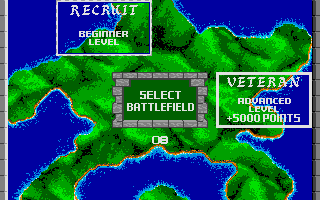
Battlefield: There are two Battlefields to choose from: Recruit, which is the easier field, and Veteran, which is more difficult. Starting on the Veteran Battlefield earns 5000 bonus points. To select, move the Selection Arrow to Battlefield and press the Controller left or right to toggle.
•
Difficulty: This determines how much time you will have to repair your walls. There are three levels: Easy (most time), Medium, and Tough (least time). To select, move the Selection Arrow to Difficulty and press the Controller left or right to toggle.
•
Secret Code: When you complete each level above Level 2 in a one player Normal or Super Rampart, a Secret Code for the next level will appear. Enter this on the Option Screen to skip directly to that screen. Secret Codes contain only consonants and may contain a blank space (found before B and after Z). Note: There are no Secret Codes in Normal Rampart for levels after level 4.
Entering a Secret Code
•
Use the Controller to move the Selection Arrow to the Secret Code Entry Line.
•
Use the Controller to move the Letter Selection Arrow left or right until it is beneath the letter you want to change.
•
To change a letter, press the B button to scroll toward the beginning of the alphabet (toward B) or use the A button to scroll toward the end of the alphabet (toward Z).
•
Once you have entered the Secret Code, press START to start the game.
Beginning a One Player Game
When you have chosen your Starting Level, Game Type, and Difficulty, press Start to begin a game.
Two Player Game Options
•
Battlefield: There are 8 starting Battlefields to choose from: Smotania, Martonia, Frepania, Crotania, Brana, Mortra, Mellodia, and Smilobn. Move the Selection Arrow to Battlefield and press left or right to toggle.
•
Battles: Sets the maximum number of Battles a Round will last. Move the Selection Arrow to Battles and press left or right to toggle the maximum Battles from 3 to 5 to 7.
•
Cannon Kill: Determines the
.png)

.png)


.png)








 (Beta).png)



.png)



.png)
.png)