Starting the Game
1) Insert the game pak.
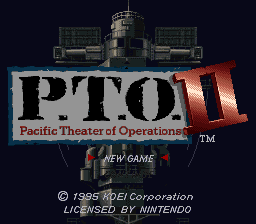
2) Turn the Super Nintendo Entertainment System ON. 3) The P.T.O. opening will begin. Press Start to skip to game set-up.
4) Select New or Saved Game and press A.
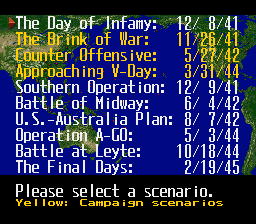
5) Select a scenario.
6) Select 1 or 2 player game and press A. The 0-player game will run a demo.
7) Select command of Allied or Japanese forces.
8) Answer game option questions (Message wait time, view of battle animation, view of fleet and base battles).
9) Select difficulty level, 10 is the most difficult.
10) Confirm you are ready and begin.
0-Player Game
The computer will play both sides. Before the game begins, you can adjust game options from the Options Menu. To stop a demo game, press the RESET button.
Saving and Quitting
Select 6. Save game from the Options Menu. Select a save location; all previous information at the location will be replaced with your current game. See Entering Names to create a name for a saved file. After saving, decide whether to continue or end your game.
Continuing a Saved Game
Select 'Play saved game' at the beginning of game set-up to play a previously saved game. Select a saved game to continue.
Distributing Budget Funds
Press left on the Control Pad or use Button A to increase the funds allocated. Press right on the Control Pad or use Button B to decrease this amount. Up and down will allow you to distribute funds to different areas. When finished, press Start.
Each investment area has an investment multiple (X up). For example, set one unit of budget funds towards fuel and the fuel supply (Budget) will increase by 10,000.
Setting Officer Abilities
A new screen will appear with an officer's graphic and randomly scrolling numbers. Press any button to distribute ability points to an officer. 102 points will be distributed between the four ability levels. Confirm each officer's ability by pressing A or left on the Control Pad. The game will begin after the abilities have been set for all officers.
Options Menu
Press Select for options when at a main menu.
•
1) Name change: Change an officer's name. Select an officer and then enter the new name from the character chart. See Entering Names.
•
2) Wait: Set the message display time (1-10). The higher the number, the longer the message display time.
•
3) HEX: Turn the display of fleet and base hex battles for fleets other than the #1 Fleet on/off.
•
4) Battle animation: Turn battle animation on/off.
•
5) Participation: Switch from a 1 to 2 player game or from a 2 to 1 player game.
•
6) Save game: Save your game. Decide to quit or continue the game after saving.
*Tip:* You can switch sides from a 1 player game. Select Participation and change to a 2 player game. At the command turn of the side you will quit, select Participation again and you will return to a 1 player game with you in command of the other side.
Scenario Victory Conditions
Scenario 1 covers the entire Pacific Campaign between the Allies and Japan. War is yet to be declared. You set the strategy for your forces and target the first area of attack. Scenarios 2 through 9 simulate famous sea battles. Playing any of these scenarios will quickly immerse you in battle. Victory differs according to each scenario. Fulfilling the original scenario victory conditions will allow you to continue the game under the victory conditions for Scenario 1.
Conditions for victory are displayed when you select a scenario in the opening setup. You can also verify these conditions during the game through DATA-Victory Goal. Only one of the listed victory conditions must be met.
Scenario 1: Negotiations Breakdown (November 1, 1941)
•
1) Occupy all 45 seaside bases
Scenario 2: Attack on Pearl Harbor (December 8, 1941)
•
1) Sink at least 4 Fleet Aircraft Carriers
•
2) Sink at least 3 Battleships and 4 Cruisers
•
1) Sink at least 4 Fleet Aircraft Carriers
•
2) Sink at least 3 Battleships and 4 Cruisers
Scenario 3: Battle of the Coral Sea (May 7, 1942)
•
1) Sink at least 2 Fleet Aircraft Carriers
Scenario 4: Battle at Midway (June 5, 1942)
•
1) Sink at least 2 Fleet Aircraft Carriers
•
2) Sink at least 1 Fleet Aircraft Carrier and 4 Cruisers
•
1) Sink at least 3 Fleet Aircraft Carriers
•
2) Sink at least 1 Fleet Aircraft Carrier and 3 Battleships
•
3) Sink at least 3 Battleships and 4 Cruisers
Scenario 5: Battle of the Solomon Islands (August 8, 1942)
.png)

.png)
