Starting the Game
•
Turn off your Super Nintendo Entertainment System by sliding the POWER bar away from the Game Pak slot. Plug a controller into your system. •
Insert the Riddick Bowe Boxing Game Pak, label facing front, in the system slot. •
Turn on the system by sliding the POWER bar toward the Game Pak slot.
•
When the Title screen appears, press the START Button to begin play.
Main Game Menu
From the Title screen, press the START Button to reach the Main Game Menu. To view the Riddick Bowe Hall of Fame, let the demo run. To make a selection in the Main Game Menu, press the Control Pad UP or DOWN to highlight a selection, and press the START Button to enter that selection.
Career Mode
Here you can go after Bowe using a fighter of your own creation, or pursue the career of a fighter previously created.
1 Player Match
Choose your fighter, and your opponent, and then go one-on-one with a computer-controlled opponent in a regulation 12-round bout.
2 Player Match
Duke it out with one of your buddies using any of the 25 fighters in the cart or a boxer of your own creation in Career Mode.
Option Mode
From here you can adjust the button assignments on your Control Pad and erase all boxer data.
To make an adjustment to a pre-assigned control setting, use the Control Pad to highlight the setting, then press the button on the Control Pad you wish to change it to. Once you've made all your adjustments, press the START Button to return to the Main Game Menu.
•
Restarting the game will return you to the default controls.
•
Warning: Selecting "Erase all boxer data" will erase all the boxers you have created in Career Mode and all their pertinent data—including any championship stats listed in the Hall of Fame.
Choosing an Opponent
To select an opponent, use the Directional Pad to scroll UP or DOWN through the challenger list to highlight a fighter, press the START Button to enter your selection, and begin fighting.
In a 1-Player game, you can also choose a Career Mode fighter and challenge the computer by pressing the SELECT button and going to the Career screen. In 2-Player Mode, both players can also press SELECT to go into the Career screen.
Career Mode Overview
Every contender wants a shot at the title, but only the very best deserve the chance to share the ring with Bowe. You must work your way up the Top 25 rankings using powerful uppercuts and combinations while surviving the heavy punches of your opponents.
If you manage to sign a contract with the Champ and defeat him, all your championship stats will be listed on the Hall of Fame Board.
Creating Your Own Boxer
You have up to seven boxers you can create (four boxers have already been created for you). To begin building your boxer, press the Control Pad LEFT or RIGHT to highlight the desired Question Mark (?), then press the START Button to go to the Create A Boxer Screen.
Name Entry
First you must give your fighter a name. To select a letter, use the Control Pad to highlight any letter and press the X Button to enter your selection. Once you've entered your boxer's name, press the START Button to begin programming your fighter's characteristics.
Characteristics
Here you can customize your fighter using a variety of head types, hair styles and colors, skin tones, and trunk and glove designs.
Press the Control Pad UP or DOWN to highlight a feature, then press the Control Pad LEFT or RIGHT to cycle through the options. Press the START Button after the desired item is highlighted to move automatically to the next item. After adjusting all settings, press the START Button to add your boxer to the Challenger list.
Skills Level
Adjust the following skill levels by highlighting the skill type and pressing the Control Pad RIGHT or LEFT to increase or decrease the level setting:
•
POWER: This determines the power behind your fighter's punch. A powerful puncher will score more for each punch if the fight goes the distance.
•
SPEED: This determines your fighter's punch speed and his overall quickness in the ring.
•
STAMINA: This determines how fast your fighter can recover from a punch, and his ability to survive a regulation 12-round bout.
Scoring
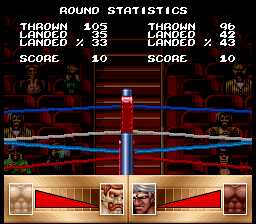
Scoring is based on the number of punches that connect, with uppercuts counting the most, hooks next, and jabs the least.
If you hit the canvas anytime during the round, your score for that round will be automatically lower than your opponent's score. You can also lose points for retreating from your opponent during the round.
Replenishing Your Energy and Strength
After each match in Career Mode, you can go to the gym and replenish your skill points with items like the speed bag, free weights, or isotonic energy drinks. Some items boost your power level, while others increase your speed and stamina levels.
To use an option, press the Directional Pad LEFT or RIGHT to cycle through three choices and press the START Button to enter your selection.
Getting Off the Canvas
To pick your fighter up off the canvas after being knocked down, rapidly press all the Buttons and the Directional Pad. How fast your fighter recovers depends on the power of the punch that put him down, the number of times he has been knocked down, and the damage sustained during the fight.
When your Body Damage Window becomes completely shaded and begins to flash, getting knocked down means you won't be able to get back up. Getting knocked down more than two
.png)

.png)
.png)
.png)


.png)


.png)
.png)
.png)

.png)