Number of Players
Wayne Gretzky and the NHLPA All-Stars supports up to four players using a multi-player control adapter. The game's smart interface senses the number of controllers plugged into your Super NES console.
At anytime before or during a game, players can begin or join a game in progress automatically by picking up a control pad and pressing a button. This smart interface also allows one player to plug in a controller and play using either port 1 or 2.
In tournament and season game modes, players 2, 3 and 4 will join Player 1 on the same team. In Just Play mode, Player 3 teams up with Player 1, and Player 4 with Player 2. In Exhibition mode, players choose which of the one or two teams they wish to play on.
Main Menu Options
•
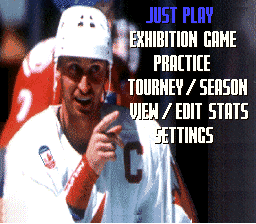
Just Play: Press any button twice at the Title Screen to select this option. You will automatically play an exhibition game with up to four players, and teams will be chosen for you.
•
Exhibition: This option allows you to play an exhibition game using any two of the 32 available teams. Selecting this takes you to the Team Selection Screen.
•
Practice: This option lets you select and practice various facets of hockey. You will play as the last home team chosen, or go to the Team Selection Screen if none was selected.
•
Tourney / Season: Choose from various tournament modes and a complete pro season mode.
•
View / Edit Stats: Access team and player statistics, edit rosters, change team names or colors, trade players, or perform cartridge maintenance.
•
Settings: View and adjust your game's rules, modes, and audio settings.
Practice Menu
•
Team Practice: Take to the ice with your team against only an opposing goalie. Practice your passing, shooting, one-timers, and offensive game plan.
•
Face-Off Practice: Gives you an opportunity to practice your skills during face-offs.
•
Shoot Out Practice: Practice your shoot out skills by taking turns shooting and defending against Player 2 or the CPU.
•
Done: Select this option to exit the Practice Menu.
Tourney/Season Modes
•
All Star Open Tournament: Choose a professional team from one of six International All-Star teams. Guide your team toward a championship against a mixed field of professional and All-Star teams.
•
Professional Tournament: Select one of 26 pro teams to play a tournament bracket against other pro teams.
•
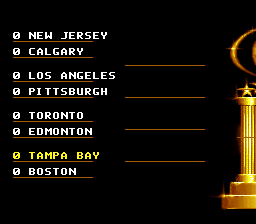
Pro Playoffs Best of Seven: Select a pro team to enter a 16-team bracket. The first team to achieve four wins in a series moves on, while other matchups are simulated by the computer.
•
Pro Season: Choose a team to play in a complete, 84-game hockey season.
Pro Season Options
•
Play Next Match: Play the next scheduled opponent listed on the bottom of the screen.
•
Skip Next Match: Let the computer instantly simulate the upcoming game based on team skill levels. You may lose the game you choose to skip.
•
Team Rankings: View rankings, games played, wins, losses, ties, and points for all 26 teams. Your team is highlighted in white. Scroll with the D-Pad and press START to exit.
•
Season Schedule: View your team's season schedule. Previously played games turn white and display their scores. Press START to exit.
•
Save Season and Exit: Save your current season, scores, and statistics, then exit the Pro Season option.
Returning to a Saved Tourney/Season
•
Continue Saved Tourney/Season: Continue the last tournament or season you saved.
•
Start New Tourney/Season: Erase previously saved information and start a new tournament or season from scratch. All previously stored information will be lost.
•
Exit: Return to the Main Menu without playing or erasing any data.
View/Edit Stats Options
•
View Season 94/95 Stats: View the rosters and 1994-'95 season statistics of all 32 teams. Use the D-Pad to scroll, the A Button to advance teams alphabetically, and the B Button to go in reverse.
•
Player Ratings: View the individual attribute ratings for players on all professional teams.
•
Last Game Stats: Look at the statistics accumulated in the last full game played, listing the teams and the top scoring players.
•
Change Team Names: Edit the name of any professional team.
•
Change Team Colors: Change any professional team's uniform colors.
•
Trade Players: Trade players from one professional team to another. International teams are not available for trades.
•
Reset Cartridge: Access cartridge maintenance options to erase or reset saved data.
•
Done: Return to the Main Menu.
Player Stats Abbreviations
•
PIM: Penalties in Minutes
•
SHOT: Shooting Percentage
Player Positions
Player Ratings Attributes
•
Speed: Indicates the skater's overall speed.
•
Shooting: Indicates the skater's shooting accuracy.
•
Toughness: Determines aggressiveness, intimidation, and checking frequency.
•
Awareness: Indicates the skater's offensive and defensive awareness on the ice.
•
Overall: An accumulation of all attributes that determines the player's overall rating.
**How to View
.png)

.png)
.png)
 (Beta).png)
