The Park Menu
The Park Menu is structured in the following sections:
•
Vegetation and Boulder Placement Menu
•
Building Construction Menu
•
Facilities Construction Menu
•
Dinosaur Area Management
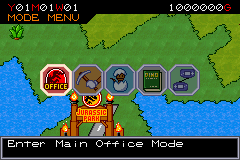
Mode Menu
You can switch to the following modes in the Mode Menu:
Construction Menu
Vehicle Road
Construct roads for buses, which are the only way of getting around the park. Build roads along borders of dinosaur areas so that dinosaurs can be seen from the buses. Also, don't forget to connect the roads to rotaries and the gate at the southern (lower) end of the island.
•
Roads cannot be connected to the entrances of hotels, restaurants, and shops (walking paths are used for this purpose and are explained below).
Walking Paths
Construct paths for visitors to walk on. Make it easy for visitors to find their way around by connecting these paths to the rotaries and facilities such as shops and hotels.
•
The ground around the dinosaur areas is built up high, so visitors won't be able to see the dinosaurs even if you build walking paths here.
You can build crosswalks where vehicle roads and walking paths intersect.
Rotary
Construct rotaries, which serve as bus stops for visitors. Be sure to construct vehicle roads all the way up to vehicle road entrances and exits, and walking paths all the way up to walking path entrances and exits. (You must specify direction during construction.)
Full Map
View the full island map.
Park Menu
Facilities Construction Menu
Build street lamps, water fountains, and clock towers.
Vegetation and Boulder Placement Menu
Place vegetation or boulders, which have a calming effect on visitors.
Symbol Placement Menu
Construct symbols, used as landmarks for the park.
Building Construction Menu
Hotels
Build hotels for tired visitors to rest when the park gets so big visitors can't take it all in in one day. (During construction, you must specify which direction hotels face.)
Restaurants
Build one of three kinds of restaurants. Different kinds of visitors like different restaurants; for instance, "Pteranodon Cafes" are popular with women, and "Spino Grills" are popular with men. Therefore, choose the type of restaurant to build carefully. (During construction, you must specify which direction restaurants face.)
Shops
Shops sell park-related merchandise. You must determine the kind of merchandise the shops will sell based on what kind of visitors and what species of dinosaur you have. (During construction, you must specify which direction shops face.)
Area Pieces
Construct area pieces to build the areas for dinosaurs to live. Area pieces are described in more detail later.
Remove
Remove areas, buildings, or roads on the map.
Facility Management
Manage park facilities like hotels, restaurants, shops, and areas. When you select a type of facility, a list of what has been constructed so far will be displayed. When you select the one you want to manage, its details will be displayed. The details screens for each kind of facility are described below.
Excavation Mode
You can send excavation crews to various parts of the world to find amber containing the DNA to make dinosaur eggs. (The DNA is contained in blood inside mosquitoes trapped in the amber.) The excavation team departs when you select the region and period of the excavation. What region you select will determine the chances of finding various species of dinosaur.
Research Lab Mode
Amber Analysis
Analyze amber brought back by the excavation crews to extract DNA blocks. Each DNA set is divided up into 5 blocks, A through E. When you assemble all of these, one DNA set is complete.
Egg Creation
Select a DNA set for which all 5 blocks have been assembled to create an egg. Eggs created here will be sent to the plant.
Plant Information
View the dinosaur egg incubation plant. You can also move hatched dinosaurs into the park from the plant.
•
A hatched dinosaur can only stay in the lab for a maximum of 24 months. If you do not place it in a dinosaur area by that time, it will automatically be retired.
Illustration Mode
In the plant you can view illustrations of all the dinosaurs you have hatched so far. Dinosaurs you have not hatched yet will be shown with a “?”. In addition to “Order” and “Family” information about dinosaur species, “Diet,” “Body Length,” and “Era” information is also displayed. The R Button and L Button can be used to skip “?” pages.
Exchange Mode
The Game Link® cable can be used to exchange blocks of dinosaur DNA. If a friend has a block of DNA that you just can't seem to find, you can use this mode to trade. However, you cannot trade a DNA block unless you have more than one of that block. The number of each DNA block that you have is displayed to the right of the block. (Maximum of 9)
•
Each player must have a DNA block to trade in order to swap DNA. A player cannot give a DNA block without receiving one in return.
**About D


 (En,Fr,De,Es,It).png)
 (En,Fr,De,Es,It).png)
 (En,Fr,De,Es,It).png)



_1.png)



.png)


_crop_1795585020.png)






_1.png)




.png)


