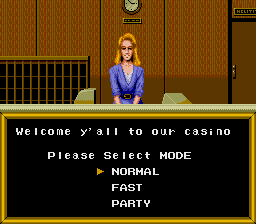
Hotel Room Interface
After checking in, you can review your finances and casino options. Select the desired symbol using the Direction Key and press Button I to enter your choice.
•
Front Desk: Change between Normal and Fast modes.
•
Music: Select background music or turn it off. Use the Direction Key to select a track and press Button I.
•
Password: Select your name in multiplayer modes and press Button I. A 16-character password is displayed at the bottom of the screen, along with the number of times it will be shown again. Write this down to retain your current funds if the game is interrupted. Press Button I to return to the hotel room.
•
Graph: View a graph showing the increase and decrease in each player's money. Press Button I to return to the hotel room.
•
Shop Data: Purchase information about any of the 15 casinos. Select a casino and press Button I. Information includes the casino's rank (difficulty indicated by stars), size, and table count for each game.
Street Navigation
To Go to a Different Casino
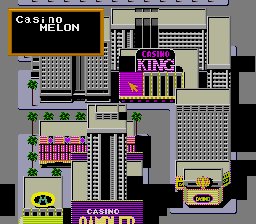
Select “Cashier” and press Button I to return to the street. Note that the maximum and minimum bets for each game are pre-determined.
Speeding Up Arrow Movement
Press the Direction Key, then press Button II.
Resetting the Game
Hold down the RUN Button and press the SELECT Button simultaneously to reset to the title screen.
How to “Continue”
When the game ends and the title screen appears, select “continue” and enter your password. This resumes play at the beginning of the last saved round. You may continue an unlimited number of times.
Game Selection
Use the Direction Key to select a game and Button I to select a table. Position the arrow over your choice and press Button I.
Roulette
The roulette board features numbers 0, 00, and 1 through 36 in red and black. Bets are placed by positioning chips on up to 12 numbers or groups. The dealer spins the wheel and drops a ball; your winnings depend on which number the ball lands on and the type of bet placed. Like in Las Vegas or Monaco, you can continue placing bets after the ball is dropped until the bell sounds. Timing your bets after the ball is dropped is a key strategy.
Types of Bets and Payout Rates
•
A (1-number bet): Bet on one number (0, 00, or 1-36). Payout: x36.
•
B (2-number bet): Bet on two vertically or horizontally adjoining numbers. Payout: x18.
•
C (3-number row): Bet on a horizontal row of three numbers. Payout: x12.
•
D (4-number bet): Bet on four vertically and horizontally adjoining numbers. Payout: x9.
•
E (2 rows of 3 numbers): Bet on six numbers in two horizontally adjoining rows. Payout: x6.
•
F (1 column): Bet on a column of 12 numbers by placing a chip on A, B, or C. Payout: x3.
•
G (4 rows/1 dozen): Bet on a block of 12 numbers by placing a chip on P (first), M (middle), or D (last). Payout: x3.
•
H (First/Second half): Bet on numbers 1-18 (MANQUE) or 19-36 (PASSE). Payout: x2.
•
I (Red or Black): Bet on red or black numbers. Payout: x2.
•
J (Odd or Even): Bet on odd (IMPAIR) or even (PAIR) numbers. Payout: x2.
Roulette Sequence of Play
You can place bets by pressing Button I only when the "Push I to Bet" message is flashing.
•
Select the Player: Use the Direction Key to select a player and press Button I. Press Button II to cancel.
•
Place Your Bet: Select a position with the Direction Key and press Button I. You can make up to 12 bets per spin. Press Button I again to adjust the bet amount. Press Button II when done. Ensure the arrow is not highlighted, or your bet will be deleted. If you run out of money, the game is cancelled.
•
The Wheel Spins: The ball is thrown, and you may continue betting until the bell sounds.
•
The Bell Sounds: Results are displayed, and money is paid out.
•
"Push I to Bet" Flashes Again: Prepare for the next round, or press Button II to return to the casino interior.
Slot Machines and Keno
Slot Machines
Playing slots is simple: insert coins and pull the lever. Three drums rotate, and you win based on the combination of pictures that line up. The number of coins bet determines which rows are active:
•
One Coin: Middle row only.
•
Two Coins: Middle and Upper rows.
•
Three Coins: Upper, Middle, and Lower rows.
Slot Machine Sequence of Play
•
Select a Machine: Each machine costs a different amount. Use the Direction Key to select and press Button I. Press Button II to change machines.
•
Insert Coin: Press Button I to insert one