Getting Started
Make sure the POWER switch is OFF. Insert the mary-kateandashley Girls Night Out™ Game Pak into the Game Boy® Advance slot as described in your Nintendo Game Boy® Advance instruction manual. Turn the POWER switch ON.
Note: The mary-kateandashley Girls Night Out™ Game Pak is for Game Boy® Advance only.
Entering a Name
The first thing you need to do is enter a name. Press a direction on the Control Pad to highlight a character, then press the A Button to enter the character.
To delete a character, press the B Button or highlight the back arrow and press the A Button. To enter a space, highlight the forward arrow and press the A Button. When your name is complete, highlight END and press the A Button.
Choosing a Dancer
Choose to be Mary-Kate or Ashley. Each has unique outfits and moves, so make sure you try playing as both! To make your selection, press ◄ or ► on the Control Pad and press the A Button to confirm your choice. Then choose your difficulty level.
Difficulty Levels
You can choose Basic, Normal or Advanced difficulty levels. There are different tracks and challenges for each level, so try them all! Press ↑ or ↓ on the Control Pad to highlight your choice, then press the A Button to confirm. Once that's done, press the A Button to advance.
Help Section
After selecting New Game and entering a name, choosing a dancer and a difficulty level, the game will set up and you will come to the Help section. Highlight the right arrow and press the A Button to view helpful game instructions. Continue pressing the A Button to see more information. When you are through, you will advance to the Main Menu.
Instructions involve pressing the Control Pad to match falling symbols (△▽◇◆) when they reach the bottom, using Circle and Triangle button icons. Exit is available via Left/Right arrows and an EXIT icon.
Tip: You can access the help screen anytime from the Main Menu. Use "exit" to skip all the help screens.
Main Menu
At the Main Menu, you will see several choices. Each is explained in detail later on.
•
Practice: Get comfortable with the game controls before starting a whole dance!
•
Dance!: Complete the song sets to unlock extra clothes, songs and more!
•
Help: Access the Help screen to view game instructions.
•
Mix: Combine up to five unlocked tunes in any order you want.
•
Jam: Get crazy creative jamming along with the game tracks.
•
Closet: Create a look that matches how you feel.
Tip: Press the L or R Button to turn the dancing figure on this screen.
Extras
Earn A's in Practice mode and unlock all sorts of incredible extras that will rock your night out even more! View and access your Extras here.
Options
A/V Options:
•
Brightness: Set the brightness of the display for best viewing. You can choose among Lowest, Low, Medium and High brightness settings.
•
Sound Mode: Choose Speaker (mono) or Headphones (stereo) sound settings. Speaker is louder than Headphone.
•
Extra Music: Choose to play with extra music ON or OFF. Choose ON to have music play even when the Dance game is not in play (on menus, etc.).
•
Sound Effects: Choose to play with sound effects ON or OFF.
Game Play
•
Difficulty: Make your Misses and Perfects count for more at lower levels, and less at higher levels. Levels are Novice, Amateur, Pro and Master.
•
Hide/Show Advanced Options: When Show Advanced is toggled, these options are available:
•
Perfect Bonus: Turn Bonus Slow Motion Earned for getting a certain number of Perfects in a row ON or OFF.
•
Spinning: Choose to have the falling arrow symbols spin Always, Not in Basic (mode) or Never.
•
Spin Help: The bottom row will show the direction of the spinning arrow symbols Always, Not in Advanced (mode) or Never.
•
High Scores: View the high scores to date.
•
Credits: View the people who helped create the game.
•
Reset Game: Choose this to start over from the beginning. Resetting your Game Pak will clear ALL progress: current unlocked items, high scores, jams, mixes and options settings. You must confirm that you wish to reset the game.
Level Rank
This shows the current rank you've gotten at each difficulty level for the highlighted song. No grade appears if you haven't yet "beaten" the song at that level.
Pattern Selection
Once you've selected your song, you'll choose the pattern setting, from Easy up to Extreme. Easy patterns are less complex, while more difficult patterns are more complicated and use more buttons. In the beginning, only the Easy patterns are available. You must unlock the others in Dance! mode.
Tip: You can unlock certain Extras in Practice mode by getting "A" ranks.
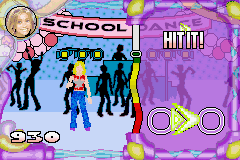
Playing Dance Basics
The object of both Practice and Dance! modes is to press the button matching the falling button symbol just as it lines up with the target at the bottom right of the screen. Each time you do this right, you earn points and the meter in the middle of the screen goes up. You get more points for pressing the correct button exactly when the button icon lines up with the target, and fewer points for being early or late.