Starting the Game
•
Make sure the POWER switch is OFF.
•
Insert the xXx™ Game Pak into the Game Boy® Advance slot as described in your Nintendo Game Boy® Advance instruction manual.
•
Turn the POWER switch ON.
Note: The xXx™ Game Pak is for the Game Boy® Advance system only.
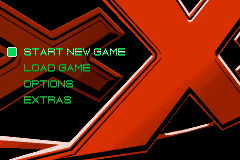
Main Menu
•
Start New Game - Begin your first mission as super-agent xXx.
•
Load Game - Continue a saved game. Select a saved game to continue your adventure from the beginning of the last mission attempted.
•
Options - Select Options to turn the sound on or off, turn the music on or off, or view the credits.
•
Extras - Once you've finished the game, you can access special features here!
Gameplay
At the beginning of each mission, you'll receive a briefing from Agent Gibbons or Shavers with the mission goals. Explore the environments and eliminate as many enemies as you can, but you must complete the mission goals to move forward and destroy the Anarchy 99 conspiracy.
Combat Driving
In between missions, you may need to get to a new location fast. This can be done using the high-tech, high-speed, wonder-bike provided to you by Agent Shavers! Don't let Anarchy 99 thugs get the best of you when you're riding the cycle. They'll slow you down and try to knock you out using fists, feet, or any other means at their disposal.
This is no ordinary motorcycle, though. This motorcycle is powered by a high tech fuel cell for maximum acceleration and power. But all that speed depletes fuel rapidly. If you see a fuel canister along the road, drive over it to replenish the cycle's power or you won't make it to the next mission area. Health - The health bar is on-screen at all times during gameplay. You only have one life, and if you run out of health, the game will end. If this happens, you are given the option to retry the current level from the beginning. You can replenish your health by using First Aid kits found throughout each level. Mission Status Indicator - A white envelope in the center of your HUD blinks when you have completed a critical mission objective or when you receive new orders. Press START to access the Pause Menu to see what you need to do next.
Selected Weapon - Pressing SELECT allows you to scroll through your currently available weapons. This indicator will let you know which one you have selected. You will find more and more powerful weapons as you progress through the game, so be sure to search in every corner to find the ammo and firepower you need. Grenade Counter - Let's you know when you pick up, or let go of, frag grenades. Clips Remaining - Extra clips of ammo for the currently selected weapon are displayed here. Motorcycle Level Display
•
Damage Indicator - This display lets you know how much damage your bike can take before it is destroyed.
•
Timer - Keeps track of how long it takes you to get to your destination.
Pause Menu
Press START to pause the game and access the Pause Menu. From here you can access all of the functions of your hand-held system.
•
Resume Mission - Selecting this will return you to the game and exit the Pause Menu.
•
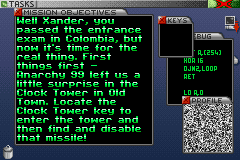
Review Briefing - Use this option to check your mission objectives.
•
View Statistics - Your hand-held system keeps track of useful information regarding the number of enemies eliminated and the percentage of shots that connect with the enemy.
•
Restart Mission - Return to the game and start the current mission from the beginning.
•
Quit Game - Exit to the Main Menu. Your game will be saved from the end of the last mission you completed.



.png)
.png)









 (En,Fr,De,Es,It,Nl).png)




_1.png)




.png)