Starting the Game
Make sure the POWER switch is OFF. Insert The Planet of the Apes Game Pak into the Game Boy® Advance slot as described in your Nintendo Game Boy® Advance instruction manual.
Turn the POWER switch ON.
Language Selection
Select the language you want with the Control Pad. The selected language is highlighted and the respective text and flag are situated at the top of the screen.
To validate your choice, press the A Button or START.
Main Menu
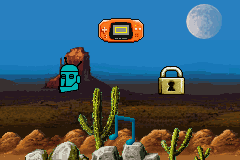
When the Main Menu screen appears, you will see four options: New Game, Password, Sound, and Credits.
Use the Control Pad to circle left or right to your selection, and then press START or the A Button to make your selection.
Password Screen
At the end of each level, you will be given a password. Make sure to write it down. It will enable you to continue the adventure from the level you reached when you received the password.
You can key your password in by selecting the padlock icon in the Main Menu. Use the Control Pad to highlight which character you wish to key in. •
Pressing either the A Button or START will enter your selection.
•
If you press the B Button, it will delete the characters.
•
If there are no characters, the B Button will exit the screen.
Tally Screen
After a level has been completed, the tally screen will appear. The tally screen will show how long it took to complete the level, how many enemies were defeated, and how many flags were collected.
(Note: Collect all the USNSA flags in the level and you will be rewarded with a Health Pack). Weapons and Items
You will have access to a wide variety of weapons and items as you try and escape the savage manhunt of the Ape Army.
Ammunition
Ammunition is limited, so make your shots count when you encounter an enemy. Keep in mind, only specific ammunition will work with specific weapons.
Technical Support
Before contacting Ubi Soft Technical Support, please carefully read through this manual. Also, help is available online at http://www.ubisoft.com/support. If you are unable to find an answer to your question using the website or the manual, please contact us via one of the following methods:
CONTACT US OVER THE INTERNET:
http://www.ubisoft.com/support
This site takes you to the Ubi Soft Solution Center. Here you can browse our FAQ listings, or search the solution database for the most recently updated information since the game's release. For fastest email response, you can send in a request for Personal Assistance from a Technical Support Representative.


 (En,Fr,De,Es,It,Nl).png)

 (En,Fr,De,Es,It,Nl).png)
.png)
