Getting Started
Correctly insert the Scrabble® Blast! Game Pak in your Game Boy® Advance system. Switch the Game Boy® Advance on.
WARNING: Inserting a Game Pak when the system is already on might result in damage to the Game Pak.
Starting the Game
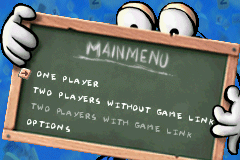
You will be brought to the Title and Main Menu screen. On the Main Menu screen, you can choose 1 or 2 player's game and access the options.
2 players can help or compete on one Game Boy® Advance system by selecting 2 PLAYERS WITHOUT GAME LINK mode. Note: 2 PLAYERS WITH GAME LINK is available only when a Game Link® cable is detected.
Menu Controls
•
Control Pad: Cycle through current selections
•
A Button (or START): Select the currently highlighted selection
•
B Button: Go back to the previous screen
Game Modes Selection
•
Classic: You have a choice of the number of tiles that will fall down the screen. Take your time to find the best words and be sure to see if you can find a 7 letter one. See how many big words you can complete.
•
Points: To continue you have to get a set number of points within a time limit.
•
Words: This mode turns everything on its head by getting the maximum score with a limited number of words.
•
Survival: Is based upon the theory that you gain time by making words. When you run out of words, you run out of time.
•
Action-Puzzle: You have clocks falling down the screen. If they reach the bottom, it is the end of the game. If you make a word from a square that has a clock in the background the clock disappears and the game continues. •
Panic: Don't Panic! For 2 players (Game Link® cable needed to play), you get rid of the clock and pass it over to your companions screen before it gets to the bottom of your own. Passing the clock backwards and forwards is Scrabble Blast with a difference for you and a friend to enjoy.
•
Puzzle: Ten words in each level make up the score and each level gets harder as you progress. Each time a word is completed, all clocks showing fall a further block down the board. When any of the clocks hit the bottom line on the next word, the game will be over. Making words over a clock makes it disappear and covering multiple clocks not only makes them disappear but also gives you higher scores. •
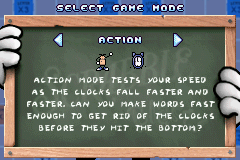
Action: Score as much as you can with as many words as you can. After 10 words, the level changes. At varied time intervals, depending on the level, all the clocks on the board fall down one block. When any of the clocks hit the bottom line on the next word, the game will be over. Making words over a clock makes it disappear and covering multiple clocks not only makes them disappear but also gives you higher scores.
Note: The game is scored according to the official rules of Scrabble. Words are scored according to the official tile values along with the official bonus square scoring convention.
Options
•
MUSIC: Play the game with or without music.
•
SFX: Play the game with or without sounds effects.
•
HINT: Play with or without hints.
•
EXCHANGE: Play with or without exchanges.
•
CREDITS: Display the names of the people who created this game.
The Game Screen Display
The playfield is on the right side of the screen. On the left side, you will find the following information:
•
Words: Words made during the current level.
•
Time: Lasting time (mode SURVIVAL).
Additional display elements include player animations, cursor position for letters selection, and a tile value reference chart.
How to Play
The cursor can be freely moved over the playfield. A word can be created by selecting character by character. Choose a character and select it with the A Button.
Once a character has been selected, the sequential character must touch the first one (8 directions). When the player wishes to validate his created word, he must press the A Button a second time on the last character selected.
The Modes (Summary)
•
Classic: Clear the scrabble board to win. You have a choice at the start of the game of either 100, 200 or 300 characters in the Scrabble bag to play with and score as much as possible.
•
Points: Make a set score within a time limit.
•
Words: Make a maximum score with a preset number of words.
•
Survival: Making words increases the time limit which is always counting down. When the time limit hits 0, the game will be over.
•
Panic: (Multiplayer) Players must make words in order to make the clock on their screen disappear to the other players screen. They have to "pass the clock back" as soon as possible to the other player so as not to get caught. The game is set to randomly stop, and if you have the clock when the game finishes you loose.
Multi-Player Mode
Multi-Player mode will allow you to play against any friend who owns their own copy of Scrabble Blast. To use multiplayer mode, the Game Boy® Advance systems must first be connected using a Game Boy® Advance Game Link® cable.
Once this is done, select the Panic option from the choice of modes to play on the Main Menu on both Game Boy® Advance systems.
Scoring System


.png)
.png)
