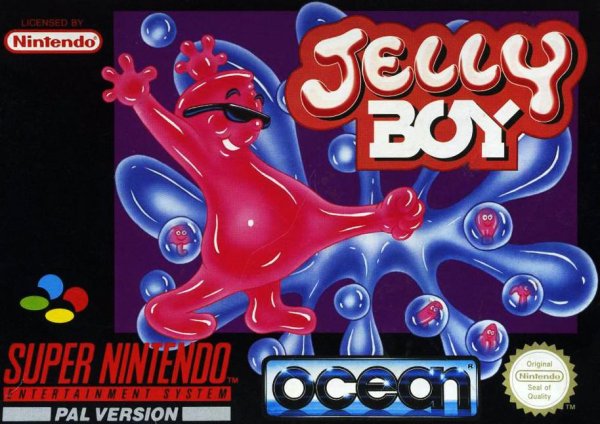
This whimsical platformer follows
Jelly Boy and his friend
Harry the Dog as they traverse various worlds to solve jigsaw puzzles, defeat bosses, and collect special items. After completing all objectives and reaching Swirley's penthouse, the protagonists achieve their ultimate dream of playing among fantastic toys and exploring all worlds in harmony. The concluding section transforms the gameplay into a lighthearted experience where previous enemies become friendly companions.
Endgame Achievement
You have successfully completed all jigsaws, destroyed all Bosses, collected all special items, and finished every world. The lift operator finally grants you access to Swirley's penthouse.
Swirley's Reward
Upon seeing the six special items collected, Swirley is overjoyed and decides to fulfill your heart's desire. Jelly Boy wishes to play among all the fantastic toys and visit all different worlds forever with his friend Harry the Dog. New Gameplay
This time, the natives of every world are your friends and will play along instead of trying to stop you. Have fun with your new friends, Jelly Boy. Credits
•
Producer: Kevin Shrapnell
•
Assistant Producer: David Amor
•
Product Manager: Al King
•
Documentation: Neil Cook
Legal Information
Unless indicated otherwise, all software and documentation is © 1994 Electronic Arts. All Rights Reserved.
Publisher Contact
•
47 High Street, Eaglehawk
AIM OF THE GAME
Behind each door is another world designed and paid for by Mr. Swirley. Every level contains a piece of puzzle hidden among jungle trees, snow drifts, or building blocks.
Jelly Boy must survive against all the heavies each level can throw at him, collect all the pieces of the puzzle, and then enter the lair of the hideous Boss. Defeat the Boss and it drops the special item it has been protecting, allowing Jelly Boy to move on to the next world. Remember that Jelly Boy needs to find a key on one level of the current world, or he's unable to open the door to the next. Jelly Boy needs all his wits, skill, and shape-changing powers to make it through this spectacular adventure. THE OPTIONS SCREEN
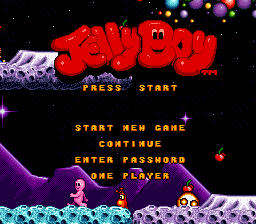
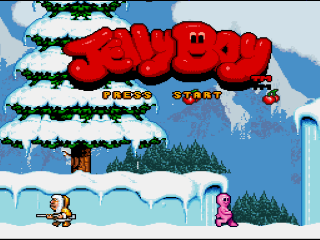
From the Jelly Boy Title Screen, press START for the Options Screen. The first option, Start New Game, is flashing. Use the Control Pad down to highlight any of the other options. The options listed are:
•
Start New Game: Press START to pass through the door and enter the first of Swirley's worlds.
•
Continue: If you've come a cropper and lost all three lives, elect to Continue. You return to the beginning of the level you were last playing, but have lost any bonuses, musical notes, and your previous score.
•
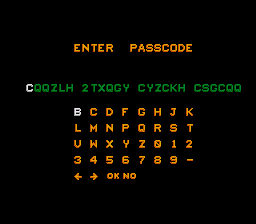
Enter Password: Press START for the Enter Password screen. Use the Control Pad to highlight the appropriate letter/number from the grid and press B. Repeat the process until the whole password has been entered. You resume a saved game at the Entrance Screen of the world you were last exploring.
•
One Player: Use Control Pad down to One Player and press B to switch to a 2-player game.
When you've chosen the game mode, press START. You're told to 'Hold On A Sec' before the Entrance Screen appears and the fun begins.
AT THE ENTRANCE SCREEN
With Start New Game highlighted, press START and you leave the Options Screen for the first world's Entrance Screen. Jelly Boy is stood just inside the door of this world, having entered from the corridor where the lift operator is guarding the way up to Mr. Swirley. Use the Control Pad to direct Jelly Boy along the yellow path to the entrance portal of the first level. When you start a new game, you arrive in Toy World, which is constructed of building blocks. Toy World's 8 levels are:
1. Here Goes Jelly
2. Marble Alley
3. Drum Solo
4. Barmy Army
5. Blocks Away
6. Mini Maze
7. The Darkroom
8. Dolls House
When you return to the Entrance Screen after completing a level, the piece of jigsaw Jelly Boy has just collected is displayed in the bottom right-hand corner. ENTERING A LEVEL
You must complete all 8 levels before you're able to move onto the next world. If Jelly Boy loses a life or runs out of time on a level, he returns to the Entrance Screen from where you can try the level again. Move Jelly Boy over the entrance portal using the Control Pad and he descends into the chosen level. The "Here Goes Jelly" message appears while Jelly Boy is descending. When the level screen appears, make sure you take control of Jelly Boy straight away-the action comes thick and fast. Entering Completed Levels
When a level has been completed, the portal is filled in with a red platform. You can return to these completed levels for more points and 1-Ups. Move Jelly Boy onto the red platform and press B. Jelly Boy is lowered down into the completed level. CONTROLLING JELLY BOY
•
Use the Control Pad to guide Jelly Boy through the current level. •
Press B to leap over an obstacle or jump a gap, and use the Control Pad to give the jump a sense of direction.
•
Press Y and Jelly Boy's jelly belly delivers a knockout blow to any nasty geezer in his way. •
Press A and Jelly Boy ducks to avoid low obstacles which might cost him a life. •
Press X and Jelly Boy morphs back into his original shape without waiting for the new shape's time limit to run out. REMOULDING JELLY BOY
What makes Jelly Boy really special is his ability to change shape. Gift boxes and Morph icons are littered throughout the levels of every world. Don't just ignore them, as Jelly Boy is unable to reach inaccessible areas of a level unless he changes shape. He'll miss out on big bonus scores, but even more importantly might not be able to find the jigsaw puzzle piece and complete the level!
Gift Boxes
•
Press Y to open gift boxes. The contents of some gift boxes need a bit of chasing, even after you've opened them. Use the Control Pad to help Jelly Boy catch these. •
You may need to press Y (repeatedly) to get the new shape to fulfil its function, for example the Hammer.
•
Gift boxes take a few seconds to reappear after use, but most of them can be re-used a limitless number of times.
•
Note: Be careful! Not all gift boxes give Jelly Boy the ability to change shape, but can contain a nasty surprise. Morph Icons
Jelly Boy can also change shape by landing on or leaping for Morph icons. These look like small versions of Jelly Boy in his