Thank You
Thank you for purchasing the HuCARD "Squique" from Victor Musical Industries Inc. Please read this manual carefully to ensure correct handling and storage. Keep this document in a safe place for future reference. Precautions
•
Avoid using or storing the card under extreme temperature, humidity, or strong shock.
•
Do not bend the card excessively.
•
Keep terminal parts clean and dry to prevent malfunctions.
•
Wipe dirty terminals lightly with soft gauze or gauze soaked in ethyl alcohol.
•
Play at a distance of approximately 2 meters from the TV screen.
•
Take a 5-10 minute break every hour during long play sessions.
Reset Method
Press the [SELECT] button while holding down the [RUN] button during gameplay to restart the game from the beginning.
Product Notes
HuCARD is a game card exclusive to the HE System. The manufacturer exchanges products with defects under their responsibility. Duplication of the software without permission or its use in rental businesses is prohibited.
How to Start the Game
1. Turn On the Power
Insert the 'Squeek' cartridge into the PC Engine body and turn on the power. The title screen will appear after a moment. Press the RUN button or the I or II button to proceed. 2. Choose a Mode
Use the + button to move up and down to select a mode, then press the RUN button or the I button.
•
1 PLAYER: Single-player mode.
•
2 PLAYERS: Two-player mode.
•
HISCORES: View the top 8 high scores.
•
OPTION: Go to the options menu screen.
3. Decide the Starting Stage
Use the + button to move up and down to choose an option, then press the RUN button or the I button.
•
START: Start from Stage 1.
•
PASSWORD: Enter a password to start from a specific stage.
4. Play
On the stage selection screen, press the RUN button, the I button, or the II button to bring up the game screen.
5. After Clearing
A password is displayed upon clearing a stage, allowing you to start from the next stage at any time. Write down the password to keep track of your progress. Press the RUN button or the I or II button to play the next stage.
Enter a Password
If you select "PASSWORD" before starting, a selection screen appears for entering a 6-character password using alphabets, numbers, and symbols.
•
Use the + button to move the Squeegee cursor up, down, left, and right to select characters.
•
Press the I button to input the selected character.
•
Press the RUN button after selecting all characters.
Objective of the Game
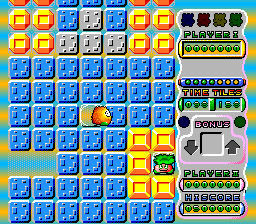
Squeegee's goal is to change all blue or gray tiles on the stage to pink by passing over them. Avoid enemy interference and shoot enemies with bullets to complete the stage. You can also compete on points, which may lead to delaying entry into bonus item doors to rack up more score.
How to Clear a Stage
Satisfy one of the following conditions within the time limit to clear a stage:
•
Paint all tiles on the stage pink.
•
Enter the door that appears as a bonus item (the stage exit).
•
Freeze 6 monsters simultaneously with freeze bullets.
•
Collect all 4 different colored Special Bears (collecting all four increases the SKWEEK team by 3 people upon clearing).
A password to start from the next stage is displayed upon clearing. Recording these passwords allows you to play from any stage later.
Game Over
The game starts with 5 SKWEEK members. The game ends if you lose all of them. You lose one member under the following conditions:
•
Falling into a hole (a place without a tile).
•
Touching a monster or being hit by a monster's bullet.
•
Getting crushed by a Cruncher (a tile where enemies appear).
Losing one SKWEEK member invalidates previously obtained weapons or shoes, though Special Bears remain valid until Game Over. A password to restart from the stage where Game Over occurred is displayed; write this down to resume later. Continue
You can continue the game from the stage where it ended by using the CONTINUE function.
•
Select "YES" to continue.
•
Select "NO" using the left and right directions of the ➤ button, then press the [RUN] button or the ① button to exit.
The item with orange text indicates the currently selected option.
High Score
View High Scores
Select "HISCORES" on the mode selection screen to view the top 8 high scores and names. Note that high scores are recorded only while the console power is on; turning off the power erases the records. Press the [RUN] button, ① button, or ⑪ button to return to the mode selection screen.
Enter Name
If your score enters the top 8 at Game Over, you can enter your name on the high score table using up to 10 characters (alphabets, numbers, and symbols).
•
Use the up, down, left, and right directions of the ➤ button to move the Skweek cursor and select characters.
•
Press the ① button to enter one character.
•
Press the [RUN] button when finished selecting characters.
Playing with 2 PLAYERS
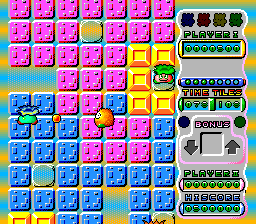
Select "2 PLAYERS" on the mode selection screen to play with two people. This mode is played


.png)

.png)
