Setting Up
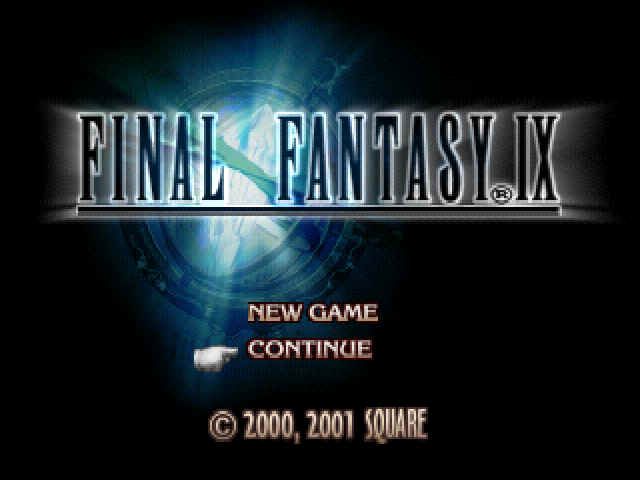
Set up your PlayStation® game console according to its instruction manual. Ensure the power is off before inserting or removing a compact disc. Insert disc 1 of FINAL FANTASY® IX into your PlayStation game console and close the disc cover. Insert game controllers and turn the power on. The Title Screen will appear after an opening movie sequence. The opening sequence can be skipped at any time by pressing the button. Beginning a New Game
On the Title Screen, use the directional buttons to highlight <New Game>, then press the button to begin.
Loading a Saved Game
Insert a MEMORY CARD containing saved data into a MEMORY CARD slot, then start up the game. On the Title Screen, use the directional buttons to highlight <Continue>, then press the button.
A menu of saved game data will appear. Select the data to load, then press the button to confirm.
Saving a Game
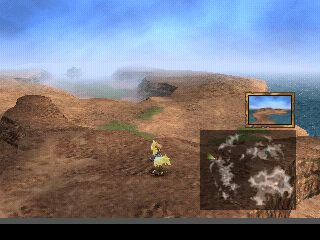
On the Field Map, you will encounter certain moogles who will allow you to save your game. On the World Map, you may save at any time by calling a moogle with the button.
When changing discs, you will be prompted to save your game. A MEMORY CARD with at least one free block is required to save a game.
Entering Names
During the game, you will encounter several characters. When you first meet certain characters, the Name Input Screen will appear.
At the Name Input Screen, you may <Confirm the existing default name, or choose a name of your own. To enter a name, highlight letters by moving the cursor with the directional buttons, then press the button to confirm the letter selection. Any mistakes can be deleted by pressing the button.
When you have finished naming your character, move the cursor out of the letters box with the directional buttons and select <Confirm>. Press the button to finalize your character's name and continue the game.
Changing Discs
When you reach the end of a disc, you will be prompted to open the disc cover, remove the current disc, and replace it with the specified disc. Do not turn off the power when switching discs.
Travel the World
The story takes place in an expansive world. Explore carefully so you don't miss anything.
Talk to People and Inspect Everything
You must speak with many characters and examine various locations to progress in the game.
In locations where there are things to inspect (like treasure chests, bulletin boards, and ladders), an exclamation point "Field Icon" will appear over the character's head. Press the button or button to acquire items, view useful information, or climb ladders.
In locations where a choice must be made, a question mark "Field Icon" will appear.
HERE Icon
Each time you enter a new Field Screen, the HERE Icon (a pointing hand) will appear briefly over your character, indicating your position. This feature can be turned off in the Config Menu.
If you ever become lost on the Field Screen, press the SELECT button to make the HERE Icon appear temporarily.
•
TIP: When you equip an item, 100% Elem-Def takes precedence over Elem-Absorb
Active Time Events (ATE)
Active Time Events, which occur throughout the story, allow you to see what other characters are doing. When the ATE icon appears at the bottom left portion of the screen, press the SELECT button to view the event. (If the text is gray, the event is shown automatically.)
You can still follow the story and finish the game without viewing any ATE, but they provide different perspectives and reveal deeper insights about the characters.
Active Time Events Change According to Your Choices
The ATE menu changes depending on which ATEs you have already seen and what actions you have taken. Conversations may change after viewing an ATE. Try different options to experience different results.
•
Example of an ATE change:
•
Moving left after viewing "Treno Tradition"
•
Moving left after viewing "Ambition"
•
Moving left without viewing either event
•
TIP: Some of the rare items you buy in Treno's auction can be sold at a certain location
Battle System
Understanding the battle system and acquiring new abilities will allow you to defeat any enemy.
To Win a Battle...
This game uses the Active Time Battle (ATB) system, in which each character has an ATB Gauge. Only a character with a full ATB Gauge can be issued commands. Each character has a different set of commands. To win battles, consider which commands are effective for each situation.
Reading the Battle Screen
•
1) Cursor: Displayed over the character selecting the command.
•
2) Commands: Every character has "Attack" and "Item" commands.
•
3) HP (Hit Points) / MP (Magic Points): Characters whose HP reach 0 are KO'd and cannot join battles. Abilities use MP.
•
4) ATB Gauge: Refills over time. You may issue a command only to characters whose ATB Gauges are full.
•
5) Trance Gauge: Trance power accumulates when you receive damage from enemy attacks. When the Trance Gauge becomes full, the character will enter a Trance (page 11). The Trance Gauge will not appear until after a certain event.
Helpful Hints
•
Switch Turns with the O Button: If several characters are ready to take action, press the O button to switch to the desired character.
•
Escape with the L1 and R1 Buttons: You may be able to escape from a
 (Disc 1) (Rev 1).png)

 [NTSC-U] [SLUS-01295].png)
 (Disc 2) (v1.1).png)

_1.jpg)
_1.png)