Game Start
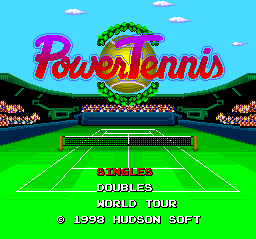
Select a mode on the title screen. There are three selectable modes. Use the direction keys to select, and the ⓵ button to confirm.
•
World Tour: Win a tournament with an original character.
Only World Tour can be saved.
Mode Selection Details
Singles
Select a match against the computer or another human. You can also select Watch mode for spectating.
Doubles
Up to three people can play against the computer. Four people can play against each other or use Watch mode. There are five combinations.
World Tour
Create an original player and aim to win the world championship within five years. The mode includes both Singles and Doubles.
Play Screen Guide
Ball Type Display
Shows the nature of the shot you have hit.
Service Area
You serve into this area on the opponent's court. At that time, you serve into the service area diagonally opposite your character.
Score Display
Constantly displayed in the lower-left of the screen when set to ON.
Court Lines
•
Double Court Line: Used for doubles matches.
•
Single Court Line: Used for singles matches.
Court Size
The width of the court changes between singles and doubles. Singles uses the inner court line, and doubles uses the outer line.
Screen Settings
Change screen settings in the Options. To bring up the Options screen before hitting a serve, press the RUN button, and use the ① button to toggle.
•
VOICE: Sets whether to display audio. Provides serve judgment and score readout.
•
SCORE: When set to ON, the score is constantly displayed in the lower-left of the screen.
•
MARK: Displays the player's number. Check your own player.
•
BALL: Displays the ball type. Instantly shows the nature of the shot you've hit.
•
COLOR: Select the ball color. Choose a color that is easy to see against the court color.
Court Select
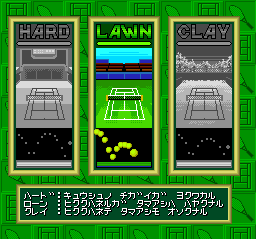
Select the court you will play on. The way the ball bounces and its speed differ by court, so please choose carefully.
•
HARD: Ball speed up on a hard court. The ball bounces high, and the differences between ball types are clear.
•
LAWN: Ball speed down on a soft court. The ball bounces low, and the bounce is fast. It is a vivid green court.
•
CLAY: Ball speed up on a loose court. It bounces low, but the bounce is slow. Easy to play on, aimed at beginners.
Set Select
Choose between a 1-set match or a 3-set match. There are no differences in rules or victory conditions. A set is won by taking 6 games first.
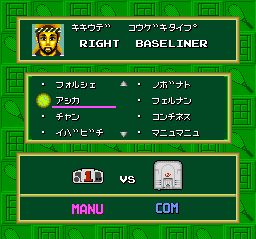
The display shown at the bottom of the set selection screen represents the characteristics of the selected player. If you are not satisfied with the selection at this point, you can change it with the (B) button.
Watch Mode
Watch mode is exclusively for spectating. If you select your favorite player and court, a match will start automatically. You cannot operate the players and join the game midway.
The computer advances the match on its own until there is a winner. When you want to end it, please reset it. Use this mode to learn how to time things and the differences in ball types.
World Tour
Story
Participate in the World Tour for up to five years and aim to become the World Champion. You must participate in eight major tournaments each year.
To become the World Champion, you must become the champion of all tournaments held in each country in the world. The tour is conducted in a tournament format.
Character Making
Choose and combine your favorite data, such as physical characteristics, dominant hand, and attack patterns, to create your own original player. Since you will play with the same character for three years, please create it carefully.
Game Rules
Scoring Method
One game is best of four points. The team that takes a 6-game lead with a difference of 2 games wins the set. You cannot win with a score of 5 to 6.
When it becomes 6 to 6, a tie-break occurs. The tie-break is best of seven points. In a tie-break, the one who takes a 6-point lead is the winner.
Serve Rights
Serve rights transfer every one game. Your side and the opponent's side take turns serving. If you commit a fault (missed serve) twice in a row, it becomes a point for the opponent. The transfer of serve rights is also done automatically by the computer.
Court Change
Court changes are performed when odd-numbered games end. In other words, after the 1st game, changes are performed every 2 games.


.png)
