Options Continued
Adjust Screen
Highlight ADJUST SCREEN and press the button. Press the Directional buttons to adjust the position of the screen. Press START to exit the screen.
Save Settings
Highlight SAVE SETTINGS and press the button. Press the button again when YES is highlighted to save all audio, controller, and screen adjustment settings.
Default Settings
Highlight DEFAULT SETTINGS and press the button. Press the button again when YES is highlighted to default audio, controller, and screen adjustment settings to their original default settings.
Back
Highlight Back and press the button to return to the Main Menu. You can also press START or the button at any time to return to the previous menu.
PLAYING THE GAME
Rynn and Arokh are the only hope for Drakan. Begin your quest at Surdana, the last bastion of human civilization on Drakan. As a bonded pair of the Order, Rynn and Arokh are sworn to protect what little civilization remains in the world.
Quests
Rynn and Arokh must embark on quests to reach the ultimate goal of awakening the Spirit Dragons. When it is time to embark on a quest, a new Journal Entry will appear in the top-left of the screen for several seconds. Check Rynn's Journal on the Items Menu to see the tasks at hand.
Optional quests may be given while in pursuit of a primary quest. Optional quests are not required to complete the game, but do provide you with valuable rewards. Talk to the inhabitants of Drakan by pressing the L1 button when standing near someone. They may give you useful information on a quest.
When you accomplish a task, a checkmark will appear in the box next to the quest description in Rynn's Journal.
Attacking with Rynn or Arokh
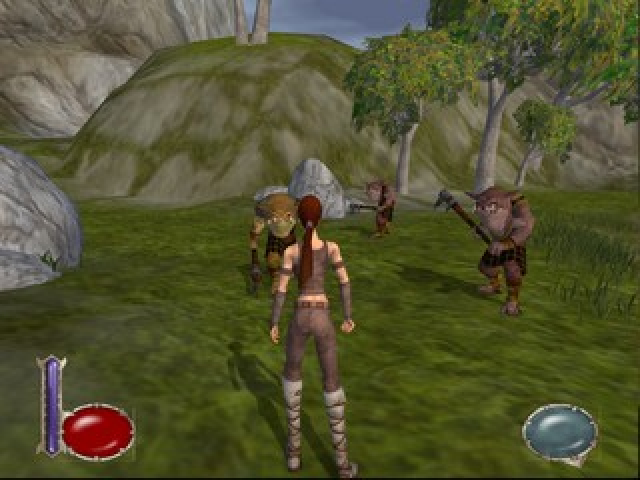
Attack enemies with either Rynn or Arokh. When Rynn is riding Arokh, he attacks, and all controls direct the dragon. When Rynn dismounts Arokh, all the controls direct her.
To dismount and attack with Rynn, land Arokh (press and hold the button). When he folds his wings, press the button again and Rynn will jump to the ground. In ground battle, Arokh may attempt to defend Rynn by pouring flames onto the enemy from the air.
Traveling with Arokh
In large open spaces, Rynn and Arokh travel together. The mighty dragon must have room to fly, land or walk. Where space is tight, Rynn must dismount and leave Arokh in a clear landing area. Arokh will attempt to protect Rynn in dangerous situations as long as he has room to attack from overhead.
During some missions, Rynn must travel completely alone to places that are too confined for Arokh.
Injury
Both Rynn and Arokh can be injured in battle. Since their souls are bonded, damage to one is dealt to both. Rynn can injure herself by falling too great a distance. Rynn can also drown in deep water.
Each time Rynn or Arokh is injured, the Health Glass loses some blood. Restore health by using a Health Elixir or Potion of Life. If all the blood in the Health Glass disappears, Arokh and Rynn die and the game is over.
Weapons/Items Continued
Hot Slot
The Hot Slot allows you to quickly equip a weapon or other item without opening the Weapons/Items screen.
•
Open the Items Menu. On the Weapons/Items screen, highlight the weapon or item you want to "hot slot".
•
Press the button. A small triangle appears above and to the right of the weapon.
When you want to select the weapon during your quest, press the R1 button to quickly cycle through all hot-slotted weapons or items to the one you want. Then press the button to EQUIP the weapon.
To remove a weapon from the Hot Slot, open the Items Menu. On the Weapons/Items screen, highlight the item you want to remove and press the button.
Spells
Spells that you purchase and learn are stored here. You may cast spells from within this screen or have Rynn cast the spell with the screen closed from within the game. From the Spells screen, select the spell and press the button to summon a spell.
Spells Statistics
Press the Directional buttons to select a spell. The casting pattern for that spell will appear in the area below and to the right. Detailed information about the spell will be displayed in the left-hand box:
•
Spell Level - The power level of the spell you currently have selected.
•
Skill Needed - The magic skill required to cast the spell.
•
Damage - The amount of damage the spell inflicts.
•
Duration - The number of seconds the spell will remain active. (Used only for Fear, Clone and Speed.)
•
Health Regained - The percentage of total health regained after casting. (Used only for Rejuvenate.)
•
Mana Cost - Percentage of Rynn's total mana required to cast spell.
Skills
As Rynn gains combat experience, skill levels can increase allowing her to use stronger weapons and magic. Each skill begins at 1 and can reach a maximum of 8.
Experience Level
As Rynn wins battles, her experience meter begins to fill. When it reaches its peak, Rynn's experience level increases by one point and her health is restored to maximum. She also wins a skill point that can be used to increase any one of her three skills.
Assigning Skill Points
To assign unused skill points to one of the skills: Press the Directional button
.png)


.png)
.png)
.png)
.png)
.png)

_1.jpg)



_1.png)
_1.png)