GETTING STARTED
Set up your PlayStation®2 computer entertainment system according to the instructions supplied with your system. Check that the system is turned on (the on/standby indicator is green).
Insert the Biathlon 2008 disc in the system with the label side facing up. Attach game controllers and other peripherals as appropriate. Follow the on-screen instructions and refer to this manual for information on using the software.
Memory Card (8MB) (for PlayStation®2)
To save game settings and progress, insert a memory card (8MB) (for PlayStation®2) into MEMORY CARD slot 1 of your PlayStation®2 system.
You can load saved game data from the same memory card or any memory card (8MB) (for PlayStation®2) containing previously saved games.
YOUR COCKPIT / THE RACE
Minimap
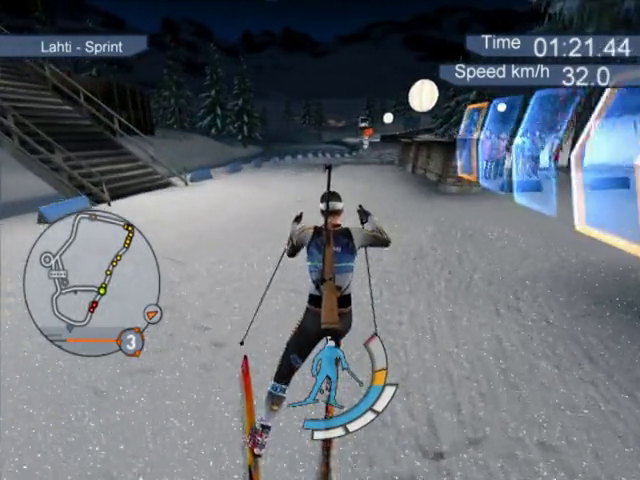
The Minimap serves as general orientation during the race. It indicates the course of the track, the position of the checkpoints, the direction of the wind, and the altitude, including your actual position.
Additionally, the Minimap displays important information about the actual situation of the race. The big Green Point shows your actual position on the course.
Rivals who are in front of you or who started earlier than you are marked as Red Points. Yellow Points indicate rivals who are behind you or who started later than you.
The Minimap also indicates the number of loops still to go. If you have to do Penalty Loops, their number is displayed in red.
Checkpoint Display
On each track, Checkpoints indicate the Intermediate Times. When you are approaching a Checkpoint, the Checkpoint Display appears on the upper left-hand side of the screen.
If other skiers have already passed a Checkpoint before you, the Checkpoint will display your standing in comparison to the best competitor. If you are first to reach a Checkpoint you will be shown your own intermediate Time.
THE RACE
In Biathlon 2008, each race consists of three loops and two rounds of shooting. The first shooting round is done in the prone position, the second in the standing position.
There are four different racing modes, held under official competition rules:
•
Individual: Athletes start one after the other with an interval of five seconds between them. Misses at the Shooting are punished with a Time Penalty of 10s.
•
Sprint: The start is identical with the start of the Individual competition. Misses at the Shooting are punished with Penalty Loops, which have to be passed directly after the respective Shooting.
•
Pursuit: Pursuit Races take place after a Sprint or Individual competition. In this race, the biathletes start according to the time they were behind in the preceding competition. Each miss at the Shooting is punished with a Penalty Loop. This racing mode only exists in modes Quick Start and Career.
•
Mass Start: All biathletes start at the same time. Misses at the Shooting are punished as in Sprint with Penalty Loops.
POWER EMPLOYMENT
•
up to this point for sprinting
When your player is moving or holding his breath during the shooting, he uses up power. Your actual Power Employment is indicated in the Power Bar by the blue or blue and orange display.
The influence of your Power Employment on power and stamina is indicated by the red area that comes down from above (Stamina Consumption Rate).
How do I accelerate?
You accelerate by increasing your Power Employment. To do this, press the X button. As soon as you release the X button, the Power Employment decreases again.
Alternatively, you can fix the Power Employment with the right analog stick at a certain value, which you can raise or reduce at any time.
You can increase your power only up to the lower end of the bar that shows your Stamina Consumption Rate.
What is the optimal Power Employment?
The dynamic limit between the white and the grey area indicates the level for a Power Employment without Stamina Consumption. This limit changes according to the rise and incline of the course and the value of the Stamina Consumption Rate.
Is it possible to overexert my skier?
At a high Power Employment (orange) the red area that descends from above increases (Stamina Consumption Rate). The bigger the red area, the slower your skier becomes and the faster his or her stamina decreases.
Too many sprints and continual racing with full Power Employment saps the racer's energy and quickly consumes their stamina. If you see "Low Power" displayed, your power has decreased too much and you should reduce your Power Employment to decrease the Stamina Consumption Rate.
There is a Special Skill called Fitness, which you can use to decrease your Power Employment and thus your Stamina Consumption (see chapter Special Skills).
STAMINA CONSUMPTION
Why do I need Stamina?
Stamina designates the amount of energy your skier has at his or her disposal during the race. Each track requires a certain strategy with your Power Employment so that you have enough Stamina until the very end of the race. Stamina that is used up cannot regenerate during the race.
When does my Stamina decrease?
Your Stamina decreases when the red bar that indicates the Stamina Consumption Rate becomes visible. This


.png)


.png)

_1.jpg)





.png)