STARTING THE GAME
1. Turn OFF the power switch on your Nintendo® Game Boy®. Never insert or remove a Game Pak when the power is on.
2. Insert the Knockout Kings™ Game Pak into the slot on the Game Boy. To lock the Game Pak in place, press firmly. 3. Turn ON the power switch. The Legal screen appears, followed by the Title screen.
4. Press any button to advance to the Main menu.
GETTING STARTED
MAIN MENU
Choose the type of game you want to play or access a variety of game options.
•
CREATE YOUR OWN BOXER AND GUIDE HIM THROUGH A PROFESSIONAL CAREER
•
PICK YOUR FAVORITE FIGHTER FOR A LADDER FIGHT IN SLUGFEST MODE
•
GO HEAD-TO-HEAD WITH A FRIEND OR FOE
•
ACCESS THE OPTIONS SCREEN
•
ACCESS THE PASSWORD SCREEN
•
Control Pad → to cycle options, then press the A Button to select.
OPTIONS SCREEN
Modify the fight parameters to your liking.
•
To highlight an option, Control Pad ↑.
•
To adjust the setting of any option, Control Pad ↔.
TKO
When ON, a technical knockout is declared after a fighter is knocked down three times in a single round.
Power-Ups
When ON, power-ups appear in the ring during a match. Collect the power-up to temporarily boost your stats.
The Gloves enhances your Strength, Shoes enhance your Speed, and the Bottle enhances your Stamina.
Sound
Toggle sound effects ON/OFF.
Music
Toggle background music ON/OFF.
•
To return to the Main menu, highlight EXIT and press the A Button or the B Button anytime.
PAUSE MENU
•
To pause the game, press SELECT.
CONTINUE
Press the A Button to resume your match.
EXIT
Press the A Button to end your match and return to the Main menu.
HEALTH METER/KNOCKDOWNS
The Health Meter displays your boxer's current health level. When your fighter takes damage, the meter depletes.
When your Health Meter completely depletes, your fighter is knocked down. If the fighter does not get back up before the ten count, a knockout is declared and the fight ends.
•
To recover health between rounds or after a knockdown, rapidly press the A and B Buttons.
SLUGFEST MODE
Get in there! Choose your fighter, select your opponent and go for it.
•
After selecting SLUGFEST from the Main menu, the Boxer Select screen appears.
BOXER SELECT SCREEN
Choose a boxer to fight with and an opponent to fight against.
•
THE HIGHLIGHTED BOXER'S STATS
•
THE CPU-CONTROLLED BOXER
TO SET UP A SLUGFEST MATCH:
1. Control Pad ↔ to select your boxer.
2. Control Pad ↓ to select the CPU-controlled boxer, then Control Pad ↔ to highlight your first opponent.
3. When both boxers have been selected, press the A Button. The Ladder screen appears.
LADDER SCREEN
The Ladder screen displays who you will fight in your next match. Press the A Button to advance to the Tale of the Tape screen.
TALE OF THE TAPE SCREEN
The Tale of the Tape screen displays the vital stats of each fighter.
•
To begin your match, press the A Button.
RESULTS SCREEN
At the conclusion of a match, world-famous referee Mills Lane gathers both fighters together and declares a winner.
•
To advance to the Fight Summary screen, press the A Button.
FIGHT SUMMARY SCREEN
The Fight Summary screen displays a break down of punch and knockdown statistics from the fight.
•
TOTAL JABS LANDED AND THROWN
•
To return to the Ladder screen, press the A Button.
CAREER MODE
In Career mode, create an all-new boxer and battle your way to the top of the rankings.
To work your way up the ranks, you must travel to regional venues and defeat the top contenders to move on to the next venue. Once all venues have been cleared, you must face the ultimate challenge, Muhammad Ali!
•
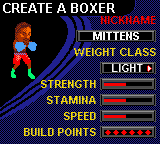
To start your career, select CAREER from the Main menu. The Create Boxer screen appears.
CREATE BOXER SCREEN
Build the fighter of your dreams to lead through Career mode.
•
CONTROL PAD ⬅➡ TO SELECT A WEIGHT CLASS FOR YOUR FIGHTER
•
CONTROL PAD ⬆⬇ TO HIGHLIGHT A CATEGORY, THEN CONTROL PAD ⬅➡ TO ADJUST
•
CONTROL PAD ⬅➡ TO SELECT A NAME FOR YOUR FIGHTER
•
YOUR CURRENT ATTRIBUTES. HIGHLIGHT AN ATTRIBUTE, THEN CONTROL PAD ➡ TO SPEND BUILD POINTS
•
USE BUILD POINTS TO IMPROVE YOUR BOXER'S ATTRIBUTES
•
Once your boxer is finished, press the A Button. The Training screen appears.
TRAINING SCREEN
Choose a training method to enhance your fighter's abilities.
HEAVY BAG
Hit the heavy bag to enhance your fighter's strength.
JUMP ROPE
Do some extra rope work to build your boxer's stamina.
SPEED BAG
Increase your fighter's speed with this routine.
TO TRAIN YOUR FIGHTER:
1. Control Pad to highlight
.png)




.png)
