SETTING UP THE GAME
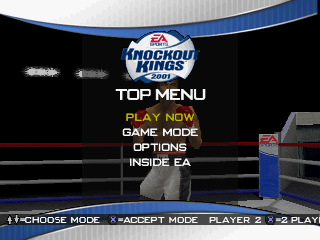
MAIN MENU
The Main menu appears following the Knockout Kings introductory video. Default options are listed in bold in this manual.
•
SLUGFEST: GET IT ON IN SLUGFEST MODE - NO WEIGHT DIVISIONS AND NO RULES. TAKE ON A COMPUTER-CONTROLLED FIGHTER OR SLUG IT OUT AGAINST A FRIEND.
•
EXHIBITION: SET UP AN EXHIBITION BOUT BETWEEN ANY TWO CURRENT OR LEGENDARY BOXERS.
•
CAREER: CREATE A BOXER AND WORK YOUR WAY UP THE RANKS IN CAREER MODE.
•
OPTIONS: ACCESS MATCH OPTIONS, INCLUDING RULES, CONTROLLER CONFIGURATION, AND SOUND OPTIONS.
OPTIONS MENU
RULES
•
SAVE BY BELL: Toggle ON/OFF. When OFF, a fighter who is knocked down at the end of a round cannot be saved by the bell.
•
EXHIBITION ROUNDS: Set rounds per match to 4, 6, 8, or 10.
•
3 KNOCKDOWN: Toggle the 3 Knockdown rule ON/OFF. When ON, the referee calls the fight after the third knockdown in any round.
•
CLOCK: When the clock is set to FAST, each round lasts about 2 minutes (even though the 3-minute clock is displayed).
•
DONE: When you finish customizing your rules, select DONE to return to the Options menu.
CONTROLLER
Choose from the available controller Presets, each with a slightly different button configuration. Select the preset that works best for you.
SOUND
•
PLAY BY PLAY: When ON, ringside announcers Sean O'Grady and Al Albert provide blow-by-blow commentary and analysis.
•
MUSIC VOLUME: Move the slider to adjust the music volume.
•
SFX VOLUME: Move the slider to adjust sound effects volume.
•
OUTPUT: Toggle STEREO/MONO.
•
DONE: When you finish customizing your sound options, select DONE to return to the Options menu.
SAVE AND EXIT
If a Memory card is in place, your settings are saved before you return to the Main menu. If you don't insert a Memory card, select EXIT to return to the Main menu.
STARTING A SLUGFEST
The quickest way to get into the ring is to begin a SLUGFEST. Forget rules, refs, or weight divisions. Pick any two boxers to duke it out.
After selecting SLUGFEST from the Main menu, choose the number of rounds for your fight (1, 2, or 3), then proceed to the Boxer Select screen.
BOXER SELECT SCREEN
Mix it up with any two boxers and choose your venue.
You can fight a Slugfest bout between two created boxers. When you save a created boxer to a Memory card in Career mode, you can select that boxer in Slugfest mode.
•
Cycle through the available boxers until your created fighter(s) appears.
•
To fight head-to-head with another created pugilist from another Memory card in Slot 2, make sure the card is inserted before making your selection.
•
D-button to view available boxers for Player 1, then press to select a boxer.
•
D-button to cycle through the boxers in the current weight division. In Slugfest mode, you can also D-button to change weight divisions.
•
After selecting the first fighter, D-button to select a CPU-controlled opponent.
•
When setting up a head-to-head bout with a friend, Player 2 must press START before choosing a boxer.
•
After choosing the boxers, select an arena by highlighting the venue you want, then pressing. The fight begins.
You can select RANDOM fighters for the ultimate test in Slugfest mode. You might get a legendary champion or you might get a nobody. There are no rules, so everyone has a chance, right?
IN THE RING
•
POWER METER: As your power decreases, your punches become less effective. When your power is low (indicated by a flashing red power meter), your punches are least effective and you should try to regain power.
•
HEALTH METER: As your health decreases, you become more susceptible to a knockdown or knockout punch.
Between rounds each fighter recovers some health and full power. During the fight you can regain health and power by fighting a defensive fight (i.e., by backing off, blocking, and clinching).
PAUSE MENU
The Pause menu allows you to change camera angles, view instant replays, and quit the current fight.
•
CAMERA: Cycle through the available camera angles.
•
INSTANT REPLAY: Go to the Instant Replay screen to check out a knockout.
•
PLAY AT NORMAL SPEED/PAUSE MOVE FORWARD FRAME-BY-FRAME
•
EXIT GAME: Leave the current game and return to the Main menu.
GAME FLOW
END OF ROUND
The Round Stats screen shows stats for the round. Gauge how well you're doing in the fight by checking out your punches thrown/landed.
The stats screen at the end of each round shows TOTAL PUNCHES, JABS (the total number of punches to the head), and BODY SHOTS (which includes fouls to the body).
To continue to the next round, press *.
KNOCKDOWN/OUT
When a fighter goes to the canvas, the referee gives him a standing 8 count.
To attempt to get up from a knockdown, press * repeatedly when your boxer is on the canvas. If he
.png)




.png)



.png)











.png)




.png)







.png)
_1.png)
.png)



_1.jpg)