Getting Started
•
Make sure the power switch is OFF.
•
Insert the Fantastic 4™: The Game Game Pak into the Game Boy® Advance slot as described in your Nintendo Game Boy® Advance instruction manual.
•
Turn the power switch ON.
NOTE: The Fantastic 4™: The Game Game Pak is for the Game Boy® Advance system only.
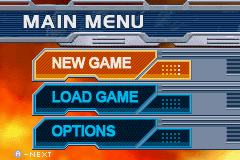
Main Menu
New Game
Start a new game.
Continue
Select this option to load a previously saved game. You'll start at the beginning of the last level played.
Options
Click on Options to change the following settings:
•
Music: Change the music volume.
•
SFX: Change the sound effects volume.
•
Credits: A list of everyone involved in the making of this game!
Lives and Health
The Fantastic 4 begin the game with five lives. The maximum number of lives available is nine. If a Fantastic character receives too much damage in combat, they lose a life.
If a character loses a life when there are still lives available, they will respawn. When all lives are lost, it's Game Over.
You can retry the current level from the Continue screen or by selecting another saved game using the Load option in the Main Menu. Keep a close eye out for health pick-ups and extra lives.
Pick-Ups
•
Mini health: Restores health by 25%.
•
Large health: Restores health by 50%.
Hot Spots
Hot spots are areas where a member of the Fantastic 4 must perform a certain action. A specific hot spot is assigned to each character.
Once on a hot spot, press the B Button to activate.


_1.png)
 (Fr,De,Es,Nl).png)
.png)
.png)








_1.png)



 (En,Fr,De).png)






.png)


_1.png)

.png)

_1.png)

.png)