GETTING STARTED
Set up your PlayStation® game console according to its Instruction Manual. Ensure the power is OFF before inserting or removing a compact disc. Insert the DANCE DANCE REVOLUTION KONAMIX (DDR KONAMIX)™ disc and close the disc cover. Follow the on-screen instructions to start a game. Console Top View
Console Front View
MEMORY CARDS
To save game settings and progress, insert a Memory Card into MEMORY CARD slot 1 (MEMORY CARD slot 2 is not used) of the PlayStation game console before starting play. You can load your saved games from the same card, or from any Memory Card containing previously saved DANCE DANCE REVOLUTION KONAMIX (DDR KONAMIX)™ games. For more information on saving and loading, see page 20. DANCE DANCE REVOLUTION KONAMIX (DDR KONAMIX)™ uses 1 block of Memory Card data to save each game. Make sure there are enough free blocks on your Memory Card before commencing play. Do not insert or remove a Memory Card while saving/loading games or after the power has been turned ON.
USING THE CONTROLLER
DUALSHOCK® analog controller
Be sure to verify that the game is set to analog mode (red LED lamp should be lit). You can toggle the vibration function ON and OFF in the OPTIONS SCREEN.
Button functions on a digital controller are the same as those on an analog controller.
USING THE DANCE DANCE REVOLUTION CONTROLLER
•
START Button: Start Game
•
Button: Confirm Selection, Left Diagonal Arrow in SOLO MODE (See Page 9, SOLO MODE, for details).
•
Button: Confirm Selection, Right Diagonal Arrow in SOLO MODE (See Page 9, SOLO MODE, for details).
•
Directional Arrows: Step on the correct arrows that correspond to the dance steps on the screen.
•
SELECT + START Buttons: Resets the current game and returns to the Title screen.
HOW TO PLAY
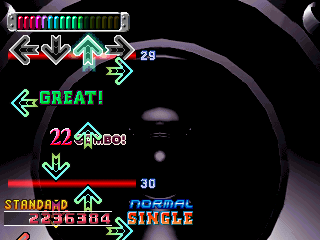
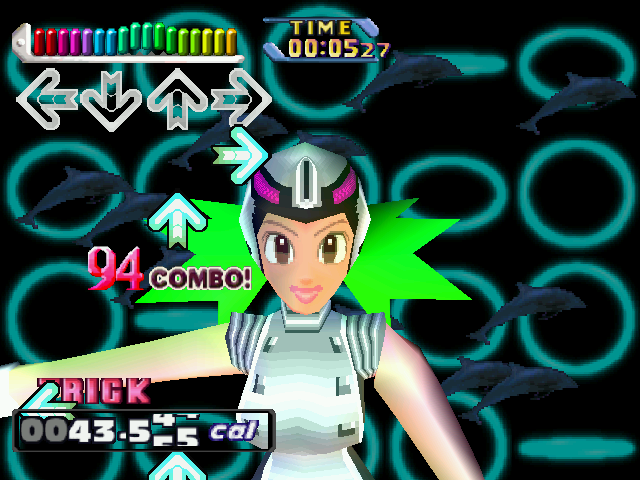
Dance Dance Revolution KONAMIX (DDR KONAMIX)™ is a game that combines quick reflexes and timing with dance music. All you have to do is press the correct Directional Buttons or dance arrows on the DDR Controller that correspond to the arrow(s) that appear on-screen. The correct dance arrow must be inputted when it crosses the permanent arrows inside the Step Zone. The Step Zone for each player is located in the upper part of the screen. Build up your dance meter and continue to the next stage by successfully completing the dance steps. However, if you continue to miss dance arrows, the dance meter level drops. If the meter drops to zero, the game will end.
STARTING THE GAME
After the introductory logos are displayed, the Title screen will appear. Press the or START Button to bring up the MODE SELECT screen. Select GAME MODE, SOLO MODE, WORKOUT MODE, LESSON MODE, TRAINING MODE, EDIT MODE, NONSTOP ORDER, RECORDS OR OPTIONS. Enter the selection with the, or START Button.
GAME MODE
This is the main mode for DDR KONAMIX and is identical to the style of gameplay and difficulty found in the arcade versions.
SOLO MODE
This is a 1-Player only mode where you can play songs in the standard four-arrow arrangement or an even more challenging six-arrow arrangement. It is recommended that players master GAME MODE before attempting SOLO MODE.
WORKOUT MODE
This mode adds fitness goals while counting the number of calories consumed during play.
LESSON MODE
This mode enables first-time players of DDR to learn the basics in a relaxed setting. This is an excellent tutorial that will help you become a pro.
TRAINING MODE
This mode allows players to practice and master difficult songs.
EDIT MODE
This mode allows players to create original dance routines to any song. The dance steps can be saved and re-played.
NONSTOP ORDER
This mode allows you to customize the Nonstop playlists for GAME MODE and SOLO MODE. You can create up to 3 different Nonstop playlists and you can import customized step data created in EDIT MODE.
RECORDS
This section displays the high scores for each section.
OPTIONS
This section allows players to configure various settings to their individual tastes.
WARNING: ENDING A GAME
The correct procedure when ending the game is to open the disc cover, wait for the disc to stop moving, and then turn OFF the power. The disc will continue to turn if the power is switched OFF first, and become scratched during removal.
GAME MODE & SOLO MODE
At the MODE SELECT screen, highlight GAME MODE or SOLO MODE and press the, or START Button to select a play style. Select from Single, Versus or Double play mode or 4 Panels and 6 Panels and confirm the selection with the or Button.
GAME MODE
.png)

.png)
.png)
.png)


.png)



.png)
_1.png)
_(Germany)_1.png)
.png)

.png)
_1.png)
.png)
.png)
.png)
.png)
.png)



_1.png)



.png)

.png)