PORSCHE® HISTORY
Ferdinand Porsche set out to design cars back in 1931. It wasn't until 1948 that the first car bearing his name was put into production. This was the Porsche® 356.
Over the years, Porsche® evolved their 356. Eventually, the 911 series was created, with its instantly recognizable shape. Renowned for their performance, Porsches® were the only 'super car' that was just as happy making the day-to-day trip to work than it was on the racetrack.
Need For Speed™: Porsche® Unleashed draws from this history of groundbreaking cars. It allows you to choose and customize 25 different vehicles from within Porsche's® 50-year history. Unleash the power of the Porsche®!
THE CARS
Need For Speed: Porsche® Unleashed gives you the opportunity to drive virtually any car from Porsche's® 50-year history. Vehicles range from a classic '50s 356 right up to the modern day GT1 race car.
The handling and performance of each vehicle differs with the era, engine power, tires, and suspension.
CLASSIC YEAR MODEL
•
Class 3: 1950 356 Cabriolet, 1954 356 Coupe
•
Class 2: 1960 356 B 1600 Cabriolet, 1964 356 B 2000 GS Carrera 2
•
Class 1: 1967 911 S Coupe, 1967 911 S Targa
•
Race Class: 1956 550 A Spyder
GOLDEN ERA YEAR MODEL
•
Class 3: 1970 914, 1982 944 Coupe
•
Class 1: 1987 911 (930) Turbo Targa, 1987 959, 1978 911 (930) Turbo
•
Race Class: 1978 935 "Moby Dick"
MODERN ERA YEAR MODEL
•
Class 3: 1997 Boxster, 1989 944 S2 Cabriolet, 2000 Boxster S
•
Class 2: 1995 911 (993) Carrera 4 Coupe, 1990 911 (964) Carrera 2, 1994 911 (993) Carrera Cabriolet, 1992 928 GTS, 1998 911 (996) Carrera Coupe
•
Class 1: 1995 911 (993) Turbo, 2000 911 (996) Turbo
•
Race Class: 1998 911 (996) GT1
GETTING STARTED
First, make sure the POWER switch is OFF. Insert the Need for Speed™: Porsche® Unleashed Game Pak into the Game Boy® Advance or Game Boy® Advance SP. If you are unsure how to do this, please consult your Game Boy® Advance or Game Boy® Advance SP User Manual. With the Game Pak firmly in place, switch on the Game Boy® Advance. USING THE MENU SYSTEM
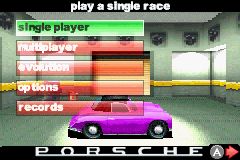
The menu system can be navigated using the Control Pad, along with the A and B Buttons. The options are displayed sequentially down the screen. The currently selected option will be highlighted GREEN, while unselected options will be RED.
Use the following buttons to navigate the menus:
•
Control Pad Up: Select option above
•
Control Pad Down: Select option below
•
Control Pad Left / Control Pad Right: Change / Toggle Option
•
B Button: Go back to previous option
SINGLE PLAYER > QUICK RACE MODE
This arcade mode is for anyone who wants to get into the action quickly. Use any of the unlocked cars to race competitors around any of the tracks.
Only 4 cars are initially available. Additional cars can be unlocked by winning tournaments in Evolution mode.
There are 3 Quick Race Modes. These are:
•
Quick Race: A race from start to finish along any track.
•
Quick Knockout: Multiple laps around a circuit track.
•
Knockout: Multiple Races across all tracks. This mode enables you to create your own Knockout tournaments. You can select which tracks you want to race on, along with the weather conditions and other settings.
SETTING UP A NEW PLAYER
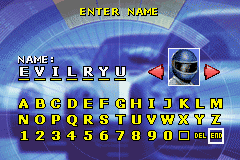
Before you begin, you can personalize the game by entering your own name. You may also choose from a selection of driver images.
Use the Control Pad to move the selector box around the letter selection area. Pressing the A Button will select a letter. If you make a mistake, select the 'Del' button from the selection area. Alternatively, pressing the B Button will delete the letters.
Your driver image can be selected by moving the selector cursor directly beneath the driver image, then pressing Control Pad Up. This will activate


 (En,Fr,De,Es,It).png)

.png)
 (Rev 1).png)
 (Rev 2).png)
_1.png)
 (Rev 1).png)





_1.png)
 (En,Fr,De,It).png)

_1.png)
