Language Select
•
Use the + Control Pad Left and Right to select your language.
•
Press the A Button to confirm.
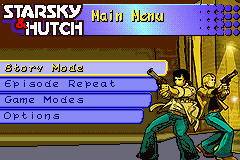
Main Menu
•
Use the + Control Pad to highlight the desired option.
•
Press the A Button to make your selection.
•
Press the B Button to go back a screen or cancel an option.
•
Available options: Story Mode, Episode Repeat, Game Modes, and Options.
Story Mode
Select Story Mode to play through the STARKSY & HUTCH™ story. You can choose to play a New Game or Resume a previously saved game.
•
Pick-ups: Some missions require collecting specific objects from the city, ranging from keys to pieces of paper.
Rear View
Holding down the L Button allows you to see behind your current position. This helps keep a target vehicle in your sights if you overtake them or are being chased.
•
TIP: You can shoot enemies chasing you by switching to the Rear View.
In Game Menu
Press SELECT at any time during gameplay to access the in-game menu.
•
Continue your current mission.
•
Quit back to the Main Menu screen.
Ammo
The Ammunition bar indicates remaining bullets. Once ammo is depleted, Hutch reloads, but you cannot shoot until 6 bullets are reloaded. Look for yellow Ammo Pick-Ups scattered around Bay City.
Energy
The Energy bar shows damage taken by your car. A full GREEN bar represents a healthy vehicle. Energy decreases when hit by enemy vehicles or crashing into objects and buildings.
•
If energy gets too low, the bar flashes RED as a warning.
•
The vehicle is destroyed when no energy remains.
•
Look for yellow Energy Pick-Ups scattered around Bay City.
Targeting and Shooting
The Crosshair appears automatically when a target is available and homes in on the nearest one. To stay locked on a target, keep your vehicle facing it at all times.
•
Switching to the Rear View (L Button) allows you to shoot enemies behind you.
•
TIP: Closer proximity to the target inflicts more damage.
•
If you run out of ammo, you can still ram the enemy vehicle.
Mini Map
Press START during normal gameplay to access the Mini Map. The game pauses while you browse the map.
•
Primary Function: Shows your current position, enemy targets, and required locations. Use the + Control Pad to scroll through the map.
•
Secondary Function: Displays messages from the Station via radio, shown as text scrolling along the bottom.
•
Press START again to return to the game.
Episode Repeat
Episodes unlock automatically as you progress through Story Mode. You can then play specific missions at a later date.
Game Modes
Extra Game Modes unlock by playing through Story Mode. Cruise Mode and Chase the Ace are available from the start.
Cruise Mode
Drive around the streets of Bay City at your leisure. There is no time limit and no objectives to complete.
•
Unlock Conditions: Available from the start. The 2nd and 3rd city maps unlock after completing Season 1 and Season 2, respectively.
Chase the Ace
Damage the fleeing car as much as possible in the quickest time.
•
Unlock Conditions: Available from the start.
Chicken Chase
Collect as many chickens as possible before time runs out. Each chicken collected adds 2 seconds to your time.
•
Unlock Conditions: Complete Season 1.
Downtown Dash
Race 3 other vehicles to the destination marker in the quickest time possible.
•
Unlock Conditions: Complete Season 2.
Plane Survival
Avoid 2 Bombers for as long as possible.
•
Unlock Conditions: Complete Season 3.
Donut Dash
Collect all 10 donuts before the time runs out. Each donut collected adds 25 seconds to your time.
•
Unlock Conditions: Complete Season 4.
Vehicle Select
Choosing a Game Mode presents the Vehicle Select Screen. Vehicles unlock automatically as they appear in Story Mode.
Map Select
After selecting Cruise Mode and a vehicle, you will see the Map Select Screen. Only maps unlocked during Story Mode are available.
Options
Controls
•
Select controls to change default settings.
•
Choose from 4 pre-set control options.
High Scores
•
View high scores achieved in Extra Game Modes.
Enter Passcodes
•
Enter Passcodes found for Starsky and Hutch here.
Credits
•
Select this option to view the credits.


 (En,Fr,De,Es,It).png)
_2.png)
 (En,Fr,De,Es,It).png)
.png)
 (Beta).png)




_1.png)

.png)
_1.png)
.png)
 (Rev 1).png)
 (Rev 2).png)
_1.png)
 (Rev 1).png)





 (En,Fr,De).png)