Button Functions
Game Boy (Original) Controls
Game Boy Advance Controls
| Button | Menu Screen | During game play (Offense) | During game play (Defense) |
| :--- | :--- | :--- | :--- |
| + Control Pad | Move Cursor | Move player, Dash | - |
| A Button | Confirm | Pass | Dodge |
| B Button | Cancel | Throw | Catch |
| START | - | Pause game | - |
| SELECT | - | Switch between players | - |
| L Button | - | Dashing attack | - |
| R Button | - | Select Target | Not used |
| A + B Button | - | Jump | - |
Title Screen
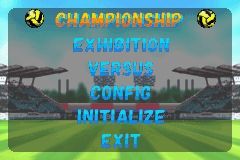
When you press START on the Title Screen, you will go into the Data Select Screen. There are 3 Data Files to choose from. As you proceed with game play, your information will be saved in the selected Data File.
After you select the Data File to be used, the game will go to the Mode Select Screen.
Game Rules
Each infield player has a set amount of health points that diminishes according to the amount of damage taken from an opponent's attack. When a player's health points reach zero, that player can no longer continue. When all the infield players of either team are out of the game, the game is over.
Each team consists of 7 players - 4 infield players and 3 outfield players. The outfield players do not receive damage.
Championship Mode
The goal of the Championship Mode is to win the tournament against teams from around the world and become the No. 1 team. When you are ranked No.1, stronger teams will challenge you. They are called Dream Teams. Who are the Dream Teams? What will happen when you defeat them?
Flow of the Championship
1. Your team manager will introduce herself and explain what the goal of the Championship is.
•
*"I'm Sara, your team manager. Nice to meet you! Which area would you like for our home court?"*
2. You will then select a country your team will represent.
3. You can move the Cursor from country to country using the ◄ and ► on the + Control Pad. Select the country you want your team to represent.
4. After you have selected your country, the Championship Tournament will start. Select a team to play against. You can switch between the two ranking screens by using the ◄ and ► on the + Control Pad.
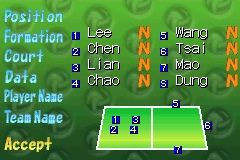
5. After you select the team to play against, you will be taken to the Strategy Screen. You can change the various settings of each player and choose their starting position.
6. When you finish setting up your team, you are ready to start the game. Good luck!!
You will go up in rank when you win against a team with a higher ranking. The game data will be saved automatically after the Game Result Screen, Configuration Screen, and Initialization Screen.
Exhibition Mode
In the Exhibition Mode, you can select any team you would like to play against. There are no restrictions for which teams can be selected. When you win against a Dream Team in the Championship Mode, more teams are added for selection.
FOXES VERSUS BEARS
•
Are you ready? Take a deep breath.
•
Throw 9/10 Hit 9 Catch 5 Miss 4 Score 2250
•
Yeah! We're good! You're awesome!
Versus Mode
You can play the game with a friend in the Versus Mode using the Game Boy® Advance Game Link® cable (Sold separately). You and your friend can both select any team of your choice.
*Both players should select Versus on the Game Mode Select Screen.*
Mode Selection Options
*Connecting...* Please wait.
Player Data
There are 10 attributes given to each player. A larger number represents higher skill. You can view the player's attributes on the Strategy Screen before the match.
•
Throw Power: Power of a throw
•
Throw Speed: Speed of the ball
•
Throw Control: Controlling the curve of the ball
•
Jump: Player's jumping ability
•
Catch: Ability to catch an opponent's ball
•
Dodge: Ability to dodge an opponent's ball
•
Toughness: Defensive ability when hit by a ball
•
Will Power: Ability to recover after being hit by a ball
•
Stamina: The total number of health points of a player
DREAM TEAMS
Nobody knows who the Dream Teams are, but you can be sure that they'll be tough. You get to challenge these teams only when your team is ranked No. 1 in the Championship Mode. Can you take your team all the way?
*There is a rumor that there are more mysterious teams... It's up to YOU to find out.*
Team/Player Settings
You can change the characteristics of the players on your team.
(1) Select the [Style] on the Strategy Screen.
Example Stats:
•
Power 40, Speed 16, Control 28, Agility 18, Jump 30
•
Catch 20, Dodge 32, Toughness 44, Will Power 42, Stamina 09



.png)

.png)
.png)
 (Beta).png)

.png)
 (Rev 1).png)
 (Rev 2).png)
_1.png)
 (Rev 1).png)




