SETTING UP YOUR CONSOLE
•
MEMORY CARD SLOTS (ABOVE CONTROLLER PORTS)
Set up your PlayStation® game console according to the instructions in its Instruction Manual. Make sure the power is off before inserting or removing a compact disc. Insert the DANGER GIRL disc and close the disc cover. Insert a game controller and turn on the PlayStation® game console. Follow on-screen instructions to start a game. MAIN MENU
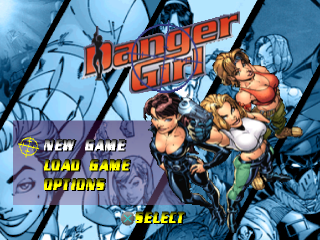
NEW GAME
Select "New Game" to start a new game from the beginning of the mission.
LOAD GAME
Select "Load Game" to get to the Load Game menu. Here you can select from previously saved games to resume play where you last left off. You must be using a MEMORY CARD containing DANGER GIRL game data to use this option.
At the end of each level you'll be given an opportunity to save the game. If the Auto-Save function is enabled, the game will automatically save your progress as you finish the levels. If the Auto-Save function is disabled, a save menu will appear when you complete a level.
To load a game from the Load Game Menu use the Directional buttons/Left Stick ↑↓ to select the saved game. Press the X button to confirm and load the saved game.
MEMORY CARD
To save or load game data, you must insert a MEMORY CARD into MEMORY CARD slot 1 or 2 of the PlayStation game console before beginning play. You can load your saved games from the same card, or from any MEMORY CARD containing previously saved DANGER GIRL games. Press the Select button to switch between MEMORY CARD 1 and 2.
OPTIONS
Select “Options” to go to the Options menu. Here you can "fine-tune" your gameplay controls and preferences. If you choose not to, the game will automatically use controls listed on page 3.
Audio
Use the Directional buttons/Left Stick ↑↓ to select "Sound Volume", "Music Volume", "Cinematic Volume" or "Stereo/Mono". Use the Directional buttons/Left Stick ←/→ to adjust the volume from 0 to 9 (9 maximum) and to change from Stereo to Mono (and back).
ACCESSING INVENTORY & OBJECTIVES
When you need to go into your inventory, press the SELECT button on your controller. Use the Directional buttons/Left Stick to switch between the weapons and item lists. Use the Directional buttons/Left Stick to choose a weapon or item.
You can also press the R1/R2 buttons to scroll through inventory and the L1/L2 buttons to scroll through weapons. Press the X button to confirm that you are finished adjusting your inventory and you're back in action. I'll brief you on the situation and the objectives at the beginning of each mission. Any updates to the objectives are provided via telecommunications from Valerie. When she contacts you...please pay attention!
To look at your objectives, press the button while in the Inventory screen. This will lead you to the Objectives screen. Press to back out of the Objectives and Inventory Screens to return to action. OBJECTIVES
The Objectives screen lists descriptions of each objective, the amount completed (in multi-part objectives), the name and face of the operative currently playing, her stats and any other relevant information displayed by a 'system link.'
Normally you won't have more than three objectives to complete, but often they have multiple parts, for instance, six hostages to rescue. You don't necessarily need to complete the missions perfectly, but you know how I expect perfection. Only the best from my Danger Girls!
.png)