The Main Menu
At the NASCAR 98 Main menu, you can select a game mode, learn about the NASCAR drivers, access options, or view the game credits.
On-Screen Menu Help
•
TO HIGHLIGHT A MENU ITEM: PRESS D-BUTTON
•
TO SELECT A MENU ITEM: PRESS START
Note: Always check the on-screen instructions for menu commands specific to the current menu.
Single Race
Spend the weekend at your favorite NASCAR 98 track. As driver and pit crew chief, you can control your race from both sides of the wall.
Championship Season
Enter a season at the NASCAR Cup Series level. Accumulate points over a 17-race season on your way to the championship.
Driver Info
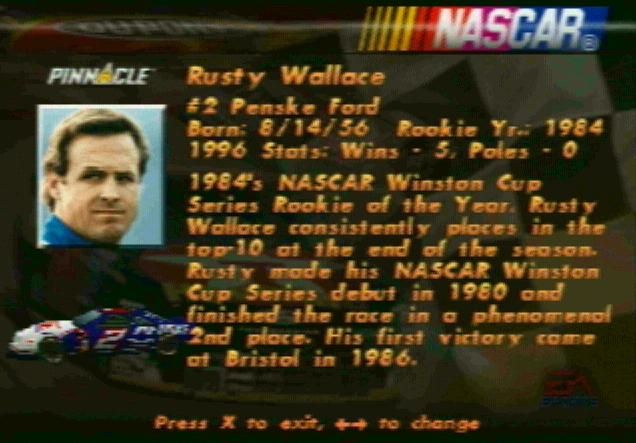
Check out statistics and background information on all 24 NASCAR drivers featured in the game.
Game Options
Configure the general environment for your next race. You can adjust sound, music, controller options, and more.
NASCAR Options
Configure specific race-related features including race length, car damage, and yellow flag options.
Credits
View a list of the folks on the EA SPORTS pit crew who turn the bolts and make NASCAR 98 happen.
Game Options Menu
From the Game Options menu, you can select an alternative controller setup and adjust three different audio options.
Note: Default options appear in bold in this manual.
Controller Setup
NASCAR 98 features multiple controller configurations. If you want to try a different setup, go to the Controller Setup screen and choose another.
•
TO CYCLE MENU ITEMS: D-BUTTON
•
TO ACCESS A VOLUME ITEM: START BUTTON
Analog Controllers
Analog controllers deliver a more realistic driving experience than their digital counterparts because they allow for gradual control, rather than simple on/off functions. NASCAR 98 recognizes a number of popular analog controllers. To calibrate an analog controller:
•
Insert the game controller(s) and turn on the PlayStation game console. •
Go to the Controller Setup screen and scroll the controller options until your device appears on the screen.
•
If your controller has an Analog/Digital switch, it must be set to Analog to appear on the screen.
•
If your controller does not appear, choose the most similar option.
•
Press START to select the configuration you want. The Calibration screen appears.
•
Follow the instructions on the Calibration screen, then press START to accept.
Stereo/Mono
Set NASCAR 98 music and sound effects to MONO or STEREO. To hear stereo sound, your TV must be equipped for stereo.
CD Volume
Use the D-Button to set the CD Music/CD Announcer sound level.
Sound FX Volume
Use the D-Button to set the in-game sound effects level.
Done
Return to the previous screen.
NASCAR Options
NASCAR options affect the authenticity level and complexity of the race. By adjusting these options, you can customize NASCAR 98 to your style of play.
Race Length
Set the length of your next race. Race length appears as the percentage of a regulation event (e.g., 100% is the distance driven on that circuit in an actual NASCAR race). Check the track overlay for lap equivalents.
Damage
Set Damage OFF for invincible cars, ON for realistic results from collisions and the possibility of being knocked out of a race, or LTD (limited) for cars that sustain damage but continue racing if they flip or lose a tire. EA Tip: If your car becomes damaged in a collision and you can make it back into the pits, your crew completes all necessary repairs.
Yellow Flag
When Damage is set to ON, the Yellow Flag option becomes available.
•
YELLOW FLAG ON: If a car stalls or gets knocked out of a race, the yellow flag appears. While the yellow flag is out, your car enters auto-pilot mode and the field runs under caution. When the course is clear, the green flag appears and you resume control of your car.
•
YELLOW FLAG OFF: If a car breaks down, the race continues uninterrupted while the track is cleared.
Breakdown
Set Breakdown ON or OFF. With Breakdown ON, pushing a car beyond its limits may result in a blown engine.
Best Line
Set Best Line ON or OFF. When you set Best Line ON, the oil drippings and rubber laid down by previous cars marks the best racing line around the track. Time Display
Set Time Display ON or OFF. Time Display presents current split times and time differentials.
•
SPLIT TIME: Tracks are divided into four equal quadrants, or traps. When you complete a trap, NASCAR 98 records the elapsed time. After the first completed lap, Time Display compares your current trap time to your best time through the same trap, and displays the difference.
•
TIME DIFFERENTIAL: The time differential pop-up appears each time you pass the Start/Finish line. Time differential displays the name of the driver behind you and his time deficit and the driver ahead of you along with his advantage.
Physics/AI Settings
Set your car's performance relative to the other cars on the track.
•
ARCADE: You have the clear advantage.
•
SIMULATION: Every car's performance level is identical. •
CUSTOM: You can change any option
.png)


.png)
.png)
.png)





.png)
.png)

