GETTING STARTED
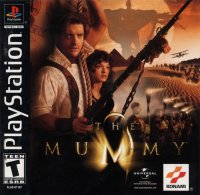
Set up your PlayStation® game console using its Instruction Manual. Ensure the power is off before inserting or removing a compact disc. Insert THE MUMMY disc and close the disc cover. Insert a game controller and turn on the PlayStation game console. Follow the on-screen instructions to start a game. Console Top View
Console Front View
Memory Cards
To save game settings and progress, insert a Memory Card into Memory Card slot 1 before starting play. Memory Card slot 2 is not used.
You can load your saved games from the same card, or from any Memory Card containing previously saved THE MUMMY games.
NOTE
THE MUMMY uses 2 blocks of Memory Card data to save each game. Make sure there are enough free blocks on your Memory Card before commencing play.
Do not insert or remove a Memory Card while saving/loading games or after the power has been turned ON.
STARTING THE GAME
After the introductory logos are displayed, the Title Screen will appear. Select New Game, Load Game, Options or Mummy II using the Directional Buttons or left analog stick. Enter the selection with the Button.
NEW GAME
Select NEW GAME to play a game from the beginning.
SAVING A GAME
A message will appear when finishing a level asking if you want to save the game. Memory Card slot 1 is the only slot supported.
Make sure you have a Memory Card inserted in slot 1. If you don't have a Memory Card inserted, follow the on-screen instructions. 2 Memory Card Blocks are required to save the game.
LOAD GAME
Select LOAD GAME to continue playing a previously saved game using data saved on a Memory Card. Select the desired game using the Directional Buttons or left analog stick and enter your selection with the Button.
OPTIONS
Select OPTIONS to modify game settings. Game settings can also be modified during play by pressing the START Button to open a menu.
MUMMY II
Select MUMMY II to view a special sneak-peak theatrical trailer of "The Mummy Returns," the upcoming sequel to The Mummy movie. WARNING: ENDING A GAME
The correct procedure when ending the game is to open the disc cover, wait for the disc to stop moving, and then turn OFF the power. The disc will continue to turn if the power is switched OFF first, and may become scratched during removal.
GAME MENU
After selecting NEW GAME from the Title Screen, the Game Menu sub-screen will appear. Select PLAY GAME, SAVE GAME, REPLAY LEVEL, or QUIT GAME using the Directional Buttons or left analog stick. Enter the selection with the Button.
•
PLAY GAME: Continue current game.
•
SAVE GAME: Save current game.
•
REPLAY LEVEL: Select and replay any completed level and access the bonus game mode menu.
•
QUIT GAME: Quit game without saving your progress and return to the main menu.
HEADS-UP DISPLAY
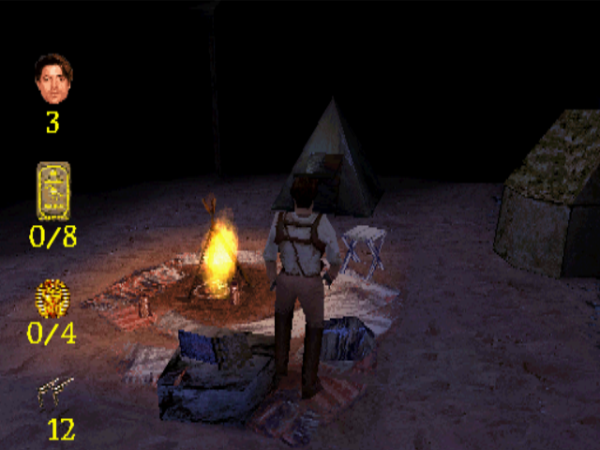
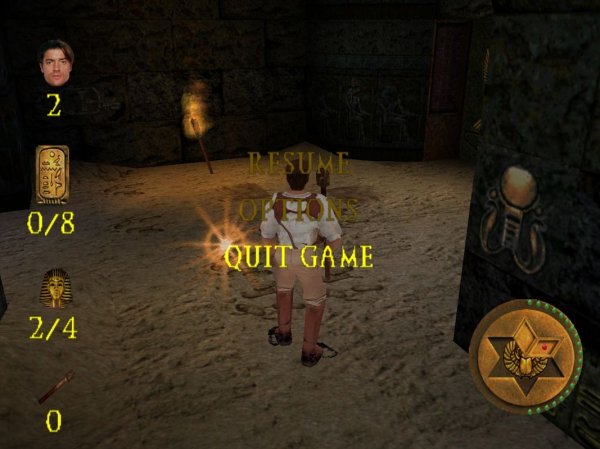
During gameplay, press the Select Button to have the Heads-Up Display appear on the left side of the screen. It will show the following items:
•
RICK'S HEAD: Number of lives that your character has.
•
CARTOUCH: Number of Hieroglyphs you've lit out of 8. Receive an extra life for every 8 you light.
•
PHARAOH MASK: Collect 4 pieces of treasure to gain a Magic Amulet.
•
CURRENT WEAPON SELECTED: Shows current selected weapon and if applicable, ammo count and in case of torch time left for burning torch.
HEALTH/STAR KEY METER
This stays on the screen at all times. The interior shows how many star key fragments you've collected.
Rick's health meter is displayed in the green colored bar. If the health bar becomes completely depleted, you will lose a life.
The blue colored bar represents the health status of the targeted enemy. During multiple enemy combat, only the currently targeted enemy's health will be displayed.