Getting Started
Make sure the power is off before inserting or removing a compact disc. Insert the World's Scariest Police Chases disc and close the disc cover.
Insert a game controller and a MEMORY CARD and turn on the PlayStation® game console. World's Scariest Police Chases supports MEMORY CARD slot 1 only. Follow the on-screen instructions to start a game. Note: It is advised that you do not insert or remove peripherals or MEMORY CARDS once the power is turned on.
World's Scariest Police Chases supports the DUALSHOCK™ analog controller. When the ANALOG mode button is on, and the LED is lit up, the left analog stick works the same as the directional buttons.
Weapon Selection
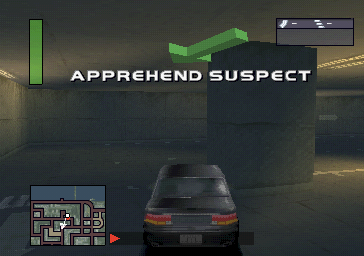
Designates which weapon is currently activated and how much ammo is remaining. Pressing the L1 button will scroll through the available weapons.
Map
Keep your eyes on the map! Here you see your position in the city, the position of your perp (or perps), and other information such as specific locations you have to reach.
Perp Information
This shows the health and the stress of the current perp (or perps) you're chasing. The health is the red bar and the stress value is the blue bar.
The stress meter is affected by how long you've been chasing the perp, if you have your sirens on, etc. Get any of them to max and the perp gives up.
Main Menu
Once the pulse-pounding opening cinematic has finished, the Main Menu will appear. On this screen you can choose from the various options and game modes available.
Choose the game or option you want by moving the directional buttons left or right and pressing the X button.
Free Patrol Mode
To prepare for the wild ride ahead of you, try out Free Patrol mode to get a feel for your car and the crime-stained streets on your beat. In this mode, you cruise the city, learning all the streets, alleyways, highways, and shortcuts.
On your patrol, you will encounter escaping suspects. If you choose to enforce the law and chase the perp, you will receive a score for how many perps you can stop before your vehicle is disabled.
The more perps you catch, the higher the score; however, if you lose the perp or cause property damage, then your score decreases.
Free Patrol Options
•
Select Number of Players: Select one or two players (Cooperative Mode).
•
Starting Location: Choose your starting location in the city. In the beginning you only have one location to select, but as you explore the city, more starting locations become available.
•
Time of Day: Select the time of day for your patrol.
•
Weather Conditions: Choose the weather conditions during your patrol.
Pursuit Mode
This is the main game in World's Scariest Police Chases. In Pursuit mode, your department will assign you challenge after challenge, taxing your law enforcement skills to the limit on a high-octane battleground!
New Game/Load Game
Select if you want to start a new game or continue a World's Scariest Police Chases game previously saved on your MEMORY CARD.
NOTE: World's Scariest Police Chases only supports MEMORY CARD Slot 1.
Sign In For Duty
Enter your name.
Hint: Evidence vs. Bombs
In Pursuit mode and Single Mission, certain missions require you to pick up evidence. Evidence is highlighted with a green circle and can be picked up by driving over the object. Other missions require you to disarm bombs. The bombs are highlighted with red circles and can only be disarmed by stopping next to them.
Hint: Don't Shoot Carelessly
In Pursuit mode and Single Mission, shooting at civilian vehicles will result in mission failure. So use caution when aiming and firing during a pursuit.
Single Mission
In Single Mission, you just choose one of the missions you previously played and unlocked during Pursuit Mode.
Player Selection
Select if you want to play this game yourself or if you want to play it with a friend (for Cooperative mode, see below).
Note: Cooperative only applies to those missions where shooting is allowed.
Cooperative Mode
In Cooperative mode, one player controls the driver, while the other player controls the shooter. When playing Cooperative mode, the auto-aim is changed to manual aim to make the shooting more challenging for player two. Cooperative mode is only available in Patrol mode and Single Mission.
Options
Audio
Adjust the volume of sound effects, speech, and music.
Display
Adjust the screen position.
Controls
Change the controller settings and turn vibration on or off.
Memory Card
Save or load settings.
NOTE: World's Scariest Police Chases only supports MEMORY CARD Slot 1.
Game Play
Toggle City Map, vehicle indicators, and change distance unit of measure.
Credits
View the credits movie.
Bonus Items
Toggle Bonus Items unlocked when a Commendation is earned in a mission.
In-Game Menus
Pause Menu
•
Continue: Return to playing the game from the Pause Menu.
•
Restart: Restart the mission.
•
Quit: Quit to the Debriefing screen.
•
Mission Objectives: Review the criteria for successfully completing your mission.
•
City Map: View the entire city map in three