PLAYING THE GAME
KICK-OFF
Press the START button in the main menu to get straight out onto the pitch with your default settings.
If you'd like to play a different mode, select TEAM, BE A PRO, or BE A KEEPER.
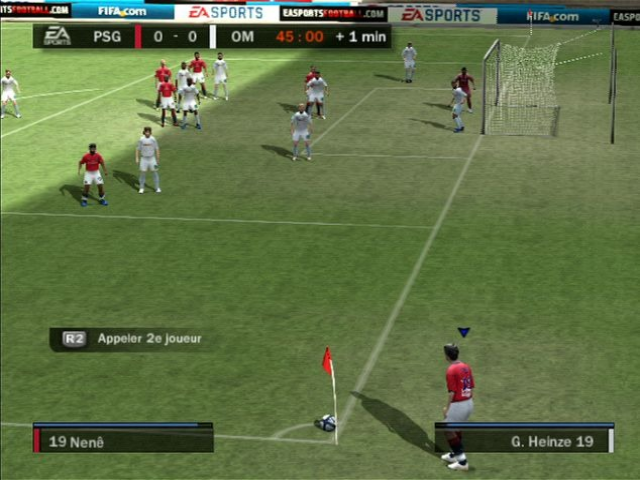
GAME SCREEN
SAVING AND LOADING
Before exiting a game mode or a menu where changes have been made, make sure to save your progress to a memory card. All unsaved information will be lost otherwise.
You can load files manually by accessing the Load Screen (via the main menu).
GAME MODES
NEW CAREER MODE
Career Mode is an immersive experience that offers you the chance to play through a lifelong soccer career. It is split into three different eras: Player, Player Coach, and Manager.
Start as a player and play through all three, or start later as Coach or Manager. Your success in each mode is tracked through the Fame system, so the better you perform, the more famous you will become!
PLAYER CAREER
Take control of a single professional soccer player as you play in multiple league, cup, and continental competitions to boost your form rating and ultimately represent your national team.
PLAYER COACH CAREER
Player Coach is the perfect stepping-stone from being a player to becoming a manager. Handle the tough decisions and play as either the full eleven or just your pro when on the pitch.
Your main focus on the team is having full control of everything from the formation, playing style, and training, to who is on the bench. As a coach, you do not have to worry about the financial side, such as transfers and ticket prices. The manager is in charge of your team's finances.
MANAGER CAREER
Take control of the financial side of your favorite club and please the Board. Rise to prominence with the new Fame system by keeping the team in top form by winning prestigious cup matches and your League!
FAME
Throughout Career Mode, Fame is the measure of how well known you are in the soccer world. Fame points are needed to progress through the eight levels of Fame.
Meet challenges and perform well to earn points. Rising to the occasion will also give you benefits. Check out the Fame screen in Career Mode for your current level and its benefits.
NEW LOUNGE MODE
Compete for ultimate bragging rights with up to eight players in offline multiplayer matches. Throw down with your friends over the course of a series of games while FIFA Soccer 11 keeps track of your wins and losses.
Play a round with all your friends and figure out who is the FIFA Soccer 11 king!
CHEAP SHOTS
Cheap shots are rewards and tricks you can use to help defeat your opponent. They are not representative of real soccer and the laws of the game.
Select YES to activate cheap shots or NO to leave them out.
NEW BE A KEEPER
Keeper is one of the most important positions on the pitch. In Be A Keeper, you take control of the goalie and must keep your team's net secure!
Maintain good positioning in front of the net, make saving shots, cut off crosses, and distribute the ball to your teammates after saves. Stay alert! You cannot afford to fail.
NOTE: There are two camera modes in Be A Keeper. One allows you to follow the ball as the action takes place down the field. The other allows you to focus on the goalkeeper and prepare for oncoming attacks. To switch between the two camera modes, press the L1 button.
BE A KEEPER CONTROLS
•
Run to position L2 button (press and hold)
•
Face the ball R2 button (press and hold)
•
Distract kicker (when facing ball) R3 button
BE A PRO
Be A Pro is your chance to become a national hero. You can take control of a specific player on the field and guide and follow all the action with the player-focused 3rd Person Cam.
NOTE: The 3rd Person Cam is only available when playing as a single-player in Be A Pro modes. When playing with your friends, the normal Be A Pro camera is used.
OTHER GAME MODES
THE SEASON
In The Season, you can take control of a soccer club and play through a full season campaign without worrying about anything but playing the game.
Managing finances, transfers, and training your team is for someone else to handle - you simply need to get on the pitch. Pick it up and play away.
TEAM MANAGEMENT
TEAM STYLES
Every team has a different way to approach the game. Team Styles gives you the chance to create a custom style for your team of choice, putting your indelible stamp on a classic club.
Formations, attacking and defensive tactics, and styles of attack can be fine-tuned before gameplay begins, allowing you to experiment with a classic team in a new way. If you so choose, you can completely disable the Team Styles feature.
CREATE FORMATIONS
Create custom formations for individual opponents by selecting CREATE FORMATIONS in the Team Management screen and following these steps:
•
Select an empty slot, then a formation to use as your base.
•
Select the position you want to customize. The grey box shows what area of the pitch it covers (if boxes overlap, that area is well covered).
•
Move the icon for the selected position with the left analog stick



_1.png)










.png)


_1.jpg)




_1.jpg)


.png)

.png)


_1.png)