Main Menu
Press the START button on the Title Screen to begin. You can start a new game or load a previously saved game.
A memory card (8MB) (for PlayStation 2) with 110KB of free space in MEMORY CARD slot 1 is required to save your progress. Use the directional buttons to highlight an option, then press the X button to select it.
Original Mode
Defeat your enemies and collect the Dragon Balls. If you find them all, you can make a wish.
Battle through seven increasingly difficult battles to gain experience points and strength. You can also collect the seven Dragon Balls.
Once you have collected the Dragon Balls, you can summon Shenron and make a wish. There are many different things to wish for.
Dragon Summoning
Once you have collected all the Dragon Balls, enter this mode to summon Shenron. He only grants one wish at a time, so choose carefully.
Once you have made your wish, you must collect the Dragon Balls again to make another wish. Shenron can grant new abilities, or even the abilities of your opponents. He can also grant access to new fighters.
Z Survivor
You can win great prizes here, but you'd better be ready to fight for them. Each fight is more and more difficult, and there is no normal health recovery after a battle.
This is an endurance battle where you fight opponents until you are defeated. You will not return to full health before each fight.
After you win a battle in Z Survivor mode, you can choose a prize from the Bonus Roulette Wheel. Prizes vary from extra experience points and attack power to extra health or even a Dragon Ball.
Customize
Here you can create and edit your custom characters. Choose your new powers wisely, because there is no going back after you have made a decision.
You must have a memory card (8MB) (for PlayStation®2) in MEMORY CARD slot 1 to organize skills.
Select Customize from the Main Menu. At the first screen, choose Character Customization and select the custom character you would like to edit. You must have already created a custom character to choose this option.
You can also view which skills you have in your list, and purchase new skills from your skill tree using your accumulated experience points.
•
Select this option to create a custom character card.
•
First, select the memory card slot to which you wish to save the character.
•
Then, choose the character you would like to customize.
•
Once you choose your character and a name, you will be asked to save your data.
•
Select Yes, and you can now access your custom character for battle.
•
You can only have 30 custom character cards per save.
•
Choose this selection and choose the character card you wish to erase.
•
Confirm your selection and the character will be erased.
Versus Mode
Challenge your friends to prove that you are the strongest warrior of them all.
Select this mode to fight with your friends. You can choose Custom or Regular fighters for these battles.
Once you have chosen your fighter, you can select a handicap if you and your opponent are not equally matched. Move the indicator to the left for less damage, or to the right for more damage.
Whoever chooses their character first gives the other player the opportunity to choose the battle stage.
Training Mode
Sharpen your fighting skills here. If you are having trouble executing a certain devastating special attack, this is the place for you to work on it. Select Training if you need to work on your moves, timing, or if you want to practice against a certain opponent.
First, select the character you would like to train and then choose your opponent. Once you are on the fighting field, press the START button to display your parameter list and select the area that you would like to train. •
Command List - Brings up a list of special moves and combos for your character.
•
Data Reset - Resets the Attack and Total Attack records.
•
Opponent - Choose between a CPU-controlled or player-controlled opponent.
•
Opponent Status - Set AI behaviors. You can make your AI opponent stand there and take your abuse or fight back.
•
Display - Turn On or Off to show your button combinations at the bottom of the screen while fighting. •
Ultimate Gauge - Set to On, Off or Infinite.
•
Action Gauge - Set to On, Off or Infinite. •
Obstacle - Alter the terrain.
•
Controls - Change controller setting.
•
Character Change - Change character selections.
•
Main Menu - Exit and return to Main Menu.
•
Return to Game - Confirm selections and return to battle.
Press the SELECT button to reset the characters back to the start position.
HUD (Heads Up Display)
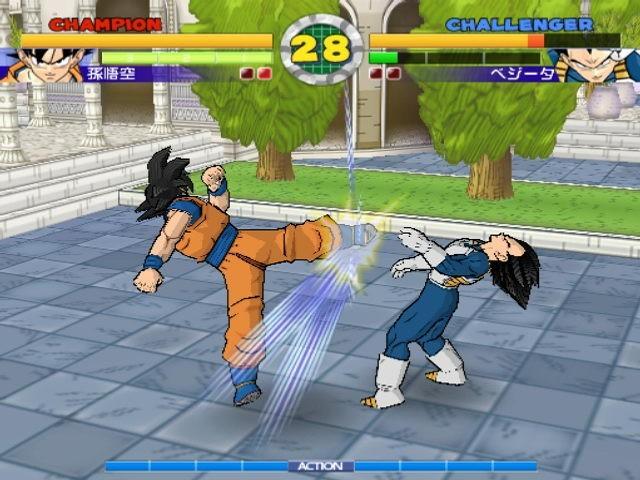
Most of Super Dragon Ball Z takes place on the battlefield. Information is presented via the HUD (Heads Up Display). The HUD has several components.
Health Gauge
In each character's display, the top (yellow) bar displays the level of the character's current health. As the character suffers damage, the Gauge reduces.
When the yellow bar disappears, the character is knocked out (K.O.) and loses the battle.
Ultimate Gauge
Directly below the Health Gauge is the Ultimate Gauge. This gauge builds up as you successfully
.png)

.png)

_1.jpg)








_1.png)


_1.png)