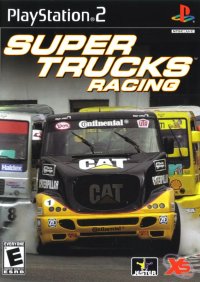
Main Menu
After boot up, you will be brought to the main menu screen. Use the directional buttons to navigate through the menus and press the button to confirm your selection.
Game Modes
•
Single Race: Get straight into the thick of the action with a one-off race. Battle against the computer opponents at any unlocked circuit. If you choose to skip qualifying, you start the race from the back of the grid.
•
Championship: Compete in five championships of ascending difficulty. Trucks and circuits are unlocked by progressing in this game mode.
•
Arcade: Starting at the back of the grid, the aim is to make each of the 3 checkpoints per lap before the allocated time runs out. Complete the race and finish in the requested position to progress to the next circuit.
•
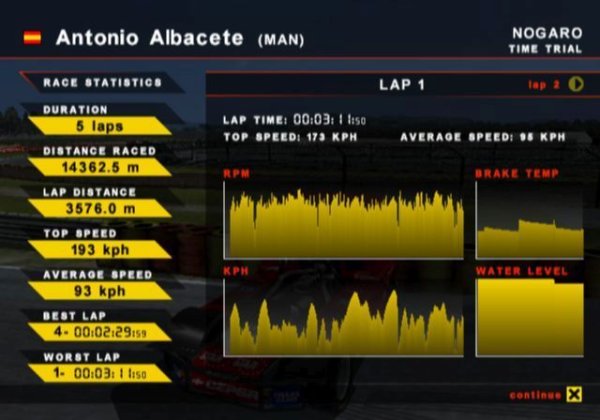
Time Trial: You are alone at a track of your choice. Each lap is timed so that fastest laps can be beaten. The number of laps is unlimited.
•
VS Mode: Race against a friend in this split screen challenge. Ensure that you have two controllers connected before attempting to play a two player game.
•
Memory Card: Save your current game, or load a previously saved game.
•
Extras: Access to various other modes and extras in the game.
•
Options: Change game settings and tune up your trucks.
Extras
•
Survival Mode: You start each race at the back of the pack and then at the end of each lap, the driver in last place is removed from the race. This process continues until only two drivers remain on the track. To progress through to the next circuit, you must finish the last lap in first place.
•
Records: If you've saved your game, check out your achievements including fastest lap times from each circuit.
•
Replay Theater: Play back your saved replays from your memory card.
•
Trophy Room: If you have saved your progress, you can check out the trophies that you have won through the various game modes.
•
Credits: Check out the people involved in Super Trucks.
Options
From here, you can customize various game settings.
Game Options
•
Truck damage: enable/disable the damage feature during races
•
Race marshals: enable/disable trackside marshals to allow/avoid penalties for excessive contact and straying from the track
•
Auto brake cooling: select automatic or manual water cooling for your brakes
•
Single race AI level: modify the difficulty level of your computer opponents
•
Single race AI trucks: choose the number of rival AI trucks
•
Single race laps: select the number of laps per race
•
Two player AI level: modify the difficulty level of computer opponents in two player mode
•
Two player AI trucks: choose the number of rival AI trucks in two player mode
•
Two player laps: select the number of laps per race in two player mode
System Options
•
Vibration: enable/disable vibration on controller
•
Motion blur: enable or disable the motion blur effect in game
•
Heads up display: adjust the display in game to standard or compact
•
Course map: enable or disable the course map visual aid in game
•
Sound effect volume: adjust how loud you want the sound effects to be played
•
Music volume: adjust how loud you want the in game music to be played
Truck Setup
From here, you can customize your truck for in game usage. Adjust everything on your truck to the way you like it. Adjust tire pressure levels, suspension, steering locks and traction control.
Controller Setup
From here, you will be able to adjust the in game controls to your liking.
Center Screen
You can adjust the picture of how the game displays on your television set.
Playing the Game
After selecting your game mode, it's time to select your team driver. Each team is represented with their own driver and truck. Each truck has their own features and abilities.
Once you select your driver, you need to choose what type of transmission your truck will have. Choose from Automatic or Manual transmissions.
Next, you get to select the handling of your truck.
•
Race: provides a balanced truck, ideally suited to precision racing. •
Drift: dynamic handling set-up which encourages powerslides.
•
User: uses the settings entered in the truck set-up screen.
In Single Race, Time Trial, VS Mode and Survival mode you get to select which circuit you wish to race on. You can choose up to 15 different circuits that feature their own unique racing experience. Before racing, you get to select how you wish to start off your race by selecting one of the following: •
Practice: You have the opportunity to practice at each track before racing. There are an unlimited number of laps available. •
Qualifying: You have five qualifying laps to improve your starting position on the grid. You take control one corner before the start of the first lap. Afterwards the results screen will display the qualifying times and grid positions.
•
Race: Races have a rolling start with the trucks in 2 by 2 formations in qualifying order. Pole position is on the inside for the first corner. You cannot control your truck until the countdown has taken place and the race starts. The rolling starts mean that the trucks are often bunched up at the first corner, so try to avoid pile-ups!
In-Game Display
•
Race position within field
•
Lap number of total laps
•
Brake temperature, water gauge